cancel
Showing results for 
Search instead for 
Did you mean: 

The Power BI Data Visualization World Championships is back! Get ahead of the game and start preparing now! Learn more

Reply
tgjones43
Helper IV
Helper IV

Pivot query

Hello. Please can someone advise how I can go from the first table to the second table? Each number, in column A, has a name in column B and occupies one to several rows depending on how many parameters are associated with that Number/Name. I would like to pivot by column C, and provide a Yes value in the relevent columns where each parameter occurs for each Number/Name.

Thank you.


NumberNameParameter    
1AA      
1AB      
2BA      
2BB      
2BC      
3CC      
3CD      
4DB      
4DC      
4DD      
4DE      
5EC      
5ED      
5EE      
5EF      
5EG      
         
NumberNameABCDEFG
1AYesYes     
2BYesYesYes    
3C  YesYes   
4D YesYesYesYes  
5E   YesYesYesYes
1 ACCEPTED SOLUTION
Ashish_Mathur
Super User
Super User

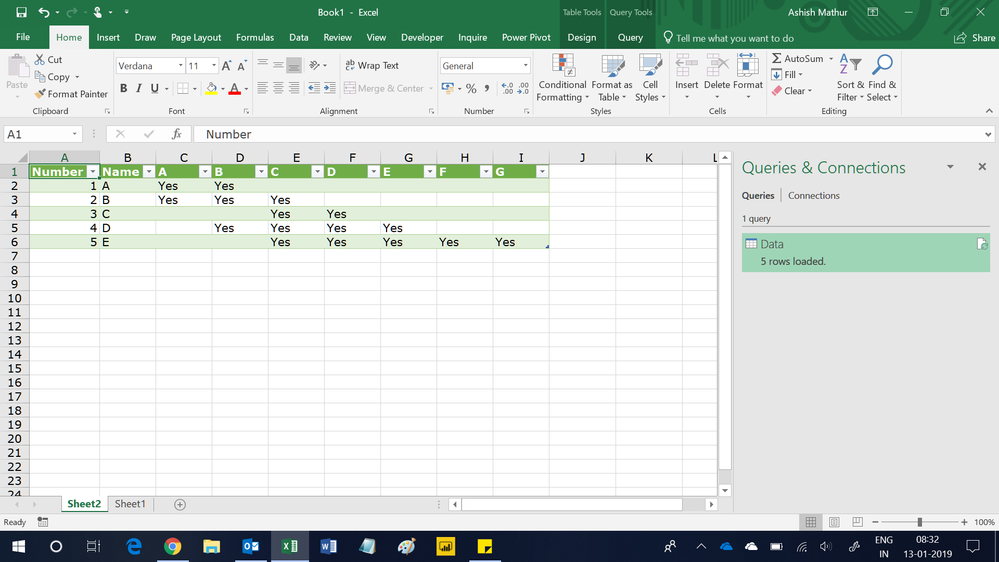
Hi,


This M code works


let
    Source = Excel.CurrentWorkbook(){[Name="Data"]}[Content],
    #"Changed Type" = Table.TransformColumnTypes(Source,{{"Number", Int64.Type}, {"Name", type text}, {"Parameter", type text}}),
    #"Added Custom" = Table.AddColumn(#"Changed Type", "Custom", each "Yes"),
    #"Pivoted Column" = Table.Pivot(#"Added Custom", List.Distinct(#"Added Custom"[Parameter]), "Parameter", "Custom")
in
    #"Pivoted Column"

Untitled.png


Regards,
Ashish Mathur
http://www.ashishmathur.com
https://www.linkedin.com/in/excelenthusiasts/

View solution in original post

6 REPLIES 6
Ashish_Mathur
Super User
Super User

Hi,


This M code works


let
    Source = Excel.CurrentWorkbook(){[Name="Data"]}[Content],
    #"Changed Type" = Table.TransformColumnTypes(Source,{{"Number", Int64.Type}, {"Name", type text}, {"Parameter", type text}}),
    #"Added Custom" = Table.AddColumn(#"Changed Type", "Custom", each "Yes"),
    #"Pivoted Column" = Table.Pivot(#"Added Custom", List.Distinct(#"Added Custom"[Parameter]), "Parameter", "Custom")
in
    #"Pivoted Column"

Untitled.png


Regards,
Ashish Mathur
http://www.ashishmathur.com
https://www.linkedin.com/in/excelenthusiasts/

Perfect, thank you so much @Ashish_Mathur

You are welcome.


Regards,
Ashish Mathur
http://www.ashishmathur.com
https://www.linkedin.com/in/excelenthusiasts/
LivioLanzo
Solution Sage
Solution Sage

Hi tg you can drop the number and number on the rows of a matrix and the Parameter on the column and then use =IF(countrows(tablename) > 0, "YES", blank() )


Did I answer your question correctly? Mark my answer as a solution!


Proud to be a Datanaut!  

Hi @LivioLanzo Thanks, can I do this in the Query Editor? If so, I can't work out how sorry.

Hi @tgjones43


it is possible to do it within Power Query but it would require more steps and be less efficient


Did I answer your question correctly? Mark my answer as a solution!


Proud to be a Datanaut!  

Helpful resources

Announcements
Power BI DataViz World Championships

Power BI Dataviz World Championships

The Power BI Data Visualization World Championships is back! Get ahead of the game and start preparing now!

December 2025 Power BI Update Carousel

Power BI Monthly Update - December 2025

Check out the December 2025 Power BI Holiday Recap!

FabCon Atlanta 2026 carousel

FabCon Atlanta 2026

Join us at FabCon Atlanta, March 16-20, for the ultimate Fabric, Power BI, AI and SQL community-led event. Save $200 with code FABCOMM.