Get certified for free when you join Fabric Data Days 2026 and dive into Fabric, Power BI, SQL, AI, and other essential data skills.
Join nowJuly 28 - August 9 | Final Round of the Power BI Dataviz World Championships. This is your chance. Learn more
Hello. Please can someone advise how I can go from the first table to the second table? Each number, in column A, has a name in column B and occupies one to several rows depending on how many parameters are associated with that Number/Name. I would like to pivot by column C, and provide a Yes value in the relevent columns where each parameter occurs for each Number/Name.
Thank you.
| Number | Name | Parameter | ||||||
| 1 | A | A | ||||||
| 1 | A | B | ||||||
| 2 | B | A | ||||||
| 2 | B | B | ||||||
| 2 | B | C | ||||||
| 3 | C | C | ||||||
| 3 | C | D | ||||||
| 4 | D | B | ||||||
| 4 | D | C | ||||||
| 4 | D | D | ||||||
| 4 | D | E | ||||||
| 5 | E | C | ||||||
| 5 | E | D | ||||||
| 5 | E | E | ||||||
| 5 | E | F | ||||||
| 5 | E | G | ||||||
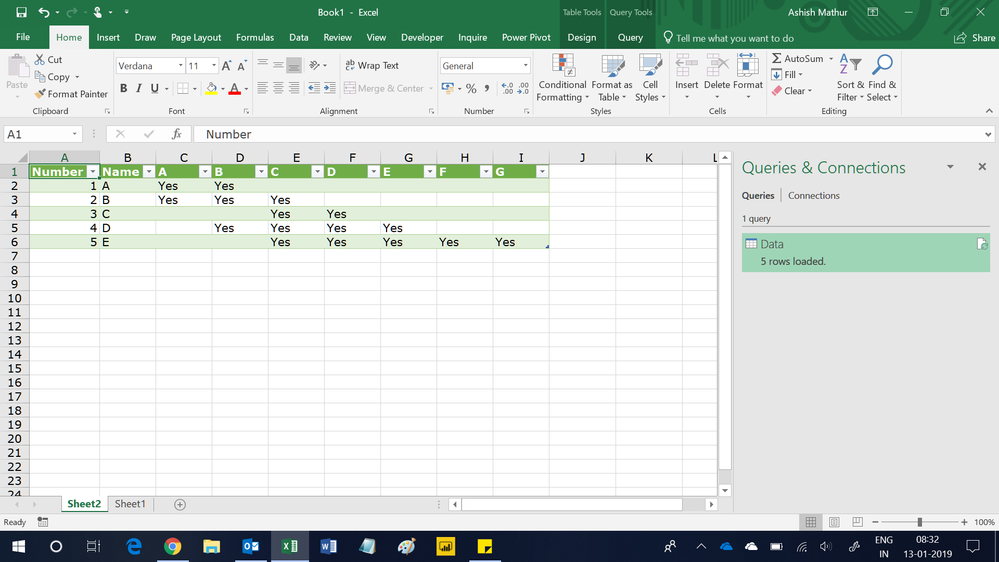
| Number | Name | A | B | C | D | E | F | G |
| 1 | A | Yes | Yes | |||||
| 2 | B | Yes | Yes | Yes | ||||
| 3 | C | Yes | Yes | |||||
| 4 | D | Yes | Yes | Yes | Yes | |||
| 5 | E | Yes | Yes | Yes | Yes |
Solved! Go to Solution.
Hi,
This M code works
let
Source = Excel.CurrentWorkbook(){[Name="Data"]}[Content],
#"Changed Type" = Table.TransformColumnTypes(Source,{{"Number", Int64.Type}, {"Name", type text}, {"Parameter", type text}}),
#"Added Custom" = Table.AddColumn(#"Changed Type", "Custom", each "Yes"),
#"Pivoted Column" = Table.Pivot(#"Added Custom", List.Distinct(#"Added Custom"[Parameter]), "Parameter", "Custom")
in
#"Pivoted Column"
Hi,
This M code works
let
Source = Excel.CurrentWorkbook(){[Name="Data"]}[Content],
#"Changed Type" = Table.TransformColumnTypes(Source,{{"Number", Int64.Type}, {"Name", type text}, {"Parameter", type text}}),
#"Added Custom" = Table.AddColumn(#"Changed Type", "Custom", each "Yes"),
#"Pivoted Column" = Table.Pivot(#"Added Custom", List.Distinct(#"Added Custom"[Parameter]), "Parameter", "Custom")
in
#"Pivoted Column"
You are welcome.
Did I answer your question correctly? Mark my answer as a solution!
Proud to be a Datanaut!
Hi @LivioLanzo Thanks, can I do this in the Query Editor? If so, I can't work out how sorry.
Hi @tgjones43
it is possible to do it within Power Query but it would require more steps and be less efficient
Did I answer your question correctly? Mark my answer as a solution!
Proud to be a Datanaut!
Join us in Barcelona for FabCon and SQLCon, the Fabric, Power BI, SQL, and AI community event. Save €200 with code FABCMTY200.
If you love stickers, then you will definitely want to check out our community sticker challenge, Barcelona edition!
Check out the July 2026 Power BI update to learn about new features.
| User | Count |
|---|---|
| 30 | |
| 28 | |
| 23 | |
| 21 | |
| 19 |
| User | Count |
|---|---|
| 44 | |
| 32 | |
| 18 | |
| 17 | |
| 17 |