
cancel
Showing results for 
Search instead for 
Did you mean: 

Join the FabCon + SQLCon recap series. Up next: Power BI, Real-Time Intelligence, IQ and AI, and Data Factory take center stage. All sessions are available on-demand after the live show. Register now

Reply
Anonymous
Not applicable

Pivot in direct Query

Hi All,


I am using direct query to get data from database. Below is requriment 

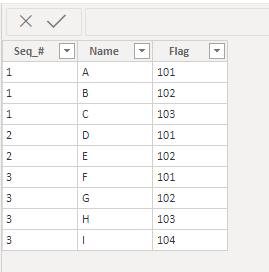
Input Table 

Seq_#NameFlag
1A101
1B102
1C103
2D101
2E102
3F101
3G102
3H103
3I104


Output required

Seq_#Flag_101Flag_102Flag_103Flag_104
1ABCNULL
2DENULLNULL
3FGHI


can any tell me how write dax expressions to give desired output .


Thanks in advance.

1 ACCEPTED SOLUTION

Hi @Anonymous ,


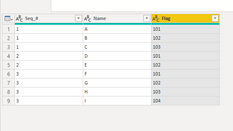
Here is my table in Power Query. The only  thing I did was to change all columns to text.

Change Type.PNG


Select the flag column. Go to the Transform tab, click on Pivot Column, select Name as the Values Column. Go to the advance options and select don't aggregate. You will see the following.


Pivot.PNGIf this solves your issue, please mark this reply as the solution. Kudos are nice too!

@Nathaniel_C 


Did I answer your question? Mark my post as a solution!

Proud to be a Super User!


View solution in original post

4 REPLIES 4
Nathaniel_C
Community Champion
Community Champion

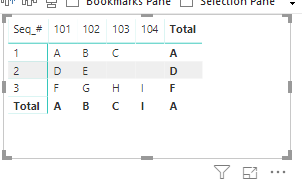
tableFlagtable.PNG

Drop each column into a matrix as follows:

rows.PNG

for this solution.

Ifsolution flag.PNG

this solves your issue, please

mark it as a solution.  Kudos are nice too!


@Nathaniel_C 


Did I answer your question? Mark my post as a solution!

Proud to be a Super User!


Anonymous
Not applicable

i want the data to be transpose in the table level but not in the visualization level . 

Hi @Anonymous ,


Here is my table in Power Query. The only  thing I did was to change all columns to text.

Change Type.PNG


Select the flag column. Go to the Transform tab, click on Pivot Column, select Name as the Values Column. Go to the advance options and select don't aggregate. You will see the following.


Pivot.PNGIf this solves your issue, please mark this reply as the solution. Kudos are nice too!

@Nathaniel_C 


Did I answer your question? Mark my post as a solution!

Proud to be a Super User!


Anonymous
Not applicable

aeriel_0-1674650376795.png

this solution is not working in DirectQuery bro! @Nathaniel_C 

Helpful resources

Announcements
April Power BI Update Carousel

Power BI Monthly Update - April 2026

Check out the April 2026 Power BI update to learn about new features.

New to Fabric survey Carousel

New to Fabric Survey

If you have recently started exploring Fabric, we'd love to hear how it's going. Your feedback can help with product improvements.

Power BI DataViz World Championships carousel

Power BI DataViz World Championships - June 2026

A new Power BI DataViz World Championship is coming this June! Don't miss out on submitting your entry.

FabCon and SQLCon Highlights Carousel

FabCon &SQLCon Highlights

Experience the highlights from FabCon & SQLCon, available live and on-demand starting April 14th.