
This time we’re going bigger than ever. Fabric, Power BI, SQL, AI and more. We're covering it all. You won't want to miss it.
Learn moreLevel up your Power BI skills this month - build one visual each week and tell better stories with data! Get started
Hi All,
I am using direct query to get data from database. Below is requriment
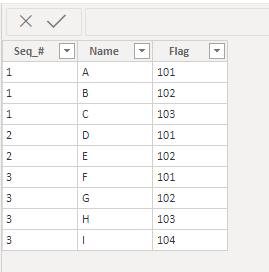
Input Table
| Seq_# | Name | Flag |
| 1 | A | 101 |
| 1 | B | 102 |
| 1 | C | 103 |
| 2 | D | 101 |
| 2 | E | 102 |
| 3 | F | 101 |
| 3 | G | 102 |
| 3 | H | 103 |
| 3 | I | 104 |
Output required
| Seq_# | Flag_101 | Flag_102 | Flag_103 | Flag_104 |
| 1 | A | B | C | NULL |
| 2 | D | E | NULL | NULL |
| 3 | F | G | H | I |
can any tell me how write dax expressions to give desired output .
Thanks in advance.
Solved! Go to Solution.
Hi @Anonymous ,
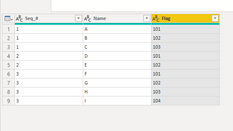
Here is my table in Power Query. The only thing I did was to change all columns to text.
Select the flag column. Go to the Transform tab, click on Pivot Column, select Name as the Values Column. Go to the advance options and select don't aggregate. You will see the following.
If this solves your issue, please mark this reply as the solution. Kudos are nice too!
Proud to be a Super User!
table
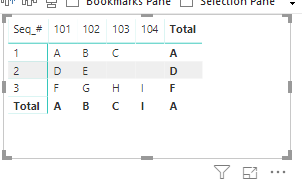
Drop each column into a matrix as follows:
for this solution.
If
this solves your issue, please
mark it as a solution. Kudos are nice too!
Proud to be a Super User!
i want the data to be transpose in the table level but not in the visualization level .
Hi @Anonymous ,
Here is my table in Power Query. The only thing I did was to change all columns to text.
Select the flag column. Go to the Transform tab, click on Pivot Column, select Name as the Values Column. Go to the advance options and select don't aggregate. You will see the following.
If this solves your issue, please mark this reply as the solution. Kudos are nice too!
Proud to be a Super User!
Check out the April 2026 Power BI update to learn about new features.
Sign up to receive a private message when registration opens and key events begin.
If you have recently started exploring Fabric, we'd love to hear how it's going. Your feedback can help with product improvements.
| User | Count |
|---|---|
| 36 | |
| 33 | |
| 31 | |
| 24 | |
| 18 |
| User | Count |
|---|---|
| 68 | |
| 50 | |
| 33 | |
| 24 | |
| 24 |