Don't miss your chance to take the Fabric Data Engineer (DP-600) exam for FREE! Find out how by attending the DP-600 session on April 23rd (pacific time), live or on-demand.
Learn moreNext up in the FabCon + SQLCon recap series: The roadmap for Microsoft SQL and Maximizing Developer experiences in Fabric. All sessions are available on-demand after the live show. Register now
Hi everyone! I'm pretty sure that my problem could be solved through pivot or unpivot feature, but I encountered a problem that I wasn't able to fix.
My dataset looks like:
| installs | signups | players | sesions |
30/5/2020 | 10 | 20 | 30 | 40 |
29/5/2020 | 20 | 33 | 44 | 22 |
28/5/2020 | 20 | 11 | 33 | 5 |
27/5/2020 | 15 | 10 | 22 | 6 |
26/5/2020 | 16 | 6 | 8 | 7 |
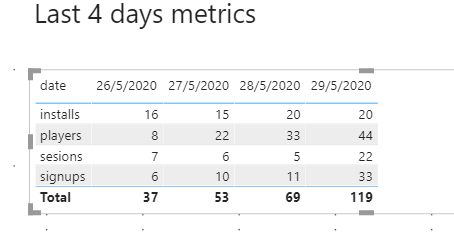
I need to show it transposed, like:
| 30/5/2020 | 29/5/2020 | 28/5/2020 | 27/5/2020 |
installs | 10 | 20 | 20 | 15 |
signups | 20 | 33 | .. | . |
players | … | .. | . | . |
sesions | .. | .. | .. | 6 |
Using pivot feature, seems to be ok:
But the problem, as the date columns now (due to pivot action) are metrics, I need to select one by one to include it in the table. But as my query datasource every day will return new days ( it recover last 4 days metrcs ) , the "new date" included every day, appears not checked ( as you can see 30/05/2020), so doesn't appear in the table.
Is there any solution to do it ? I mean, I need to show always the days returned into my datasource, with no manually intervention.
My .pbix attached, with the original table ( a sample ) and the pivoted table as other
source: https://drive.google.com/file/d/19VX0qKjk25MgowRCIxjBf6MWZ9na_v6Z/view?usp=sharing
Thanks in advance,
Regards!
Solved! Go to Solution.
Hi @gustavo80 ,
You must use the Unpivot column in the query editor.
if[Attribute] = "installs" then 1 else
if[Attribute] = "signups" then 2 else
if[Attribute] = "players" then 3 else
4
Check PBIX file attach.
Regards
Miguel Félix
Proud to be a Super User!
Check out my blog: Power BI em PortuguêsHi @gustavo80 ,
You must use the Unpivot column in the query editor.
if[Attribute] = "installs" then 1 else
if[Attribute] = "signups" then 2 else
if[Attribute] = "players" then 3 else
4
Check PBIX file attach.
Regards
Miguel Félix
Proud to be a Super User!
Check out my blog: Power BI em PortuguêsIf you have recently started exploring Fabric, we'd love to hear how it's going. Your feedback can help with product improvements.
A new Power BI DataViz World Championship is coming this June! Don't miss out on submitting your entry.
Experience the highlights from FabCon & SQLCon, available live and on-demand starting April 14th.
| User | Count |
|---|---|
| 47 | |
| 44 | |
| 40 | |
| 20 | |
| 15 |
| User | Count |
|---|---|
| 70 | |
| 67 | |
| 32 | |
| 27 | |
| 25 |