This time we’re going bigger than ever. Fabric, Power BI, SQL, AI and more. We're covering it all. You won't want to miss it.
Learn moreDid you hear? There's a new SQL AI Developer certification (DP-800). Start preparing now and be one of the first to get certified. Register now
Hi everyone! I'm pretty sure that my problem could be solved through pivot or unpivot feature, but I encountered a problem that I wasn't able to fix.
My dataset looks like:
| installs | signups | players | sesions |
30/5/2020 | 10 | 20 | 30 | 40 |
29/5/2020 | 20 | 33 | 44 | 22 |
28/5/2020 | 20 | 11 | 33 | 5 |
27/5/2020 | 15 | 10 | 22 | 6 |
26/5/2020 | 16 | 6 | 8 | 7 |
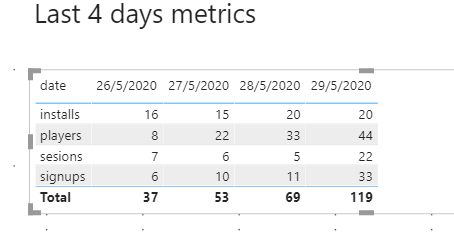
I need to show it transposed, like:
| 30/5/2020 | 29/5/2020 | 28/5/2020 | 27/5/2020 |
installs | 10 | 20 | 20 | 15 |
signups | 20 | 33 | .. | . |
players | … | .. | . | . |
sesions | .. | .. | .. | 6 |
Using pivot feature, seems to be ok:
But the problem, as the date columns now (due to pivot action) are metrics, I need to select one by one to include it in the table. But as my query datasource every day will return new days ( it recover last 4 days metrcs ) , the "new date" included every day, appears not checked ( as you can see 30/05/2020), so doesn't appear in the table.
Is there any solution to do it ? I mean, I need to show always the days returned into my datasource, with no manually intervention.
My .pbix attached, with the original table ( a sample ) and the pivoted table as other
source: https://drive.google.com/file/d/19VX0qKjk25MgowRCIxjBf6MWZ9na_v6Z/view?usp=sharing
Thanks in advance,
Regards!
Solved! Go to Solution.
Hi @gustavo80 ,
You must use the Unpivot column in the query editor.
if[Attribute] = "installs" then 1 else
if[Attribute] = "signups" then 2 else
if[Attribute] = "players" then 3 else
4
Check PBIX file attach.
Regards
Miguel Félix
Proud to be a Super User!
Check out my blog: Power BI em PortuguêsHi @gustavo80 ,
You must use the Unpivot column in the query editor.
if[Attribute] = "installs" then 1 else
if[Attribute] = "signups" then 2 else
if[Attribute] = "players" then 3 else
4
Check PBIX file attach.
Regards
Miguel Félix
Proud to be a Super User!
Check out my blog: Power BI em PortuguêsCheck out the April 2026 Power BI update to learn about new features.
Sign up to receive a private message when registration opens and key events begin.
If you have recently started exploring Fabric, we'd love to hear how it's going. Your feedback can help with product improvements.
| User | Count |
|---|---|
| 36 | |
| 33 | |
| 31 | |
| 21 | |
| 16 |
| User | Count |
|---|---|
| 66 | |
| 55 | |
| 31 | |
| 24 | |
| 23 |