Don't miss your chance to take the Fabric Data Engineer (DP-600) exam for FREE! Find out how by attending the DP-600 session on April 23rd (pacific time), live or on-demand.
Learn moreNext up in the FabCon + SQLCon recap series: The roadmap for Microsoft SQL and Maximizing Developer experiences in Fabric. All sessions are available on-demand after the live show. Register now
Below is my data:
| MemberID | Cancer Column | Hypertension Column | Diabetes Column |
| 1 | n | n | diabetes |
| 2 | cancer | n | n |
| 2 | cancer | n | n |
| 3 | n | n | diabetes |
| 4 | n | hypertension | diabetes |
| 1 | n | n | diabetes |
| 6 | cancer | hypertension | n |
| 2 | cancer | n | n |
| 5 | n | hypertension | n |
| 3 | n | n | diabetes |
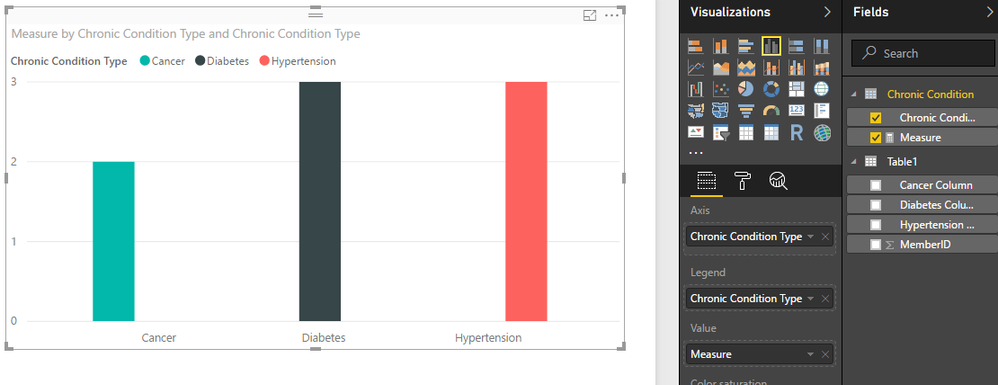
I would like to draw a graph as below:
cancer column, hypertension column, diabetes column correspond to chronic conditions.
y-axis should be the distinct count of members having that chronic condition.
How can i acheive this? do i need to create another table?
Solved! Go to Solution.
Hi @bsushy,
As the Cancer Column, Diabetes and Hypertension Columns are calculated columns, they won't appear in Query Editor. So the Pivot option is not available here.
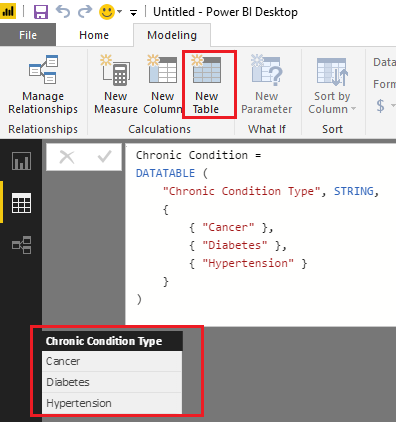
Based on my test, you can firstly use the formula below to create a new table which has a column of Chronic Condition Types.
Chronic Condition =
DATATABLE (
"Chronic Condition Type", STRING,
{
{ "Cancer" },
{ "Diabetes" },
{ "Hypertension" }
}
)
Then you should be able to use the formula below to create a new measure to calculate distinct count of MemberID for each Chronic Condition Type from your original table('Table1').
Measure =
IF (
HASONEVALUE ( 'Chronic Condition'[Chronic Condition Type] ),
SWITCH (
VALUES ( 'Chronic Condition'[Chronic Condition Type] ),
"Cancer", CALCULATE (
DISTINCTCOUNT ( Table1[MemberID] ),
Table1[Cancer Column] = "cancer"
),
"Hypertension", CALCULATE (
DISTINCTCOUNT ( Table1[MemberID] ),
Table1[Hypertension Column] = "hypertension"
),
"Diabetes", CALCULATE (
DISTINCTCOUNT ( Table1[MemberID] ),
Table1[Diabetes Column] = "diabetes"
)
)
)
And then you can show the 'Chronic Condition'[Chronic Condition Type] as Axis, and the measure as Value to get your expected result. ![]()
Regards
If I understand correctly, I suggest removing duplicate records during your data processing. That way you will have a unique record for each member. Then it should be a simple matter of graphing the table. You may need to take the extra step of converting all of the "n" values to 0 and the non-"n" to 1. Then you can simply sum the columns.
@orourkebp thank you for responding.
How do i pivot calculated coulmns? Cancer Column, Diabetes and Hypertension Columns are calculated columns...I would like to pivot because it is easy to get those columns on a single axis.
Hi @bsushy,
As the Cancer Column, Diabetes and Hypertension Columns are calculated columns, they won't appear in Query Editor. So the Pivot option is not available here.
Based on my test, you can firstly use the formula below to create a new table which has a column of Chronic Condition Types.
Chronic Condition =
DATATABLE (
"Chronic Condition Type", STRING,
{
{ "Cancer" },
{ "Diabetes" },
{ "Hypertension" }
}
)
Then you should be able to use the formula below to create a new measure to calculate distinct count of MemberID for each Chronic Condition Type from your original table('Table1').
Measure =
IF (
HASONEVALUE ( 'Chronic Condition'[Chronic Condition Type] ),
SWITCH (
VALUES ( 'Chronic Condition'[Chronic Condition Type] ),
"Cancer", CALCULATE (
DISTINCTCOUNT ( Table1[MemberID] ),
Table1[Cancer Column] = "cancer"
),
"Hypertension", CALCULATE (
DISTINCTCOUNT ( Table1[MemberID] ),
Table1[Hypertension Column] = "hypertension"
),
"Diabetes", CALCULATE (
DISTINCTCOUNT ( Table1[MemberID] ),
Table1[Diabetes Column] = "diabetes"
)
)
)
And then you can show the 'Chronic Condition'[Chronic Condition Type] as Axis, and the measure as Value to get your expected result. ![]()
Regards
Thank you:)
If you have recently started exploring Fabric, we'd love to hear how it's going. Your feedback can help with product improvements.
A new Power BI DataViz World Championship is coming this June! Don't miss out on submitting your entry.
Share feedback directly with Fabric product managers, participate in targeted research studies and influence the Fabric roadmap.
| User | Count |
|---|---|
| 48 | |
| 45 | |
| 41 | |
| 20 | |
| 18 |
| User | Count |
|---|---|
| 69 | |
| 64 | |
| 32 | |
| 31 | |
| 27 |