
cancel
Showing results for 
Search instead for 
Did you mean: 

Get Fabric Certified for FREE during Fabric Data Days. Don't miss your chance! Request now

Reply
jacobmk
Regular Visitor

Pivot Columns

Hi ,


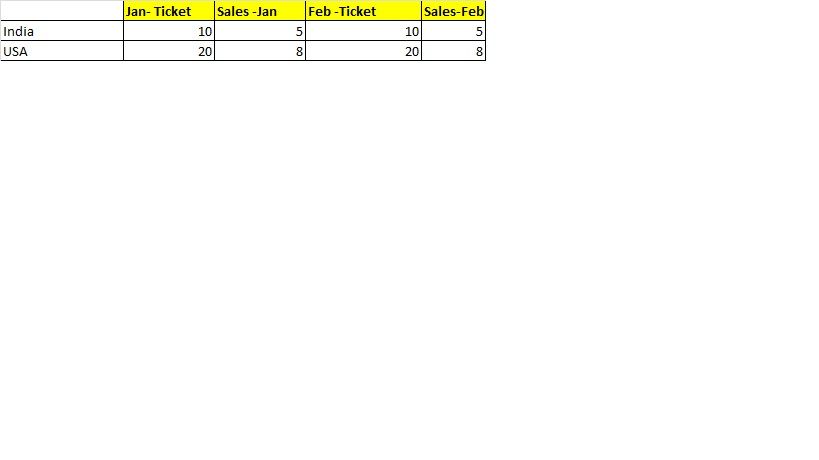
I have a Dataset as below. Four columns are there in the dataset 


Untitled.jpg


I would like to transpose the column as below


Untitled1.jpg

How can we achieve in Power BI


Thanks

1 ACCEPTED SOLUTION
v-chuncz-msft
Community Support
Community Support

@jacobmk,


You may use the Matrix visual. Drag Country to Rows, Month to Columns, and Ticket and Sales to Values.

Community Support Team _ Sam Zha
If this post helps, then please consider Accept it as the solution to help the other members find it more quickly.

View solution in original post

2 REPLIES 2
v-chuncz-msft
Community Support
Community Support

@jacobmk,


You may use the Matrix visual. Drag Country to Rows, Month to Columns, and Ticket and Sales to Values.

Community Support Team _ Sam Zha
If this post helps, then please consider Accept it as the solution to help the other members find it more quickly.
Anonymous
Not applicable

Hi @jacobmk,


This is a useful article which explains it in detail:


http://radacad.com/pivot-and-unpivot-with-power-bi


Regards,

L.Meijdam

Helpful resources

Announcements
November Power BI Update Carousel

Power BI Monthly Update - November 2025

Check out the November 2025 Power BI update to learn about new features.

Fabric Data Days Carousel

Fabric Data Days

Advance your Data & AI career with 50 days of live learning, contests, hands-on challenges, study groups & certifications and more!

FabCon Atlanta 2026 carousel

FabCon Atlanta 2026

Join us at FabCon Atlanta, March 16-20, for the ultimate Fabric, Power BI, AI and SQL community-led event. Save $200 with code FABCOMM.

Top Solution Authors
Top Kudoed Authors