cancel
Showing results for 
Search instead for 
Did you mean: 

We've captured the moments from FabCon & SQLCon that everyone is talking about, and we are bringing them to the community, live and on-demand. Starts on April 14th. Register now

Reply
highlander25361
Regular Visitor

Pie Chart split slice colours

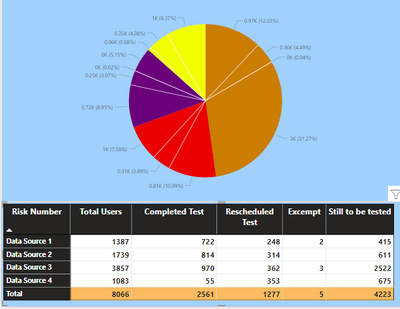
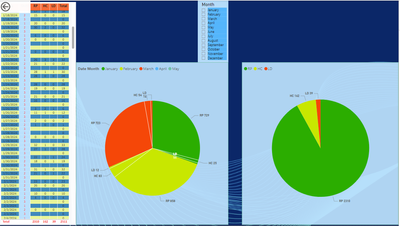
I have a piechart created from a matrix table whuich has 4 data sources. Each source is broken down into Total users. completed test, rescheduled, excempt and Still to be tested.


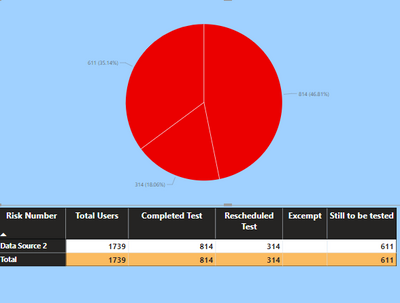
What Im trying to do is for each datasource pie slice, have each segment of that slice a different colour, so that if I used a slicer and chose a specific data source, each part of that pie would be a different colour. At the moment, I can see each data source and the splits per matrix column but they are the same base colour

highlander25361_0-1673969371497.png

highlander25361_1-1673969585827.png


Is this possible out of the box?

1 ACCEPTED SOLUTION
Anonymous
Not applicable

Hi @highlander25361 

you can refer to the following example:

e.g

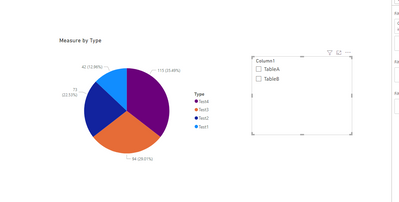
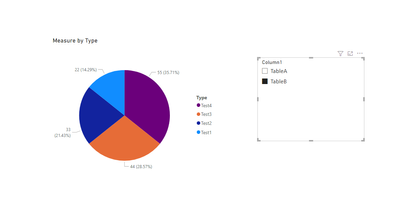
Measure = IF(ISFILTERED('Table (4)'[Column1]),IF(MAX('Table (4)'[Column1])="TableA",SUM(TableA[Column2]),SUM(TableB[Column2])),SUM(TableA[Column2])+SUM(TableB[Column2]))

Output:

vxinruzhumsft_0-1674010268481.png


vxinruzhumsft_1-1674010276158.png

Best Regards!

Yolo Zhu

If this post helps, then please consider Accept it as the solution to help the other members find it more quickly.

View solution in original post

3 REPLIES 3
Anonymous
Not applicable

Hi @highlander25361 

you can refer to the following example:

e.g

Measure = IF(ISFILTERED('Table (4)'[Column1]),IF(MAX('Table (4)'[Column1])="TableA",SUM(TableA[Column2]),SUM(TableB[Column2])),SUM(TableA[Column2])+SUM(TableB[Column2]))

Output:

vxinruzhumsft_0-1674010268481.png


vxinruzhumsft_1-1674010276158.png

Best Regards!

Yolo Zhu

If this post helps, then please consider Accept it as the solution to help the other members find it more quickly.

Hello, I tried to recreate your suggestion in my project because I have the same situation, but in my case I want to divide by months, and I have multiple columns, I spent a lot of time but I didn't get the result. My only option is to duplicate the main PIE and change the parameters. Do you have another option using Months as a divisor?


I appreciate anye help.


dangcab

dangcab_0-1711642776123.png


TomasAndersson
Solution Sage
Solution Sage

Hi!
Not out of the box, as far as I know. You can split colors either by category or source, but there will be shared colors.


What you probably could to is to create a new table where all data sources are combined using UNION(). In that table create a new column using CONCATENATE() with Category and Data Source as input and then using that column along with the values in your pie chart. That should give you the opportunity to set distinct colors for all combinations of data source and category.

Good luck!

Helpful resources

Announcements
New to Fabric survey Carousel

New to Fabric Survey

If you have recently started exploring Fabric, we'd love to hear how it's going. Your feedback can help with product improvements.

Power BI DataViz World Championships carousel

Power BI DataViz World Championships - June 2026

A new Power BI DataViz World Championship is coming this June! Don't miss out on submitting your entry.

Join our Fabric User Panel

Join our Fabric User Panel

Share feedback directly with Fabric product managers, participate in targeted research studies and influence the Fabric roadmap.

March Power BI Update Carousel

Power BI Community Update - March 2026

Check out the March 2026 Power BI update to learn about new features.