cancel
Showing results for 
Search instead for 
Did you mean: 

Vote for your favorite vizzies from the Power BI Dataviz World Championship submissions. Vote now!

Reply
AGo
Post Patron
Post Patron

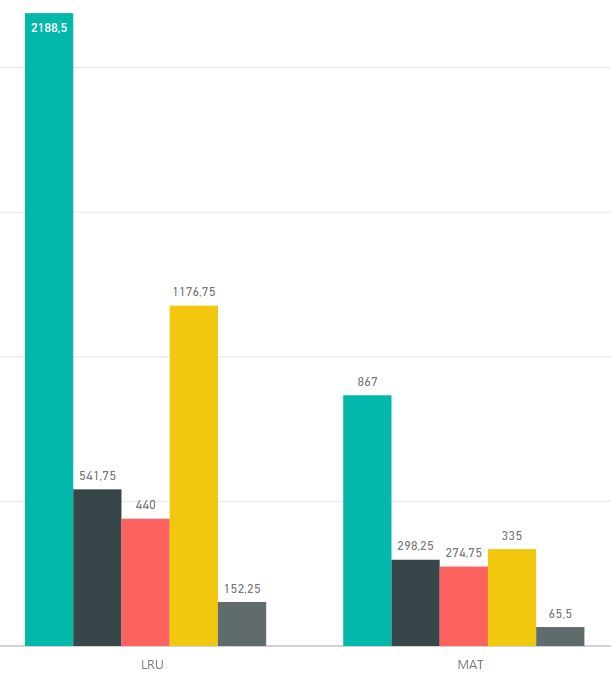
Personalized histogram

I have these different colors/cathegories because I put different value fields (sum mode) in the Values box of the visual object (no legenda used). Is there a way to have for each x-Axis element (LRU and MAT in this example) the first GREEN bar as it is, next to it the RED bar over the BLACK one, and next to it the GREY column over the YELLOW one?


Cattura.JPG

3 REPLIES 3
Bokazoit
Continued Contributor

Yes if You add a Category-column to Your data where the green is in a category for itself, while the others share same category.

Doing like this means to have a sum of the other 4 (three colours in total), I'd like to see them 4 with different colours but stacked in 2 columns (plus the green bar to the left).

Anonymous
Not applicable

Hi @AGo,


Based on test, currently clustered chart not support this feature. Since other users already shared this idea, you can vote it below :

Clustered+stacked Chart


Regards,

Xiaoxin Sheng

Helpful resources

Announcements
Power BI DataViz World Championships

Power BI Dataviz World Championships

Vote for your favorite vizzies from the Power BI World Championship submissions!

Sticker Challenge 2026 Carousel

Join our Community Sticker Challenge 2026

If you love stickers, then you will definitely want to check out our Community Sticker Challenge!

January Power BI Update Carousel

Power BI Monthly Update - January 2026

Check out the January 2026 Power BI update to learn about new features.

FabCon Atlanta 2026 carousel

FabCon Atlanta 2026

Join us at FabCon Atlanta, March 16-20, for the ultimate Fabric, Power BI, AI and SQL community-led event. Save $200 with code FABCOMM.