Join us at FabCon Atlanta from March 16 - 20, 2026, for the ultimate Fabric, Power BI, AI and SQL community-led event. Save $200 with code FABCOMM.
Register now!The Power BI Data Visualization World Championships is back! Get ahead of the game and start preparing now! Learn more
Hello,
I am creating a dashboard to monitoring all actitives that the team worked. I have a share point list that contain date and activity will performed during the year.
So I need create a percentage indicator visual to show the total activities was done during a day. For example, today is 03/24/23 and I have 10 activities planned to perform however I only finished 5 activities therefore I conclused 50% of my planned activities.
How can I count the number of activities I need perform per day ? After count it I imagine that is possible create a percentage indicator.
Solved! Go to Solution.
Hi @Viniciussouza ,
According to your description, here are my steps you can follow as a solution.
(1) This is my test data.
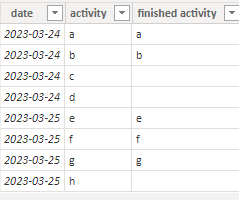
(2) We can create three measures.
total activity = COUNTROWS(FILTER(ALL('Table'),'Table'[date]=MAX('Table'[date])))finished = CALCULATE(COUNTA('Table'[finished activity]),'Table'[finished activity]<>BLANK() && 'Table'[date]=MAX('Table'[date]))percentage = DIVIDE('Table'[finished],'Table'[total activity],0)
(3) Then the result is as follows.
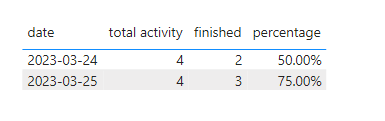
If the above one can't help you get the desired result, please provide some sample data in your tables (exclude sensitive data) with Text format and your expected result with backend logic and special examples. It is better if you can share a simplified pbix file. Thank you.
Best Regards,
Neeko Tang
If this post helps, then please consider Accept it as the solution to help the other members find it more quickly.
Hi @Viniciussouza ,
According to your description, here are my steps you can follow as a solution.
(1) This is my test data.
(2) We can create three measures.
total activity = COUNTROWS(FILTER(ALL('Table'),'Table'[date]=MAX('Table'[date])))finished = CALCULATE(COUNTA('Table'[finished activity]),'Table'[finished activity]<>BLANK() && 'Table'[date]=MAX('Table'[date]))percentage = DIVIDE('Table'[finished],'Table'[total activity],0)
(3) Then the result is as follows.
If the above one can't help you get the desired result, please provide some sample data in your tables (exclude sensitive data) with Text format and your expected result with backend logic and special examples. It is better if you can share a simplified pbix file. Thank you.
Best Regards,
Neeko Tang
If this post helps, then please consider Accept it as the solution to help the other members find it more quickly.
Hello @Anonymous ,
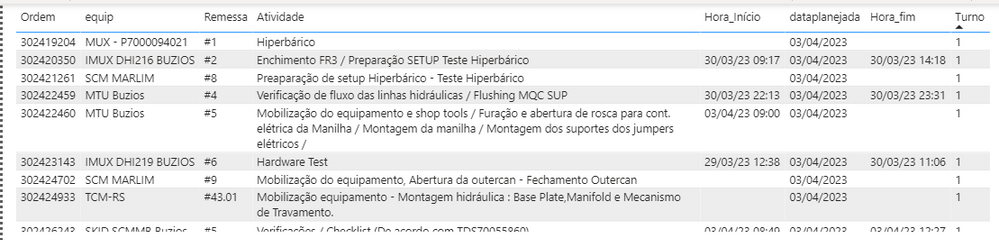
Thanks for your reply. I tried to apply it in my dashboard although it'snt work well. I don´t know how add my .pbix here so I am sharing the print screen.
Fifth column is activity date started
Sixth column is activity date planed
Seventh column is activity date finished
So if the start date and finish date <= plan date the result was 1, whether start date and/or finish date > plan date result was 0.
In this case the percentual total was 37,5 %
The Power BI Data Visualization World Championships is back! Get ahead of the game and start preparing now!
| User | Count |
|---|---|
| 41 | |
| 38 | |
| 36 | |
| 30 | |
| 28 |
| User | Count |
|---|---|
| 129 | |
| 88 | |
| 79 | |
| 68 | |
| 63 |