Join us at FabCon Atlanta from March 16 - 20, 2026, for the ultimate Fabric, Power BI, AI and SQL community-led event. Save $200 with code FABCOMM.
Register now!The Power BI Data Visualization World Championships is back! It's time to submit your entry. Live now!
Hello,
I have the below table and want to find out the percentage of reviews attended when they are not light touch.
So if there is a review date, it was attended and was not a light review = Percent attended.
Any help would be appreciated,
thanks
| Review Date | Attended | Light review | Percent attended |
| 01/01/2023 | Yes | Yes | 50% |
| 02/01/2023 | Yes | No | |
| 03/01/2023 | No | No | |
| 04/01/2023 | Yes | No |
Solved! Go to Solution.
Hi @WJ876400 ,
Here are the steps you can follow:
1. Create calculated column.
Percent attended =
var _countFlag=
COUNTX(
FILTER(ALL('Table'),
'Table'[Attended]="Yes"&&'Table'[Light review]="No"),[Review Date])
var _countall=
COUNTX(ALL('Table'),[Review Date])
return
DIVIDE(
_countFlag,_countall)Flag =
IF(
'Table'[Review Date]=MINX(ALL('Table'),[Review Date]),
[Percent attended],BLANK())
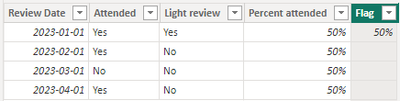
2. Result:
Best Regards,
Liu Yang
If this post helps, then please consider Accept it as the solution to help the other members find it more quickly
Hi @WJ876400 ,
Here are the steps you can follow:
1. Create calculated column.
Percent attended =
var _countFlag=
COUNTX(
FILTER(ALL('Table'),
'Table'[Attended]="Yes"&&'Table'[Light review]="No"),[Review Date])
var _countall=
COUNTX(ALL('Table'),[Review Date])
return
DIVIDE(
_countFlag,_countall)Flag =
IF(
'Table'[Review Date]=MINX(ALL('Table'),[Review Date]),
[Percent attended],BLANK())
2. Result:
Best Regards,
Liu Yang
If this post helps, then please consider Accept it as the solution to help the other members find it more quickly
| User | Count |
|---|---|
| 53 | |
| 37 | |
| 31 | |
| 21 | |
| 19 |
| User | Count |
|---|---|
| 138 | |
| 102 | |
| 59 | |
| 36 | |
| 35 |