FabCon is coming to Atlanta
Join us at FabCon Atlanta from March 16 - 20, 2026, for the ultimate Fabric, Power BI, AI and SQL community-led event. Save $200 with code FABCOMM.
Register now!- Power BI forums
- Get Help with Power BI
- Desktop
- Service
- Report Server
- Power Query
- Mobile Apps
- Developer
- DAX Commands and Tips
- Custom Visuals Development Discussion
- Health and Life Sciences
- Power BI Spanish forums
- Translated Spanish Desktop
- Training and Consulting
- Instructor Led Training
- Dashboard in a Day for Women, by Women
- Galleries
- Data Stories Gallery
- Themes Gallery
- Contests Gallery
- QuickViz Gallery
- Quick Measures Gallery
- Visual Calculations Gallery
- Notebook Gallery
- Translytical Task Flow Gallery
- TMDL Gallery
- R Script Showcase
- Webinars and Video Gallery
- Ideas
- Custom Visuals Ideas (read-only)
- Issues
- Issues
- Events
- Upcoming Events
The Power BI Data Visualization World Championships is back! Get ahead of the game and start preparing now! Learn more
- Power BI forums
- Forums
- Get Help with Power BI
- Desktop
- Percentage of total in a matrix grid for second di...
- Subscribe to RSS Feed
- Mark Topic as New
- Mark Topic as Read
- Float this Topic for Current User
- Bookmark
- Subscribe
- Printer Friendly Page


- Mark as New
- Bookmark
- Subscribe
- Mute
- Subscribe to RSS Feed
- Permalink
- Report Inappropriate Content
Percentage of total in a matrix grid for second dimension
I have a matrix grid with the Sales by Country and foreach Country the sales by product category
I want the % of total by Country and that's easy, but obviously when I expand a country the number has no sense...
In the example, I would like to see Seafood is 12,48% of the 26k of Italy
Is such a thing possible?
Thanks
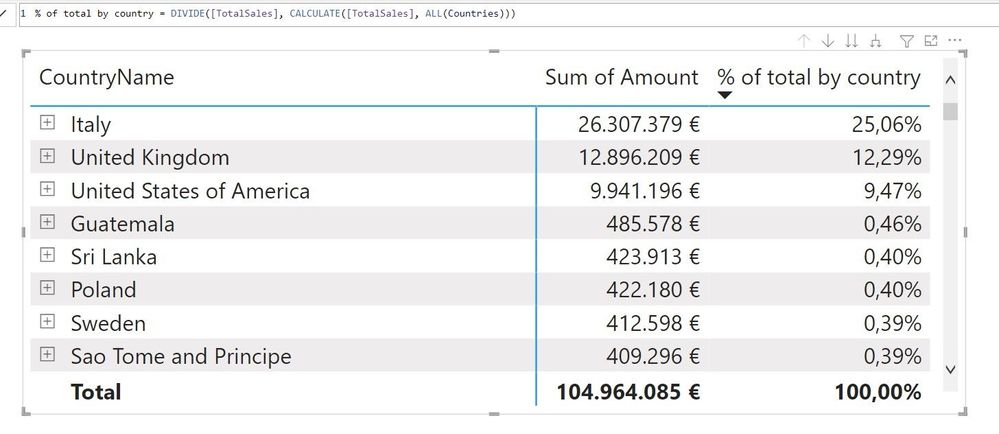
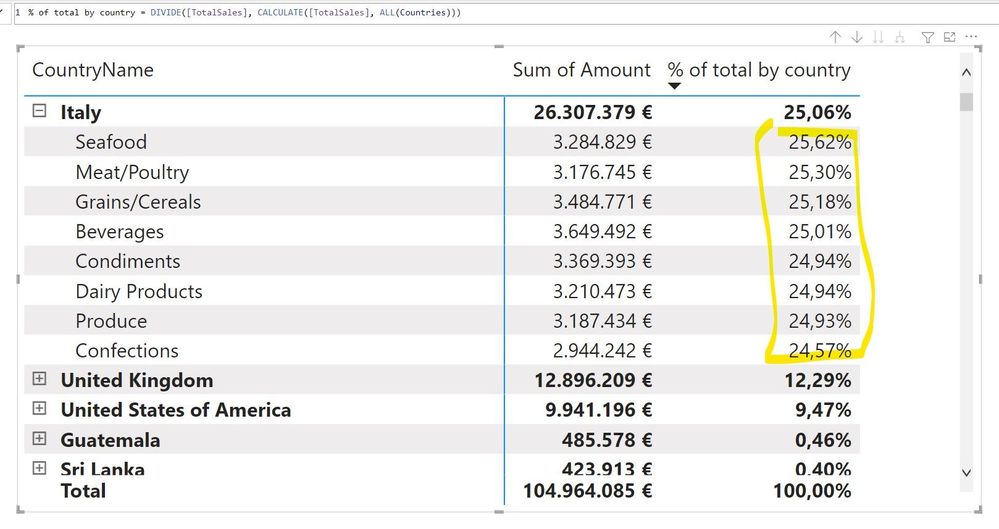
Solved! Go to Solution.
- Mark as New
- Bookmark
- Subscribe
- Mute
- Subscribe to RSS Feed
- Permalink
- Report Inappropriate Content
I see, you can test what dimensions are in scope and remove the concext acordingly.
Try this
Measure =
IF(AND(ISINSCOPE('Country'[CountryName]),ISINSCOPE(Products[Category])),
DIVIDE(
    [TotalSales],
    CALCULATE(
        TotalSales,
        ALL(Products[Category])

)
),
DIVIDE(
    TotalSales,
    CALCULATE(
        TotalSales,
        ALL('Country'[CountryName])

)
)
    )
Kind regards,
José
Please mark this answer as the solution if it resolves your issue.
Appreciate your kudos! 🙂
- Mark as New
- Bookmark
- Subscribe
- Mute
- Subscribe to RSS Feed
- Permalink
- Report Inappropriate Content
BTW, do you perhaps know why in a new file I have the PLUS sign near every ROW, while in an old pbix (but same, last, version of client) I have the old arrows to expan/collapse all the rows ?


- Mark as New
- Bookmark
- Subscribe
- Mute
- Subscribe to RSS Feed
- Permalink
- Report Inappropriate Content
EDIT:
Hi
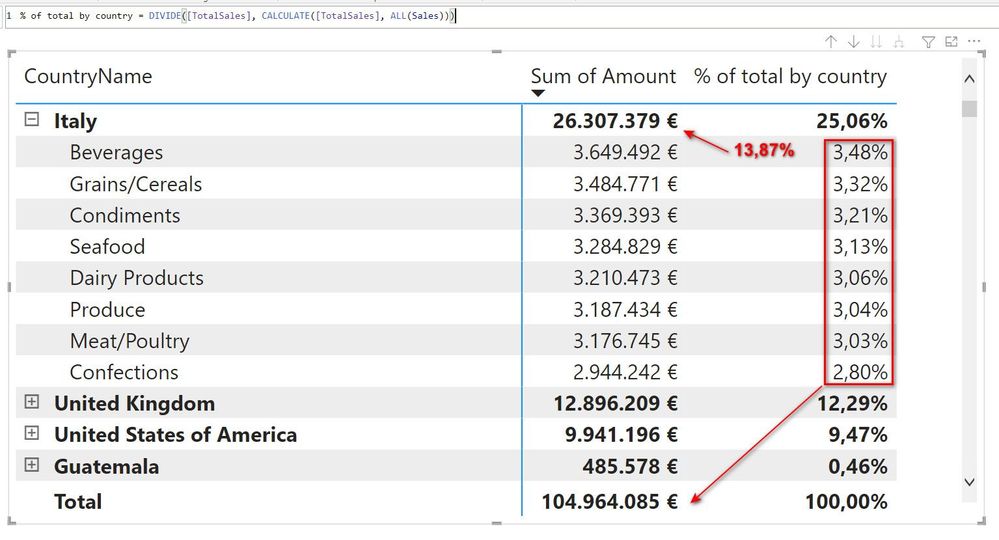
You are removing the filter context only from the product table. You need to do that for your sales table:
    DIVIDE(
        [TotalSales],
        CALCULATE(
            [TotalSales],
            ALL(Sales)
         )
    )
Kind regards,
José
Please mark this answer as the solution if it resolves your issue.
Appreciate your kudos! 🙂
- Mark as New
- Bookmark
- Subscribe
- Mute
- Subscribe to RSS Feed
- Permalink
- Report Inappropriate Content
That's better (number now make sense and are related to the gran total), but what I want to achieve is the % respect the parent total...
- Mark as New
- Bookmark
- Subscribe
- Mute
- Subscribe to RSS Feed
- Permalink
- Report Inappropriate Content
I see, you can test what dimensions are in scope and remove the concext acordingly.
Try this
Measure =
IF(AND(ISINSCOPE('Country'[CountryName]),ISINSCOPE(Products[Category])),
DIVIDE(
    [TotalSales],
    CALCULATE(
        TotalSales,
        ALL(Products[Category])

)
),
DIVIDE(
    TotalSales,
    CALCULATE(
        TotalSales,
        ALL('Country'[CountryName])

)
)
    )
Kind regards,
José
Please mark this answer as the solution if it resolves your issue.
Appreciate your kudos! 🙂
- Mark as New
- Bookmark
- Subscribe
- Mute
- Subscribe to RSS Feed
- Permalink
- Report Inappropriate Content
WOW !! only a Kudo is not enough!! Should be a Superkudo button.
Works like a charm... Thanks a lot!
- Mark as New
- Bookmark
- Subscribe
- Mute
- Subscribe to RSS Feed
- Permalink
- Report Inappropriate Content
- Mark as New
- Bookmark
- Subscribe
- Mute
- Subscribe to RSS Feed
- Permalink
- Report Inappropriate Content
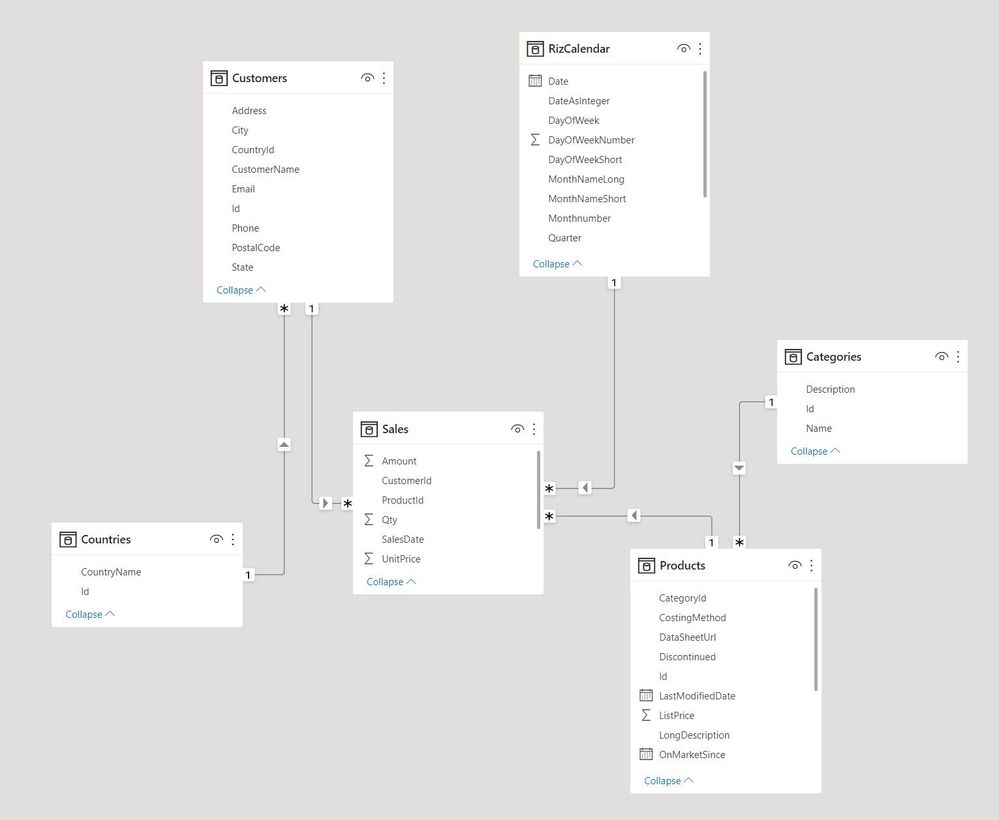
oh sorry, I left in the screenshot and I though it was visible.. anyway it is
- Mark as New
- Bookmark
- Subscribe
- Mute
- Subscribe to RSS Feed
- Permalink
- Report Inappropriate Content
Please check the edited messagem above
Helpful resources

Power BI Dataviz World Championships
The Power BI Data Visualization World Championships is back! Get ahead of the game and start preparing now!

Power BI Monthly Update - November 2025
Check out the November 2025 Power BI update to learn about new features.

FabCon Atlanta 2026
Join us at FabCon Atlanta, March 16-20, for the ultimate Fabric, Power BI, AI and SQL community-led event. Save $200 with code FABCOMM.

| User | Count |
|---|---|
| 59 | |
| 46 | |
| 42 | |
| 23 | |
| 17 |


| User | Count |
|---|---|
| 190 | |
| 122 | |
| 96 | |
| 66 | |
| 47 |


