Join us at FabCon Atlanta from March 16 - 20, 2026, for the ultimate Fabric, Power BI, AI and SQL community-led event. Save $200 with code FABCOMM.
Register now!Get Fabric Certified for FREE during Fabric Data Days. Don't miss your chance! Request now
Hi Team,
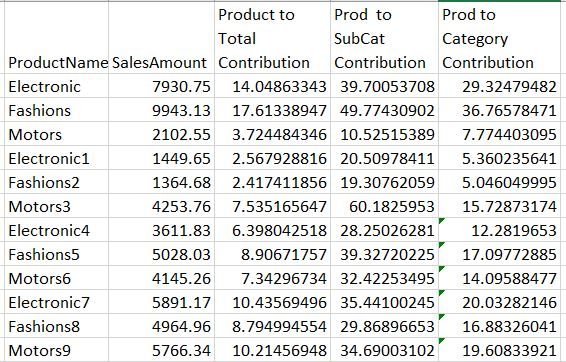
Need help here to calcuate Percentage Contribution to all the levels .
1.Product to Total Contribution is working fine for me.
2.Prod to SubCat Contribution is not working .
3.Prod to Category Contribution is not working.
Attached the Excel As well which has both data and output(Formula)
https://drive.google.com/open?id=1d2T6ktxhJBn9zwveVfif9ys8zqnTuwRj
My Data:
| Category | Subcategory | ProductName | SalesAmount |
| Market1 | Individaul Person | Electronic | 7930.75 |
| Market1 | Individaul Person | Fashions | 9943.13 |
| Market1 | Individaul Person | Motors | 2102.55 |
| Market1 | Legal Person | Electronic1 | 1449.65 |
| Market1 | Legal Person | Fashions2 | 1364.68 |
| Market1 | Legal Person | Motors3 | 4253.76 |
| Market2 | Individaul Person | Electronic4 | 3611.83 |
| Market2 | Individaul Person | Fashions5 | 5028.03 |
| Market2 | Individaul Person | Motors6 | 4145.26 |
| Market2 | Legal Person | Electronic7 | 5891.17 |
| Market2 | Legal Person | Fashions8 | 4964.96 |
| Market2 | Legal Person | Motors9 | 5766.34 |
Output:
Solved! Go to Solution.
I'll attach the pbix below, but here's the idea:
Total Sales = sum( Table1[SalesAmount] ) Grand Total Sales Product = CALCULATE( [Total Sales], all( DimProductName[ProductName])) Product to Total Contribution = DIVIDE( [Total Sales], [Grand Total Sales Product] )
Grand Total of SubSales =
CALCULATE(
SUMX(
ADDCOLUMNS(
SUMMARIZE( Table1, DimProductName[ProductName], DimSubcategory[SubCategory]),
"Total Sub Sales", CALCULATE( [Total Sales], FILTER( ALL( Table1), Table1[Subcategory] = EARLIER( DimSubcategory[SubCategory])
)
)
),
[Total Sub Sales]
)
)
Product to SubCat Contribution =
DIVIDE(
[Total Sales],
[Grand Total of SubSales])
then the same logic for category:Grand Total of Category =
CALCULATE(
SUMX(
ADDCOLUMNS(
SUMMARIZE( Table1, DimProductName[ProductName], DimCategory[Category]),
"Total Sub Sales", CALCULATE( [Total Sales], FILTER( ALL( Table1), Table1[Category] = EARLIER( DimCategory[Category])
)
)
),
[Total Sub Sales]
))
Produc to Categoy Contr = DIVIDE( [Total Sales], [Grand Total of Category])Final matrix. Dont need or probably want the grand total on each row, but left them on there for demonstration purposeshere's the file:
I'll attach the pbix below, but here's the idea:
Total Sales = sum( Table1[SalesAmount] ) Grand Total Sales Product = CALCULATE( [Total Sales], all( DimProductName[ProductName])) Product to Total Contribution = DIVIDE( [Total Sales], [Grand Total Sales Product] )
Grand Total of SubSales =
CALCULATE(
SUMX(
ADDCOLUMNS(
SUMMARIZE( Table1, DimProductName[ProductName], DimSubcategory[SubCategory]),
"Total Sub Sales", CALCULATE( [Total Sales], FILTER( ALL( Table1), Table1[Subcategory] = EARLIER( DimSubcategory[SubCategory])
)
)
),
[Total Sub Sales]
)
)
Product to SubCat Contribution =
DIVIDE(
[Total Sales],
[Grand Total of SubSales])
then the same logic for category:Grand Total of Category =
CALCULATE(
SUMX(
ADDCOLUMNS(
SUMMARIZE( Table1, DimProductName[ProductName], DimCategory[Category]),
"Total Sub Sales", CALCULATE( [Total Sales], FILTER( ALL( Table1), Table1[Category] = EARLIER( DimCategory[Category])
)
)
),
[Total Sub Sales]
))
Produc to Categoy Contr = DIVIDE( [Total Sales], [Grand Total of Category])Final matrix. Dont need or probably want the grand total on each row, but left them on there for demonstration purposeshere's the file:
Hi,
May I request the pbix file again? The above attached link is expired or not working anymore.
Tks in advance
Check out the November 2025 Power BI update to learn about new features.
Advance your Data & AI career with 50 days of live learning, contests, hands-on challenges, study groups & certifications and more!