cancel
Showing results for 
Search instead for 
Did you mean: 

July 7 - July 17 | Round 2 of the Power BI Dataviz World Championships. Don't miss your chance! Learn more

Reply
I-Jay-I
Frequent Visitor

Percentage Change Query

Hi All,


Im trying to calculate a percentage based off two other columns in my Power BI report. I have created a column called the Recovery Percentage to divide the Standard Rated Net by the Net. The Standard Rated Net column has been calculated using the formula: 


Standard Rated Net = IF('Sheet1'[Rate]="SR",'Sheet1'[Net],0)


The Reporting Month has been calculated using the formula:


Reporting Month = EOMONTH(Sheet1[Date],0)


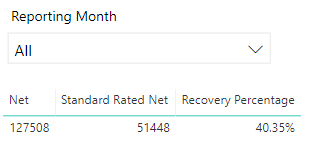
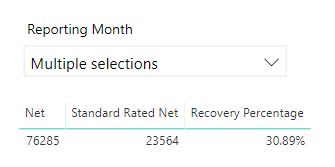
However when I change the Reporting Month filter the percentage doesnt seem to change. Please the attached photos.


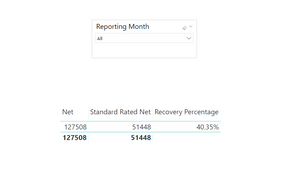
This is correct when all months are accounted for.

TestFile.PNG

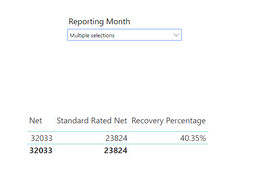
Once I have selected multiple months the percentage is clearly wrong.

TestFile2.PNG

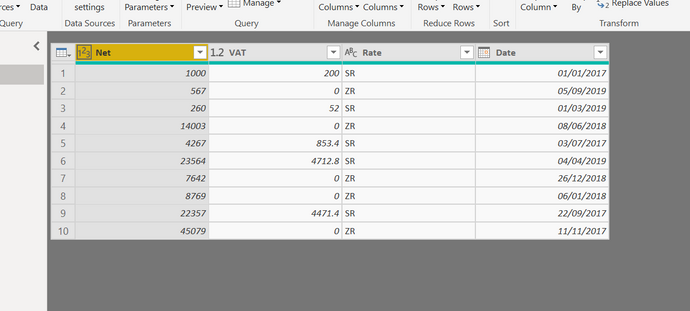
The data inputted is as follows


TestFile3.PNG


Any help would be appreciated and thank you in advance!


Spoiler
Spoiler
 
1 ACCEPTED SOLUTION
v-xuding-msft
Community Support
Community Support

Hi @I-Jay-I ,


I suggest you to create a measure of Recovery Percentage, then it will work. The following is my sample you can have a try.


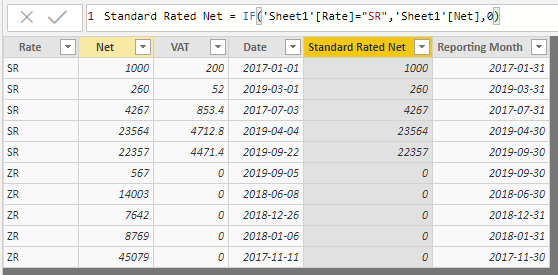
The calculated column of Standard Rated Net and Reporting Month are both used your formula.

Standard Rated Net = IF('Sheet1'[Rate]="SR",'Sheet1'[Net],0)
Reporting Month = EOMONTH(Sheet1[Date],0)

1.png


Create a measure.

Recovery Percentage = DIVIDE(SUM(Sheet1[Standard Rated Net]),SUM(Sheet1[Net]))

2.jpg3.png4.png

Best Regards,

Xue Ding

If this post helps, then please consider Accept it as the solution to help the other members find it more quickly.


Best Regards,
Xue Ding
If this post helps, then please consider Accept it as the solution to help the other members find it more quickly.

View solution in original post

2 REPLIES 2
v-xuding-msft
Community Support
Community Support

Hi @I-Jay-I ,


I suggest you to create a measure of Recovery Percentage, then it will work. The following is my sample you can have a try.


The calculated column of Standard Rated Net and Reporting Month are both used your formula.

Standard Rated Net = IF('Sheet1'[Rate]="SR",'Sheet1'[Net],0)
Reporting Month = EOMONTH(Sheet1[Date],0)

1.png


Create a measure.

Recovery Percentage = DIVIDE(SUM(Sheet1[Standard Rated Net]),SUM(Sheet1[Net]))

2.jpg3.png4.png

Best Regards,

Xue Ding

If this post helps, then please consider Accept it as the solution to help the other members find it more quickly.


Best Regards,
Xue Ding
If this post helps, then please consider Accept it as the solution to help the other members find it more quickly.

Hi Xue Ding,


Thanks for this! It appears I was using new column instead of new measure.


Thanks!


Jay

Helpful resources

Announcements
FabCon and SQLCon Barcelona 2026

FabCon & SQLCon – Barcelona 2026

Join us in Barcelona for FabCon and SQLCon, the Fabric, Power BI, SQL, and AI community event. Save €200 with code FABCMTY200.

60 days of Data Days Carousel

Data Days 2026

Join Data Days 2026: 60 days of free live/on-demand sessions, challenges, study groups, and certification opportunities.

Power BI DataViz World Championships carousel

Power BI DataViz World Championships - June 2026

A new Power BI DataViz World Championship is coming this June! Don't miss out on submitting your entry.

Top Solution Authors