Join us at FabCon Atlanta from March 16 - 20, 2026, for the ultimate Fabric, Power BI, AI and SQL community-led event. Save $200 with code FABCOMM.
Register now!Get Fabric Certified for FREE during Fabric Data Days. Don't miss your chance! Request now
Hello, anyone to assist on how i can visualize the data below to indicate the % difference using a bar chart? Field highlighted is what I need to show on the bar chart.
| Result Areas | Budget Allocation | Budget Absorption | Variance | % Burn Rate |
| Result 1 | 64,758.94 | 52,660.00 | 12,098.94 | 81% |
| Result 2 | 348,016.94 | 343,141.34 | 4,875.60 | 99% |
| Result 3 | 161,600.00 | 140,720.30 | 20,879.70 | 87% |
| Result 4 | 164,817.97 | 169,930.20 | - 5,112.23 | 103% |
Solved! Go to Solution.
Hi@sawn,
You can follow these steps to meet your needs:
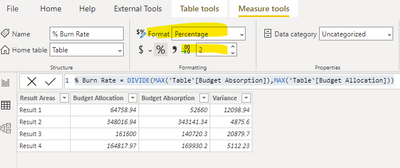
% Burn Rate = DIVIDE(MAX('Table'[Budget Absorption]),MAX('Table'[Budget Allocation]))
2.Change the format to Percentage, and change the number of decimal places shown from Auto to 2.
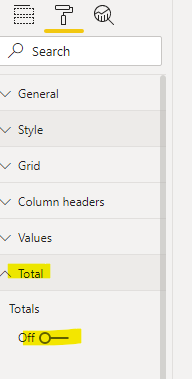
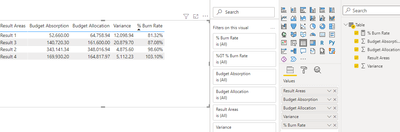
3.Create a table with the measure above, turn off the total in format setting, you will get this:
A demo is attached for your reference.
Best Regards,
Caitlyn Yan
If this post helps then please consider Accept it as the solution to help the other members find it more quickly.
Hi@sawn,
You can follow these steps to meet your needs:
% Burn Rate = DIVIDE(MAX('Table'[Budget Absorption]),MAX('Table'[Budget Allocation]))
2.Change the format to Percentage, and change the number of decimal places shown from Auto to 2.
3.Create a table with the measure above, turn off the total in format setting, you will get this:
A demo is attached for your reference.
Best Regards,
Caitlyn Yan
If this post helps then please consider Accept it as the solution to help the other members find it more quickly.
Hi,
Assuming Budget Absorption and Budget Allocation are measures, write this measure and create a bar chart
% burn rate = divide([budget absorption],[budget allocation])
Hope this helps.
Check out the November 2025 Power BI update to learn about new features.
Advance your Data & AI career with 50 days of live learning, contests, hands-on challenges, study groups & certifications and more!