cancel
Showing results for 
Search instead for 
Did you mean: 

Get Fabric Certified for FREE during Fabric Data Days. Don't miss your chance! Request now

Reply
benjaminlperry
Frequent Visitor

Percent of Total with Time Intelligence

So I have 3 Tables.  Violations, Logs, and Company


Tables look like this


Violations:


Unique ID     Company ID       Employee ID     Violation ID          Date

    987                  2                        AAA                   51                2/8/2019

    988                  2                        BBB                    51                 2/11/2019

    989                  3                        CCC                   14                 3/26/2019


Logs: (There should basically be 1 log for each employee of each company for each day.  Below is just an example)


Company ID   Employee ID     Log Date       Hours Worked

   2                        AAA            2/8/2019              15

   2                        AAA            2/9/2019                8

   2                        AAA            2/10/2019              12

   2                         BBB            2/1/2019                9

   3                         CCC            2/2/2019               10


Copmany:


Company ID     Company Name

        2                 Red Company

        3                  Blue Company

        4                  Green Company


So basically I have a table with hours worked for each company, employee, and day; and I have a table of violations that stems from those logs.  Not every log necesarily has a violation, but every violation should be tied to a specific log if that makes sense. 


What I am trying to figure out is how to take a percentage of logs that contain each specfic type of violation for each company.    So for example,  If Red company has 8 violations of Violation ID 51 on a given day, and 100 total logs for that day, I would get 8%


I know how to calculate that part, but I want to be able to adjust the date range and have both tables filter accordingly.  So If I want to look at Violation ID 51 for Red Company for the entire month, the measure would now calculate (for example) 250 violations and 2500 logs...10%. 


When I've added a date slicer to do this, it seems to only filter the violation table for the specified dates, not the Logs table too.  If I create a separate date table and build relationships to that, both tables will not filter with a company slicer.  


Any ideas?     


1 ACCEPTED SOLUTION
v-juanli-msft
Community Support
Community Support

Hi @benjaminlperry 

I understand you correctly, please refer to the following steps:

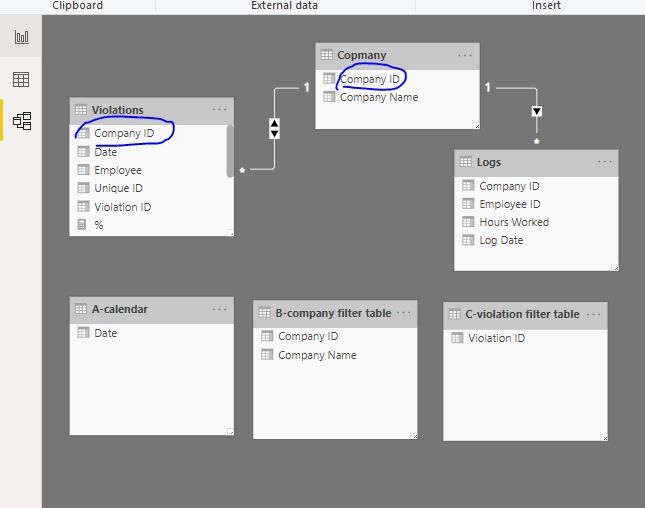
1. create three tables, leave these tables no relationship with any other table

A-calendar = CALENDARAUTO()
B-company filter table = VALUES(Copmany)
C-violation filter table = VALUES(Violations[Violation ID ])

Capture9.JPG


2, Create measures in 'Violations" table

min date = MIN('A-calendar'[Date])

max date = MAX('A-calendar'[Date])
selected company = SELECTEDVALUE('B-company filter table'[Company ID])

selected violation = SELECTEDVALUE('C-violation filter table'[Violation ID ])
count selected =
CALCULATE (
    COUNT ( Violations[Unique ID] ),
    FILTER (
        ALLSELECTED ( Violations ),
        Violations[Date] >= [min date]
            && Violations[Date] <= [max date]
            && Violations[Company ID] IN { [selected company] }
            && Violations[Violation ID ] IN { [selected violation] }
    )
)

count all =
CALCULATE (
COUNT ( Logs[Log Date] ),
FILTER (
ALL ( Logs ),
Logs[Company ID] = [selected company]
&& Logs[Log Date] >= [min date]
&& Logs[Log Date] <= [max date]
)
)
% = [count selected]/[count all]

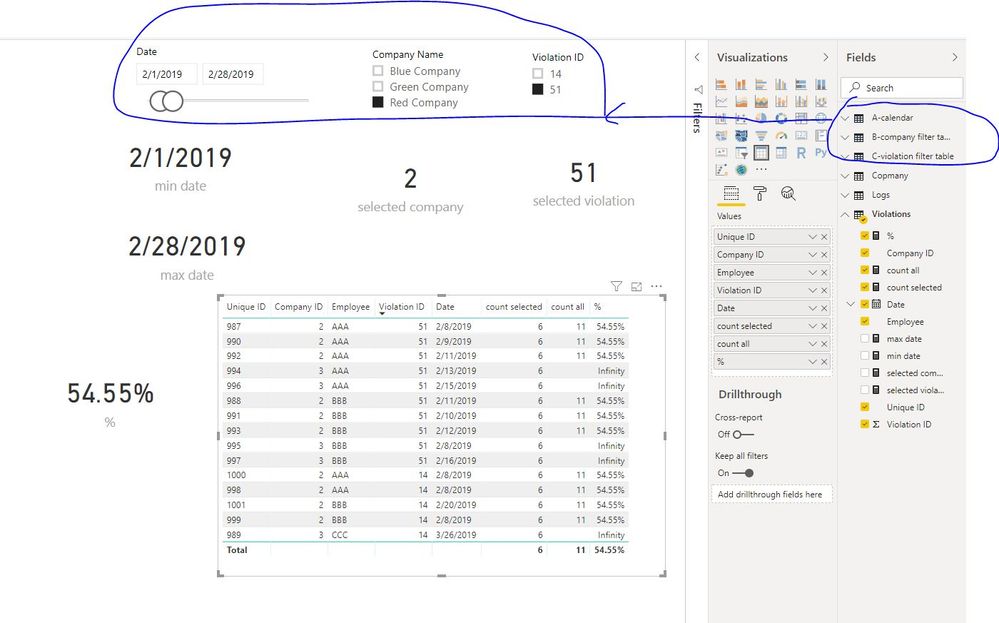
Capture11.JPG


Best Regards
Maggie


Community Support Team _ Maggie Li
If this post helps, then please consider Accept it as the solution to help the other members find it more quickly.

View solution in original post

2 REPLIES 2
v-juanli-msft
Community Support
Community Support

Hi @benjaminlperry 

Is this problem sloved? 

If it is sloved, could you kindly accept it as a solution to close this case?

If not, please let me know.


Best Regards

Maggie

v-juanli-msft
Community Support
Community Support

Hi @benjaminlperry 

I understand you correctly, please refer to the following steps:

1. create three tables, leave these tables no relationship with any other table

A-calendar = CALENDARAUTO()
B-company filter table = VALUES(Copmany)
C-violation filter table = VALUES(Violations[Violation ID ])

Capture9.JPG


2, Create measures in 'Violations" table

min date = MIN('A-calendar'[Date])

max date = MAX('A-calendar'[Date])
selected company = SELECTEDVALUE('B-company filter table'[Company ID])

selected violation = SELECTEDVALUE('C-violation filter table'[Violation ID ])
count selected =
CALCULATE (
    COUNT ( Violations[Unique ID] ),
    FILTER (
        ALLSELECTED ( Violations ),
        Violations[Date] >= [min date]
            && Violations[Date] <= [max date]
            && Violations[Company ID] IN { [selected company] }
            && Violations[Violation ID ] IN { [selected violation] }
    )
)

count all =
CALCULATE (
COUNT ( Logs[Log Date] ),
FILTER (
ALL ( Logs ),
Logs[Company ID] = [selected company]
&& Logs[Log Date] >= [min date]
&& Logs[Log Date] <= [max date]
)
)
% = [count selected]/[count all]

Capture11.JPG


Best Regards
Maggie


Community Support Team _ Maggie Li
If this post helps, then please consider Accept it as the solution to help the other members find it more quickly.

Helpful resources

Announcements
November Power BI Update Carousel

Power BI Monthly Update - November 2025

Check out the November 2025 Power BI update to learn about new features.

Fabric Data Days Carousel

Fabric Data Days

Advance your Data & AI career with 50 days of live learning, contests, hands-on challenges, study groups & certifications and more!

FabCon Atlanta 2026 carousel

FabCon Atlanta 2026

Join us at FabCon Atlanta, March 16-20, for the ultimate Fabric, Power BI, AI and SQL community-led event. Save $200 with code FABCOMM.

Top Solution Authors
Top Kudoed Authors