Join us at FabCon Atlanta from March 16 - 20, 2026, for the ultimate Fabric, Power BI, AI and SQL community-led event. Save $200 with code FABCOMM.
Register now!The Power BI Data Visualization World Championships is back! Get ahead of the game and start preparing now! Learn more
Hi!
I have 8 regions that I want to rank based on a measure. When I have all the regions selected the rank is correct. However, when I filter for one region, then rank increases by one. I think maybe when I filter the regions it includes my "Blanks" but I don't know how to avoid this? Here is my current formula:
Rank = RANKX(ALLNOBLANKROW( 'Store List'[Region] ), [Loss],,ASC)
Solved! Go to Solution.
Hi @raharebecca
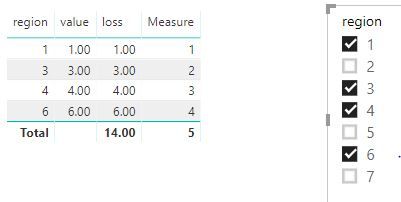
If [Loss] is a measure and you want to ignore blank regions, you could create a measure as below
Measure = RANKX(FILTER(ALLSELECTED('Table'),'Table'[region]<>BLANK()),[loss],,ASC,Dense)
Best Regards
Maggie
Community Support Team _ Maggie Li
If this post helps, then please consider Accept it as the solution to help the other members find it more quickly.
Hi @raharebecca
Is this problem sloved?
If it is sloved, could you kindly accept it as a solution to close this case?
If not, please let me know.
Best Regards
Maggie
Hi! I have 7 Regions and when I have all of them listed in a table they are ranked correctly. However, when I put in a region slicer and select one region, the rank increases by one. So my region ranked 7th, when selected in the slicer shows a rank of 8 even though there are only 7 regions. I can't understand why it increases only when one is selected. I have tried a million different versions of formulas but the rank still always increases. Any insight would be much appreciated.
Hi @raharebecca
If [Loss] is a measure and you want to ignore blank regions, you could create a measure as below
Measure = RANKX(FILTER(ALLSELECTED('Table'),'Table'[region]<>BLANK()),[loss],,ASC,Dense)
Best Regards
Maggie
Community Support Team _ Maggie Li
If this post helps, then please consider Accept it as the solution to help the other members find it more quickly.
The Power BI Data Visualization World Championships is back! Get ahead of the game and start preparing now!
| User | Count |
|---|---|
| 39 | |
| 37 | |
| 33 | |
| 32 | |
| 29 |
| User | Count |
|---|---|
| 132 | |
| 88 | |
| 82 | |
| 68 | |
| 64 |