cancel
Showing results for 
Search instead for 
Did you mean: 

Learn from the best! Meet the four finalists headed to the FINALS of the Power BI Dataviz World Championships! Register now

Reply
sowmyar
Frequent Visitor

Path Function with filter

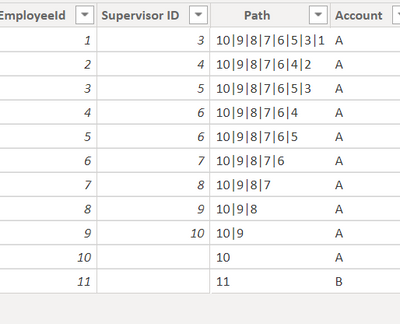
I need to create the hierachy for user and supervisor based on the date and account.

sowmyar_0-1632554198428.png

Thanks in advance

1 ACCEPTED SOLUTION

Hi  @sowmyar ,


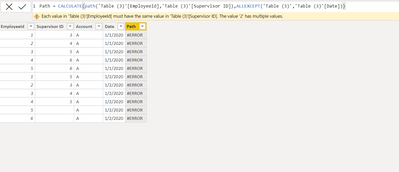
Seems cant use calculate with Path to get the result you need.

I create another 3 columns to get what you need:

mark = 
var _maxid=CALCULATE(MAX('Table'[EmployeeId]),ALL('Table'))
var _min=CALCULATE(MIN('Table'[EmployeeId]),FILTER('Table','Table'[Date]<>EARLIER('Table'[Date])&&'Table'[EmployeeId]=EARLIER('Table'[Supervisor ID])))
Return
_min
Column 2 = 
IF('Table'[mark]<>BLANK(),CALCULATE(MAX('Table'[Column]),FILTER('Table','Table'[EmployeeId]=EARLIER('Table'[mark]))))
Column 3 = 
var _len1=LEN('Table'[Column])
var _len2=LEN('Table'[Column 2])
var _res=RIGHT('Table'[Column],_len1-_len2+1)
Return
IF('Table'[Column 2]=BLANK(),'Table'[Column],_res)

And you will see:
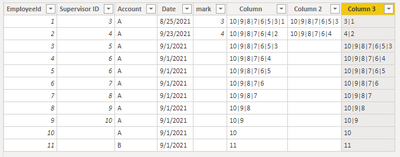
vkellymsft_0-1632816848194.png

I guess column3 is what you need.

For the related .pbix file,pls see attached.


Best Regards,
Kelly

Did I answer your question? Mark my reply as a solution!

View solution in original post

3 REPLIES 3
Greg_Deckler
Community Champion
Community Champion

@sowmyar Sorry, having trouble following, can you post sample data as text and expected output?
Not really enough information to go on, please first check if your issue is a common issue listed here: https://community.powerbi.com/t5/Community-Blog/Before-You-Post-Read-This/ba-p/1116882

Also, please see this post regarding How to Get Your Question Answered Quickly: https://community.powerbi.com/t5/Community-Blog/How-to-Get-Your-Question-Answered-Quickly/ba-p/38490

The most important parts are:
1. Sample data as text, use the table tool in the editing bar
2. Expected output from sample data
3. Explanation in words of how to get from 1. to 2.


Follow on LinkedIn
@ me in replies or I'll lose your thread!!!
Instead of a Kudo, please vote for this idea
Become an expert!: Enterprise DNA
External Tools: MSHGQM
YouTube Channel!: Microsoft Hates Greg
Latest book!:
DAX For Humans

DAX is easy, CALCULATE makes DAX hard...

@Greg_Deckler

@Greg_Deckler

sowmyar_0-1632718212812.png

but when there is a date field,few employees will have two supervisor based on the date,in this case i need to finf the hierachy based on each date

sowmyar_0-1632718441614.png


Hi  @sowmyar ,


Seems cant use calculate with Path to get the result you need.

I create another 3 columns to get what you need:

mark = 
var _maxid=CALCULATE(MAX('Table'[EmployeeId]),ALL('Table'))
var _min=CALCULATE(MIN('Table'[EmployeeId]),FILTER('Table','Table'[Date]<>EARLIER('Table'[Date])&&'Table'[EmployeeId]=EARLIER('Table'[Supervisor ID])))
Return
_min
Column 2 = 
IF('Table'[mark]<>BLANK(),CALCULATE(MAX('Table'[Column]),FILTER('Table','Table'[EmployeeId]=EARLIER('Table'[mark]))))
Column 3 = 
var _len1=LEN('Table'[Column])
var _len2=LEN('Table'[Column 2])
var _res=RIGHT('Table'[Column],_len1-_len2+1)
Return
IF('Table'[Column 2]=BLANK(),'Table'[Column],_res)

And you will see:

vkellymsft_0-1632816848194.png

I guess column3 is what you need.

For the related .pbix file,pls see attached.


Best Regards,
Kelly

Did I answer your question? Mark my reply as a solution!
Helpful resources

Announcements
Power BI DataViz World Championships carousel

Power BI DataViz World Championships - June 2026

A new Power BI DataViz World Championship is coming this June! Don't miss out on submitting your entry.

Join our Fabric User Panel

Join our Fabric User Panel

Share feedback directly with Fabric product managers, participate in targeted research studies and influence the Fabric roadmap.

March Power BI Update Carousel

Power BI Community Update - March 2026

Check out the March 2026 Power BI update to learn about new features.