cancel
Showing results for 
Search instead for 
Did you mean: 

July 28 - August 9 | Final Round of the Power BI Dataviz World Championships. This is your chance. Learn more

Reply
riazahmedshaik
Frequent Visitor

Passing multiple values from a parameter to Filter function (Report Builder)

Hi,


I'm trying to pass multiple values in Filter function in Report Builder via paramater. It is working for a single seletion but not for multiple. Below is the systax I'm using,

Filter(Values(Country), or(Country=@Country,@Country="ALL"))

While running the report, if I select ALL in the parameter it is giving the data for all countries. When I'm trying to select any 2 countris it is giving blank report.

I tried below as well but didn't not work,

Filter(Values(Country),Country in or({@Country},@Country="ALL"))

Please help me to fix this code to work for multiple selection.


Thanks,


1 ACCEPTED SOLUTION
v-kkf-msft
Community Support
Community Support

Hi @riazahmedshaik ,


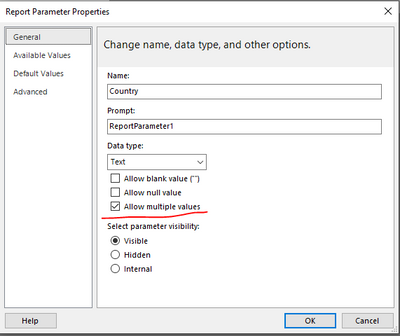
Do you enable the option "Allow multiple values" for parameter?


vkkfmsft_0-1626678895188.png


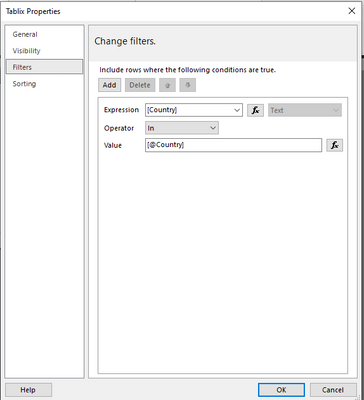
Then specify a parameter in a filter.


vkkfmsft_1-1626678937310.png

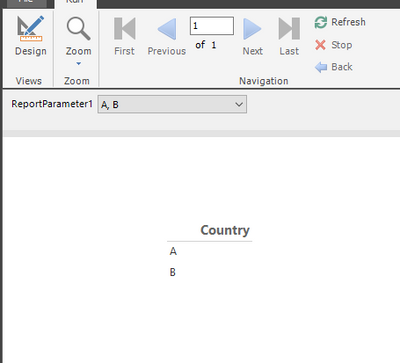
vkkfmsft_2-1626679038349.png


If the problem is still not resolved, please provide detailed error information or the expected result you expect. Let me know immediately, looking forward to your reply.

Best Regards,
Winniz

If this post helps, then please consider Accept it as the solution to help the other members find it more quickly.


View solution in original post

1 REPLY 1
v-kkf-msft
Community Support
Community Support

Hi @riazahmedshaik ,


Do you enable the option "Allow multiple values" for parameter?


vkkfmsft_0-1626678895188.png


Then specify a parameter in a filter.


vkkfmsft_1-1626678937310.png

vkkfmsft_2-1626679038349.png


If the problem is still not resolved, please provide detailed error information or the expected result you expect. Let me know immediately, looking forward to your reply.

Best Regards,
Winniz

If this post helps, then please consider Accept it as the solution to help the other members find it more quickly.


Helpful resources

Announcements
Fabric Community Sticker Design Challenge Barcelona Carousel

Fabric Community Sticker Challenge - Barcelona 2026

If you love stickers, then you will definitely want to check out our community sticker challenge, Barcelona edition!

July Power BI Update Carousel

Power BI Monthly Update - July 2026

Check out the July 2026 Power BI update to learn about new features.

Power BI DataViz World Championships carousel

Power BI DataViz World Championships - June 2026

A new Power BI DataViz World Championship is coming this June! Don't miss out on submitting your entry.

Top Solution Authors