cancel
Showing results for 
Search instead for 
Did you mean: 

Next up in the FabCon + SQLCon recap series: The roadmap for Microsoft SQL and Maximizing Developer experiences in Fabric. All sessions are available on-demand after the live show. Register now

Reply
ToddMate
Helper II
Helper II

Parsing of whole number to date format

Hi,


When i import my source data I have a field in my query that is a date but is in YYYYMMDD format without any date seperators.


When it imports the source data it treats this field as a whole number.

How can i transfrom this into DDMMYYYY format and have PowerBI rcognise this as a date field .. or create a new column with the required format?


Any help is appreciated.

Cheers,

Todd

1 ACCEPTED SOLUTION
Nathaniel_C
Community Champion
Community Champion

Hi @ToddMate ,

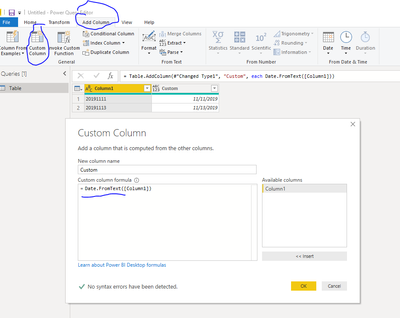
Go to Power Query. Change the type of the column to text. Go to Add Column, Custom Column and use Date.FromText as in the picture.
Let me know if you have any questions.

If this solves your issues, please mark it as the solution, so that others can find it easily. Kudos 👍are nice too.
Nathanieldatefromtext.PNG


Did I answer your question? Mark my post as a solution!

Proud to be a Super User!


View solution in original post

4 REPLIES 4
Nathaniel_C
Community Champion
Community Champion

Hi @ToddMate ,

Go to Power Query. Change the type of the column to text. Go to Add Column, Custom Column and use Date.FromText as in the picture.
Let me know if you have any questions.

If this solves your issues, please mark it as the solution, so that others can find it easily. Kudos 👍are nice too.
Nathanieldatefromtext.PNG


Did I answer your question? Mark my post as a solution!

Proud to be a Super User!


That worked perfectly !! Thanks, haven't really used the Custom Column option before but it will be on the list of features to utilise moving forward!


Thanks again!

Hi @ToddMate ,
You are welcome! It is amazing the things you can get done using the M language, and fairly easy to do using the internet to get the solution code.
Nathaniel


Did I answer your question? Mark my post as a solution!

Proud to be a Super User!


Anonymous
Not applicable

In 'Power Query Editor' 

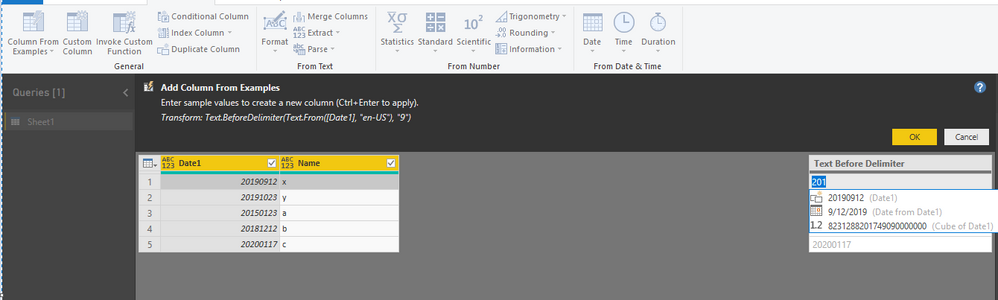
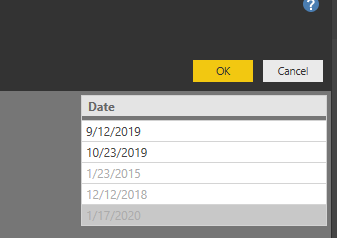
go to table, and select 'Add Column' --> Click on 'Column from Examples' and Power BI will automatically detects Date as you see in attached pictures.1.PNG2.PNG

Hope this helps. I tried convert same column as Date, but its not helping. so I tried to create a new column.

Helpful resources

Announcements
New to Fabric survey Carousel

New to Fabric Survey

If you have recently started exploring Fabric, we'd love to hear how it's going. Your feedback can help with product improvements.

Power BI DataViz World Championships carousel

Power BI DataViz World Championships - June 2026

A new Power BI DataViz World Championship is coming this June! Don't miss out on submitting your entry.

Join our Fabric User Panel

Join our Fabric User Panel

Share feedback directly with Fabric product managers, participate in targeted research studies and influence the Fabric roadmap.

March Power BI Update Carousel

Power BI Community Update - March 2026

Check out the March 2026 Power BI update to learn about new features.