cancel
Showing results for 
Search instead for 
Did you mean: 

The Power BI Data Visualization World Championships is back! Get ahead of the game and start preparing now! Learn more

Reply
AmazingRandom
Helper II
Helper II

Paginated Report Help - Background Conditional Formatting

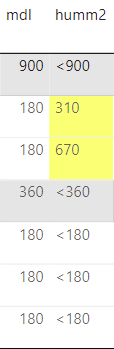
I am trying to create a report, that per client requests, should have cell background colour formatting for when a value is above the threshold. I am struggling to find a way around this. The values are based on string type, which any value equal or under the threshold has a < in front of it (<900, <1800) so for this case I could just use that as the filter, any value that has "<" or is blank should have "White" background colour formatting, whereas any other value should be yellow.

I'm trying with the current formula:


=IIF(InStr(Fields!humm2.Value, "<") > 0 OR IsNothing(Fields!humm2.Value) OR Fields!humm2.Value = "", "White", "Yellow")


Yet I get this info:

The 'BackgroundColor' expression for the text box 'Textbox37' contains an error: [BC30451] 'CONTAINSSTRING' is not declared. It may be inaccessible due to its protection level.

The definition of the report '' is invalid.

An error occurred during local report processing.

How should I write the formula to get it to work? Cheers

From a PBI Desktop App report it should look like this:


AmazingRandom_2-1711416477716.png


1 ACCEPTED SOLUTION

3 REPLIES 3
RossEdwards
Solution Sage
Solution Sage

What about:

IIF(Left(Fields!humm2.Value, 1) = "<") OR IsNothing(Fields!humm2.Value) OR Fields!humm2.Value = "", "White", "Yellow")

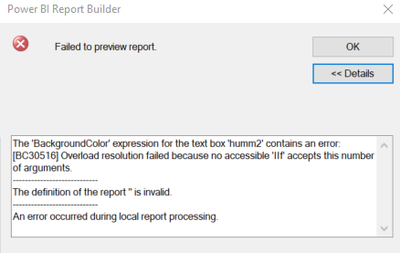
I have tweaked a little bit, I swapped the IIf into a SWITCH statement and it worked

It says this:

AmazingRandom_0-1711481425454.png


Helpful resources

Announcements
Power BI DataViz World Championships

Power BI Dataviz World Championships

The Power BI Data Visualization World Championships is back! Get ahead of the game and start preparing now!

December 2025 Power BI Update Carousel

Power BI Monthly Update - December 2025

Check out the December 2025 Power BI Holiday Recap!

FabCon Atlanta 2026 carousel

FabCon Atlanta 2026

Join us at FabCon Atlanta, March 16-20, for the ultimate Fabric, Power BI, AI and SQL community-led event. Save $200 with code FABCOMM.