Join us at FabCon Atlanta from March 16 - 20, 2026, for the ultimate Fabric, Power BI, AI and SQL community-led event. Save $200 with code FABCOMM.
Register now!The Power BI Data Visualization World Championships is back! Get ahead of the game and start preparing now! Learn more
Hi All,
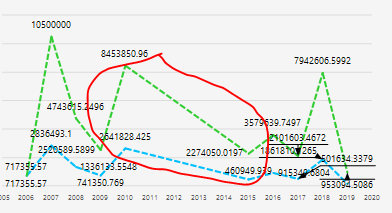
I am using the new paginated report builder and wonder if anyone knows how does the line chart handles empty values in the data?
My line chart has a region where we don't have any data, so ideally it should just go to zero/show an empty space. However, it is connecting the two adjacent data points and create a line as if it changes constantly over that period of time. See attached.
Thanks in advance,
JC
Solved! Go to Solution.
Hi @Anonymous ,
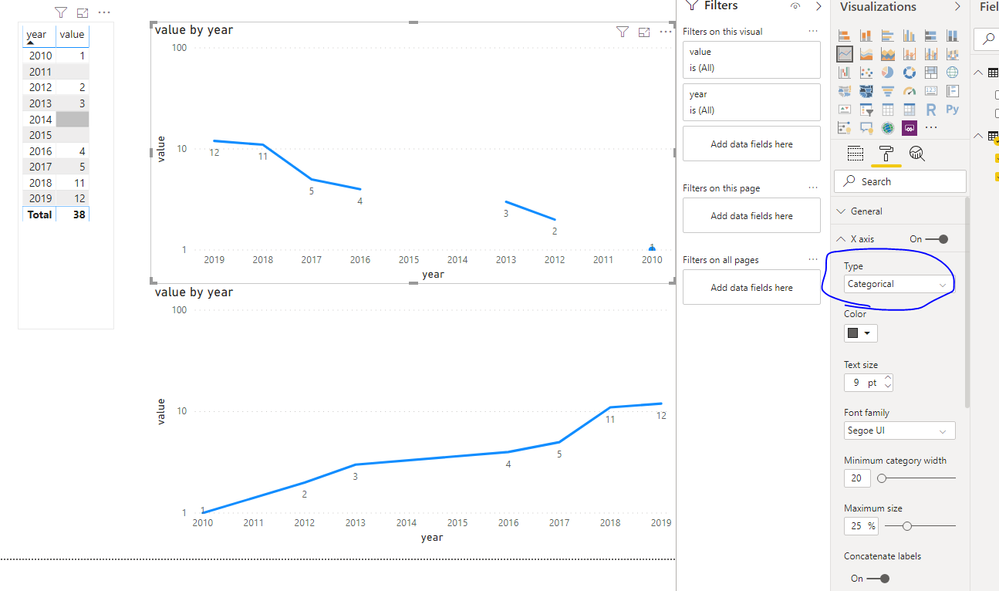
Setting the X-axis to Categorical should help you.
Hi @Anonymous ,
Setting the X-axis to Categorical should help you.
Forgot to add that I have googled this and tried several ways people suggested, including:
- Changing the value of the series to an expression where it shows 0/nothing if it IsNothing
- Changing the color of the series using an expression where it shows no colour if value of the series IsNothing
- Setting the EmptyPoint Value = Zero and changing the properties of the empty point in the Properties pane.
None of the above work. Does anyone have a clue?
Hi,
Dit you found a sloution in Report builder?
Thanks in advance
Frank
The Power BI Data Visualization World Championships is back! Get ahead of the game and start preparing now!
| User | Count |
|---|---|
| 39 | |
| 38 | |
| 38 | |
| 28 | |
| 27 |
| User | Count |
|---|---|
| 124 | |
| 88 | |
| 73 | |
| 66 | |
| 65 |