Join us at FabCon Atlanta from March 16 - 20, 2026, for the ultimate Fabric, Power BI, AI and SQL community-led event. Save $200 with code FABCOMM.
Register now!The Power BI Data Visualization World Championships is back! Get ahead of the game and start preparing now! Learn more
Hi All,
I am using the new paginated report builder and wonder if anyone knows how does the line chart handles empty values in the data?
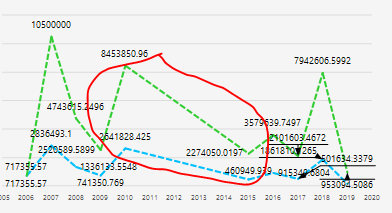
My line chart has a region where we don't have any data, so ideally it should just go to zero/show an empty space. However, it is connecting the two adjacent data points and create a line as if it changes constantly over that period of time. See attached.
Thanks in advance,
JC
Solved! Go to Solution.
Hi @Anonymous ,
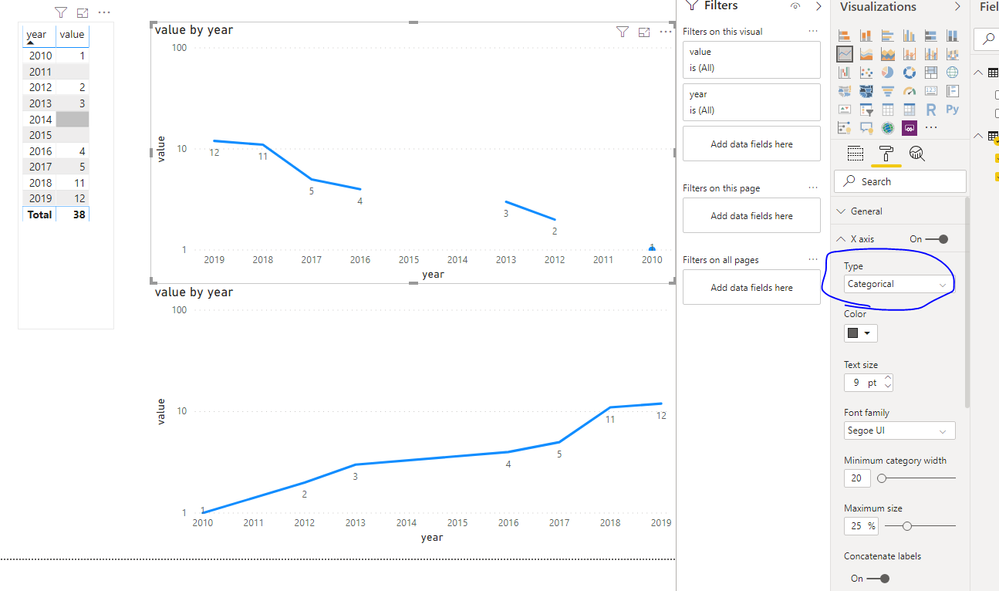
Setting the X-axis to Categorical should help you.
Hi @Anonymous ,
Setting the X-axis to Categorical should help you.
Forgot to add that I have googled this and tried several ways people suggested, including:
- Changing the value of the series to an expression where it shows 0/nothing if it IsNothing
- Changing the color of the series using an expression where it shows no colour if value of the series IsNothing
- Setting the EmptyPoint Value = Zero and changing the properties of the empty point in the Properties pane.
None of the above work. Does anyone have a clue?
Hi,
Dit you found a sloution in Report builder?
Thanks in advance
Frank
The Power BI Data Visualization World Championships is back! Get ahead of the game and start preparing now!
Check out the November 2025 Power BI update to learn about new features.
| User | Count |
|---|---|
| 59 | |
| 43 | |
| 42 | |
| 23 | |
| 17 |
| User | Count |
|---|---|
| 190 | |
| 122 | |
| 96 | |
| 66 | |
| 47 |