cancel
Showing results for 
Search instead for 
Did you mean: 

Join the FabCon + SQLCon recap series. Up next: Power BI, Real-Time Intelligence, IQ and AI, and Data Factory take center stage. All sessions are available on-demand after the live show. Register now

Reply
alisonpappas
Helper III
Helper III

Page Level Filters Viewing

Hi,


I have page level filters and I want to be able to show when they are being used, is that possible? 


Example: Page level filter of regions, so if I select "Canada" a filter on the page show's that Cananda is being shown, or Canada, US, and Europe, or US and Europe, ect.

1 ACCEPTED SOLUTION

@alisonpappas 

Change it like so.

Regions =
IF (
    ISFILTERED ( Data[Region] ),
    CONCATENATEX ( VALUES ( Data[Region] ), Data[Region], ", ", Data[Region] )
)

View solution in original post

4 REPLIES 4
Mariusz
Community Champion
Community Champion

Hi @alisonpappas 


Sure try this.

Measure 2 = 
IF( 
    ISFILTERED( 'Table'[Column] ),
    CONCATENATEX( 
        VALUES( 'Table'[Column] ), 'Table'[Column], "; " 
    )
)


Best Regards,
Mariusz

If this post helps, then please consider Accepting it as the solution.

Please feel free to connect with me.
Mariusz Repczynski


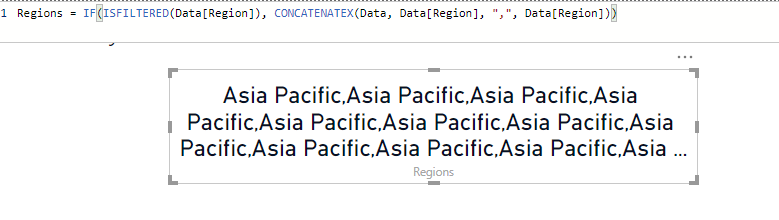
regions.PNG

HI @Mariusz ,


It shows it many times instead of one, the data has many rows of the region. Is there a way so it only comes up once?

@alisonpappas 

Change it like so.

Regions =
IF (
    ISFILTERED ( Data[Region] ),
    CONCATENATEX ( VALUES ( Data[Region] ), Data[Region], ", ", Data[Region] )
)
jdbuchanan71
Super User
Super User

Hello @alisonpappas 

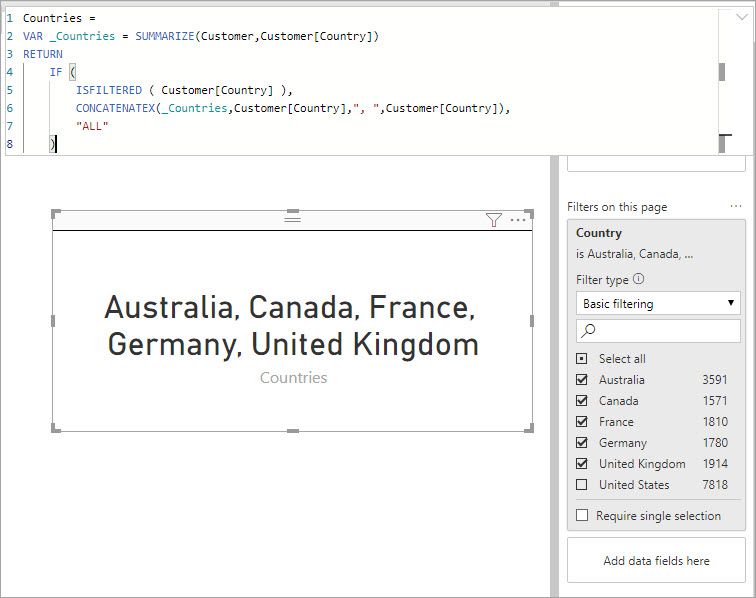
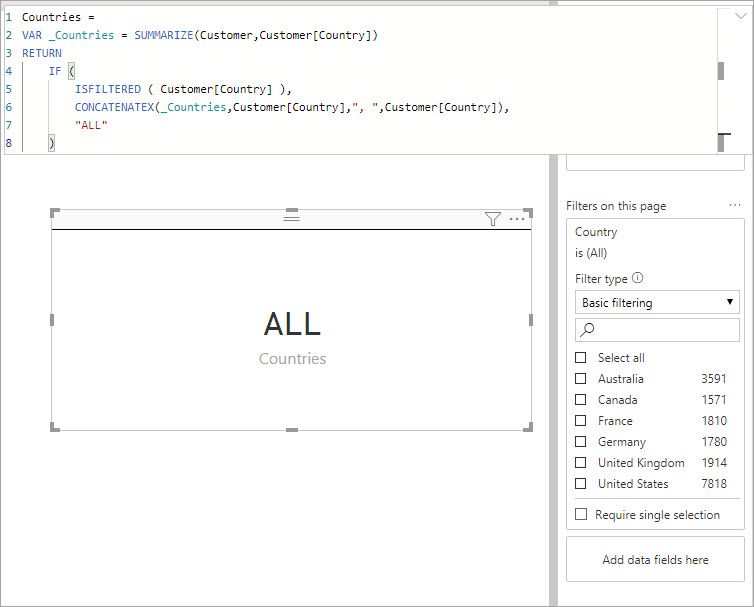
You can write a measure to string together the selected values.  Something like this then pull that measure into a card maybe.

Countries = 
VAR _Countries = SUMMARIZE(Customer,Customer[Country])
RETURN
    IF ( 
        ISFILTERED ( Customer[Country] ),
        CONCATENATEX(_Countries,Customer[Country],", ",Customer[Country]),
        "ALL"
    )

When there is a selection it shows the listWhen there is a selection it shows the listWhen there is no filter it shows "ALL"When there is no filter it shows "ALL"

Helpful resources

Announcements
April Power BI Update Carousel

Power BI Monthly Update - April 2026

Check out the April 2026 Power BI update to learn about new features.

New to Fabric survey Carousel

New to Fabric Survey

If you have recently started exploring Fabric, we'd love to hear how it's going. Your feedback can help with product improvements.

Power BI DataViz World Championships carousel

Power BI DataViz World Championships - June 2026

A new Power BI DataViz World Championship is coming this June! Don't miss out on submitting your entry.

FabCon and SQLCon Highlights Carousel

FabCon &SQLCon Highlights

Experience the highlights from FabCon & SQLCon, available live and on-demand starting April 14th.