cancel
Showing results for 
Search instead for 
Did you mean: 

Learn from the best! Meet the four finalists headed to the FINALS of the Power BI Dataviz World Championships! Register now

Reply
sabedin
Helper I
Helper I

PIVOT - UNPIVOT Rows

Hello,


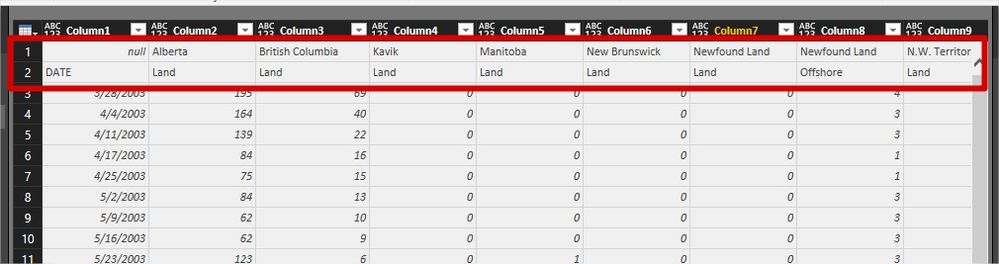
Please refer to the attached screenshot. I am not sure how to best prepare this data for creating Visuals. I guess I have to create on column State with the data from the first Row, and one other column L-O with the data from the second Row. I tried different transformation steps but no luck.


Any ideas please


Thank you

Sabedin

Unpivot.jpg

1 ACCEPTED SOLUTION
ImkeF
Community Champion
Community Champion

You should find sth on this blog about doing this with the UI.


But I prefer a formula-solution (for performance-reasons, especially if your data is large):


let
// Replace this with your source-data
Source = Table.FromRows(Json.Document(Binary.Decompress(Binary.FromText("i45WUtJRcgRiJyB2VorViVZySSxJBXJ8EvNSEJRzfl4JWNbAUA+IjAwMzYGihkBsBMTGECkjZCkDkByIMDaAyBqjyEKkIfJABbEA", BinaryEncoding.Base64), Compression.Deflate)), let _t = ((type text) meta [Serialized.Text = true]) in type table [Spalte1 = _t, Spalte2 = _t, Spalte3 = _t, Spalte4 = _t]), Rename = Table.RenameColumns(Source, List.Transform(Table.ColumnNames(Source), each {_, Text.Combine({Record.Field(Source{0}, _), Record.Field(Source{1}, _)}, "--")})), RemoveTopTwo = Table.Skip(Rename,2), // Depending on how the blanks in your first fields come in, you might need to chang {"--DATE"} to {"DATE"}
UnpivotOthers = Table.UnpivotOtherColumns(RemoveTopTwo, {"--DATE"}, "Attribute", "Value"), Split = Table.SplitColumn(UnpivotOthers,"Attribute",Splitter.SplitTextByDelimiter("--", QuoteStyle.Csv),{"Country", "Category"}) in Split


Imke Feldmann (The BIccountant)

If you liked my solution, please give it a thumbs up. And if I did answer your question, please mark this post as a solution. Thanks!

How to integrate M-code into your solution -- How to get your questions answered quickly -- How to provide sample data -- Check out more PBI- learning resources here -- Performance Tipps for M-queries

View solution in original post

1 REPLY 1
ImkeF
Community Champion
Community Champion

You should find sth on this blog about doing this with the UI.


But I prefer a formula-solution (for performance-reasons, especially if your data is large):


let
// Replace this with your source-data
Source = Table.FromRows(Json.Document(Binary.Decompress(Binary.FromText("i45WUtJRcgRiJyB2VorViVZySSxJBXJ8EvNSEJRzfl4JWNbAUA+IjAwMzYGihkBsBMTGECkjZCkDkByIMDaAyBqjyEKkIfJABbEA", BinaryEncoding.Base64), Compression.Deflate)), let _t = ((type text) meta [Serialized.Text = true]) in type table [Spalte1 = _t, Spalte2 = _t, Spalte3 = _t, Spalte4 = _t]), Rename = Table.RenameColumns(Source, List.Transform(Table.ColumnNames(Source), each {_, Text.Combine({Record.Field(Source{0}, _), Record.Field(Source{1}, _)}, "--")})), RemoveTopTwo = Table.Skip(Rename,2), // Depending on how the blanks in your first fields come in, you might need to chang {"--DATE"} to {"DATE"}
UnpivotOthers = Table.UnpivotOtherColumns(RemoveTopTwo, {"--DATE"}, "Attribute", "Value"), Split = Table.SplitColumn(UnpivotOthers,"Attribute",Splitter.SplitTextByDelimiter("--", QuoteStyle.Csv),{"Country", "Category"}) in Split


Imke Feldmann (The BIccountant)

If you liked my solution, please give it a thumbs up. And if I did answer your question, please mark this post as a solution. Thanks!

How to integrate M-code into your solution -- How to get your questions answered quickly -- How to provide sample data -- Check out more PBI- learning resources here -- Performance Tipps for M-queries

Helpful resources

Announcements
Join our Fabric User Panel

Join our Fabric User Panel

Share feedback directly with Fabric product managers, participate in targeted research studies and influence the Fabric roadmap.

February Power BI Update Carousel

Power BI Monthly Update - February 2026

Check out the February 2026 Power BI update to learn about new features.

FabCon Atlanta 2026 carousel

FabCon Atlanta 2026

Join us at FabCon Atlanta, March 16-20, for the ultimate Fabric, Power BI, AI and SQL community-led event. Save $200 with code FABCOMM.