Join us at FabCon Atlanta from March 16 - 20, 2026, for the ultimate Fabric, Power BI, AI and SQL community-led event. Save $200 with code FABCOMM.
Register now!The Power BI Data Visualization World Championships is back! Get ahead of the game and start preparing now! Learn more
Hello,
Basic information:
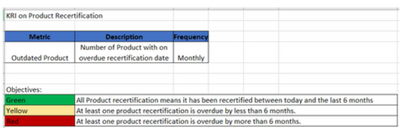
In "Green" calculation we had the change and it means: All Product > TODAY
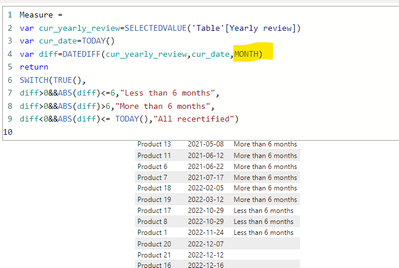
I have an issue with measure because the measure is counting values incorrectly. I would like the measure to also take into account the individual days of the month but for rest days of December it doesn't display values:
How to change the calculation in this measure?
This is pbix file with my calculations:
Could you help me, please?
Solved! Go to Solution.
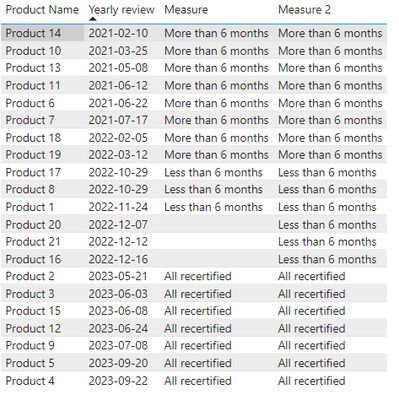
I think your calculation does not consider "diff = 0" scenario. See if the below works:
Measure 2 =
var cur_yearly_review=SELECTEDVALUE('Table'[Yearly review])
var cur_date=TODAY()
var diff=DATEDIFF(cur_yearly_review,cur_date,MONTH)
-- return diff
return
SWITCH(TRUE(),
diff > 6, "More than 6 months",
diff >= 0, "Less than 6 months",
diff < 0, "All recertified")
I think your calculation does not consider "diff = 0" scenario. See if the below works:
Measure 2 =
var cur_yearly_review=SELECTEDVALUE('Table'[Yearly review])
var cur_date=TODAY()
var diff=DATEDIFF(cur_yearly_review,cur_date,MONTH)
-- return diff
return
SWITCH(TRUE(),
diff > 6, "More than 6 months",
diff >= 0, "Less than 6 months",
diff < 0, "All recertified")
The Power BI Data Visualization World Championships is back! Get ahead of the game and start preparing now!
| User | Count |
|---|---|
| 37 | |
| 36 | |
| 33 | |
| 31 | |
| 28 |
| User | Count |
|---|---|
| 129 | |
| 88 | |
| 79 | |
| 68 | |
| 63 |