cancel
Showing results for 
Search instead for 
Did you mean: 

The Power BI Data Visualization World Championships is back! Get ahead of the game and start preparing now! Learn more

Reply
kdixon5490
Helper III
Helper III

Bar Graph to show only the top N values.

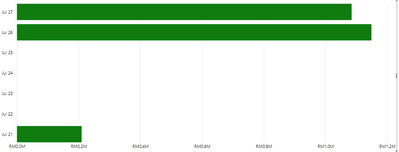
I'm trying to show only the top 3 dates in a bar chart but I'm running into issues.    

I've currently got a Rank field inside my data and I need to get the top 3 dates for the year.  When I use the Visualization of Table or Circle Graph everything works great.  But then I change it to Bar Graph I don't get exactly what I need. 

I'm not sure why it is showing July 25, 24, 23, 22.   I need to show only the TOP N which are July 27, July 26 and July 21.


Pic 1.PNG


I need to show the grid in the 1st place then 2nd place then 3rd place. 

Any help would be appreciated.

1 REPLY 1
sevenhills
Super User
Super User

Reason for blanks by default: The axis is marked as Continous as default.


Fix:

  • Select the visual > Format visual > Y-axis > Set the Type: Categorical


Hope this helps!

Helpful resources

Announcements
Power BI DataViz World Championships

Power BI Dataviz World Championships

The Power BI Data Visualization World Championships is back! Get ahead of the game and start preparing now!

December 2025 Power BI Update Carousel

Power BI Monthly Update - December 2025

Check out the December 2025 Power BI Holiday Recap!

FabCon Atlanta 2026 carousel

FabCon Atlanta 2026

Join us at FabCon Atlanta, March 16-20, for the ultimate Fabric, Power BI, AI and SQL community-led event. Save $200 with code FABCOMM.