Forum Discussion

Order text on my X-axis
How can I define the order of my X-Axis.
I can't seem to get it to go up in the correct Month order.
Any suggestions?
Please check if the type of your “Year-Month” is Text. If so, please change the Data Type to Date with Format (MMMM yyyy) and then you can get the expected result.
Regards,
4 Replies
 v-sihou-msft
Microsoft Employee
Please check if the type of your “Year-Month” is Text. If so, please change the Data Type to Date with Format (MMMM yyyy) and then you can get the expected result.
Regards,
 AnonymousNot applicable
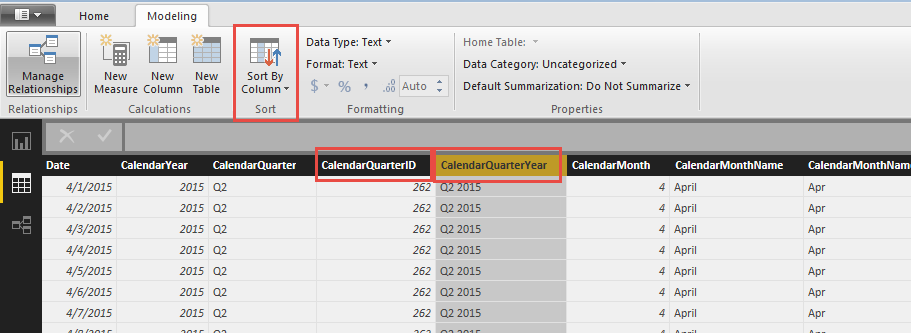
You need to create a second column that has numbers corresponding to the order you want, then use the Sort By Column option under Modeling to use that column to sort the first.
- sdjensen
Solution Sage
Is your month from a date/time table having all the dates from the beginning to the end of your data or from the same table as your measure?
If it's from a date/time table you will have to create a column in this table with a month number and they sort your month by this column using the "Sort by Column" feature on the modeling tab.
If you don't have a date/time table create one at once and then create a link between your values table and your new date/time table, but still remember to have both a column with the month number and month name. If you need to do this accross multiple years you will have to create to columns where one have the values .... 2015 November, 2015 December, 2016 January, 2016 February... and sort this by a column with the values ...201511, 201512, 201601, 201602...
There is prenty of great sources on how to create a date/time table on the internet... you could try to read this one.
- AnonymousNot applicable
You need to define what the column should sort by. Create an index column with a unique value in descending order for each distinct Calendar MonthName in your case, then select the CalendarMonthName Column and choose "Sort By" and select your new index column.
Create an additional column in your model that has the following properties: YYYY-MM. So June 2016 would have a value of 201606.
Sort Order = FORMAT('DimDate'[Date], "YYYY-MM")THEN sorted the Year-Month column by the Sort Order Column.