
cancel
Showing results for 
Search instead for 
Did you mean: 

Learn from the best! Meet the four finalists headed to the FINALS of the Power BI Dataviz World Championships! Register now

Reply
Anonymous
Not applicable

Oracle SYS Objects

I'm attempting to create a simple dashboard to help me quickly isolate blocking activity in one of our Oracle databases. Essentially the query I want to run is similar to this:


SELECT
a.object,
a.type,
a.sid,
b.username,
b.osuser,
b.program,
c.sql_text
FROM v$access a
join v$session b
on a.sid = b.sid
join v$sql c on c.sql_id = b.sql_id


I find that typically my performance is better in powerBI when using direct query when I do NOT use custom queries. I would like to bring each of these three tables in using direct query, but I can't figure out how to specify the 'SYS' user and the objects do not show up in the hierarchy navigation pane, and I can't just changes the schema/user name to 'SYS'. I've tried everything I can think of, but the only way I can get it to work is to use 'select * from v$access' as a custom query. When I do that for all three tables and then join them with the relationship diagram it just performs way too slow. Using the above as a custom query works better.


Any tips for grabbing the SYS objects?


Here are some examples of the attempts I've tried:

soldstatic_0-1642335414965.png


soldstatic_1-1642335447736.png


2 REPLIES 2
Anonymous
Not applicable

Hi @Anonymous ,

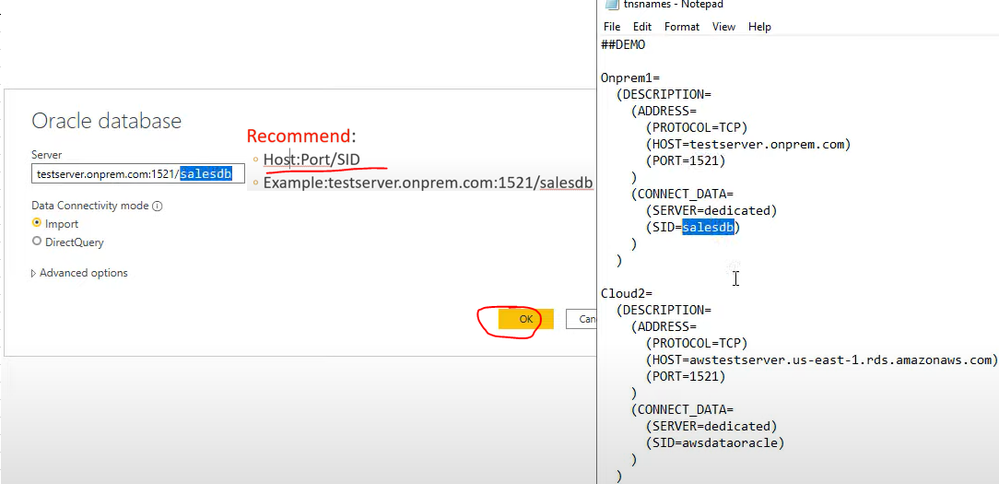
You can refer the following video to connect to Oracle database:

Connect to an Oracle database with Power BI Desktop

Power BI: How to Connect to Oracle Database

yingyinr_0-1642576596218.png

Best Regards

Anonymous
Not applicable

I can connect just fine and I see all the normal views/tables, I just can't select the SYS objects from the navigation. But it works if I use a query that runs it, so it isn't a permissions issue.

Helpful resources

Announcements
Power BI DataViz World Championships carousel

Power BI DataViz World Championships - June 2026

A new Power BI DataViz World Championship is coming this June! Don't miss out on submitting your entry.

Join our Fabric User Panel

Join our Fabric User Panel

Share feedback directly with Fabric product managers, participate in targeted research studies and influence the Fabric roadmap.

March Power BI Update Carousel

Power BI Community Update - March 2026

Check out the March 2026 Power BI update to learn about new features.