Don't miss your chance to take the Fabric Data Engineer (DP-600) exam for FREE! Find out how by watching the DP-600 session on-demand now through April 28th.
Learn moreJoin the FabCon + SQLCon recap series. Up next: Power BI, Real-Time Intelligence, IQ and AI, and Data Factory take center stage. All sessions are available on-demand after the live show. Register now
Hi guys,
In Power Query , in a table , I have 2 or plus steps of rename separately. I wonder if I group them in one same step of rename, will I optimize the performance even if it's a little. Of course, they are independants of others steps of transformation.
I would appreciate if there is some engineering explaination
Thank you in advance !
Have a nice weekend !
Solved! Go to Solution.
Hi @bboy0009 !
Every time we run a query or update it, there is a bunch of operations that Power Query/vertipaq do "behind the scenes".
I have duplicated a query "product" to "product (2)".
In "product, we have 2 renames separately (rename 1 and rename 2 - 2 separate steps):
In product (2), I've put together the 2 renames in just one step "renamed column":
This means that power query did half of the category operations, therefore half of the "effort" to get to the same result.
You can try this yourself here:
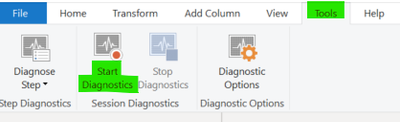
Depending on the options you select to "diagnose", several new audit queries will appear:
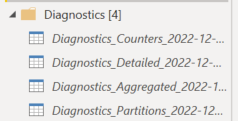
Despite reducing operations to "half" there is the question of organization: we should, has best practice to have our steps in Power Query organized and reduced to the minimum number, which avoids further confusion and eases the maintenance time 🙂
Hope I was of assistance!
Cheers
Joao Marcelino
If you liked my solution, please give it a thumbs up. And if I did answer your question, please mark this post as a solution. Thanks!
Hi @bboy0009 !
Every time we run a query or update it, there is a bunch of operations that Power Query/vertipaq do "behind the scenes".
I have duplicated a query "product" to "product (2)".
In "product, we have 2 renames separately (rename 1 and rename 2 - 2 separate steps):
In product (2), I've put together the 2 renames in just one step "renamed column":
This means that power query did half of the category operations, therefore half of the "effort" to get to the same result.
You can try this yourself here:
Depending on the options you select to "diagnose", several new audit queries will appear:
Despite reducing operations to "half" there is the question of organization: we should, has best practice to have our steps in Power Query organized and reduced to the minimum number, which avoids further confusion and eases the maintenance time 🙂
Hope I was of assistance!
Cheers
Joao Marcelino
If you liked my solution, please give it a thumbs up. And if I did answer your question, please mark this post as a solution. Thanks!
Check out the April 2026 Power BI update to learn about new features.
If you have recently started exploring Fabric, we'd love to hear how it's going. Your feedback can help with product improvements.
A new Power BI DataViz World Championship is coming this June! Don't miss out on submitting your entry.
| User | Count |
|---|---|
| 45 | |
| 38 | |
| 34 | |
| 21 | |
| 17 |
| User | Count |
|---|---|
| 66 | |
| 64 | |
| 31 | |
| 26 | |
| 26 |