cancel
Showing results for 
Search instead for 
Did you mean: 

Vote for your favorite vizzies from the Power BI Dataviz World Championship submissions. Vote now!

Reply
Nielf
Helper I
Helper I

Only calculate measure for rows with data

I have simple table in Power BI, where I have created a measure (% Compliance error percentage) as Total error count / open opportunities:

% Compliance error percentage = 

DIVIDE(SUM('Data compliance'[Total error count]),
sum('Data compliance'[Open opportunities]),
0
)


The data is logged every two weeks (week 1, 3, 5 and so forth as per the table below).
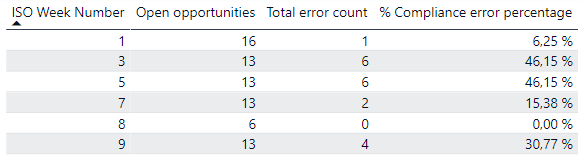
 

Nielf_0-1642419748487.png


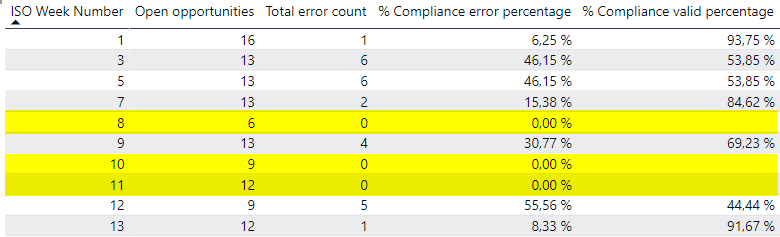
This simple calculation works fine. However, instead of showing the 'error percentage' I would like to show the 'valid percentage' by subtracting the error percentage from 1. E.g., 'valid percentage' for week 1 will be 93,75%.   


The issue is that if I make a simple measure like this:

% Compliance valid percentage = 

1 - [% Compliance error percentage]


I will end up with values for all dates, also the ones where we haven't logged any data, since 1-0 will return a value. 


Nielf_2-1642420601172.png


My question is now - is there a way I can limit the measure to only make the calculation for the rows that have data?


I have tried with varies IF statements but I haven't found a solution,. 

1 ACCEPTED SOLUTION
mh2587
Super User
Super User

https://www.burningsuit.co.uk/how-dax-treats-nulls-zeros/

Follow this url how to handle null and zeros value in dax


Did I answer your question? If so, please mark my post as a solution!


Proud to be a Super User!


LinkedIn Icon
Muhammad Hasnain


View solution in original post

4 REPLIES 4
Nielf
Helper I
Helper I

Thanks for the link @mh2587. It explained the differences nicely and I produced a solution using ISBLANK().


IF(NOT(ISBLANK([% Compliance error percentage])), 1-[% Compliance error percentage])


mh2587
Super User
Super User

https://www.burningsuit.co.uk/how-dax-treats-nulls-zeros/

Follow this url how to handle null and zeros value in dax


Did I answer your question? If so, please mark my post as a solution!


Proud to be a Super User!


LinkedIn Icon
Muhammad Hasnain


Nielf
Helper I
Helper I

@mh2587 yes - that is working. However, is it possble to return 100% as 'valid percentage' if 'error percentage is 0?


Nielf_0-1642421800946.png


mh2587
Super User
Super User

 if([% Compliance error percentage] <> Blank(),1 - [% Compliance error percentage])

Did I answer your question? If so, please mark my post as a solution!


Proud to be a Super User!


LinkedIn Icon
Muhammad Hasnain


Helpful resources

Announcements
Power BI DataViz World Championships

Power BI Dataviz World Championships

Vote for your favorite vizzies from the Power BI World Championship submissions!

Sticker Challenge 2026 Carousel

Join our Community Sticker Challenge 2026

If you love stickers, then you will definitely want to check out our Community Sticker Challenge!

January Power BI Update Carousel

Power BI Monthly Update - January 2026

Check out the January 2026 Power BI update to learn about new features.

FabCon Atlanta 2026 carousel

FabCon Atlanta 2026

Join us at FabCon Atlanta, March 16-20, for the ultimate Fabric, Power BI, AI and SQL community-led event. Save $200 with code FABCOMM.