cancel
Showing results for 
Search instead for 
Did you mean: 

Learn from the best! Meet the four finalists headed to the FINALS of the Power BI Dataviz World Championships! Register now

Reply
Qotsa
Helper V
Helper V

Only Show Previous Week

Hi,


I have this calc column to only show previous week.


Previous Week =
VAR Current_Week = CALCULATE(MAX([Week]) -1, FILTER(vw_ShiftsAll, vw_ShiftsAll[Date] = TODAY()))
RETURN
IF(vw_ShiftsAll[Week] = Current_Week, "Yes", "No")
 

Week Begins on Monday - >

Week = WEEKNUM(vw_ShiftsAll[Date],2)
 
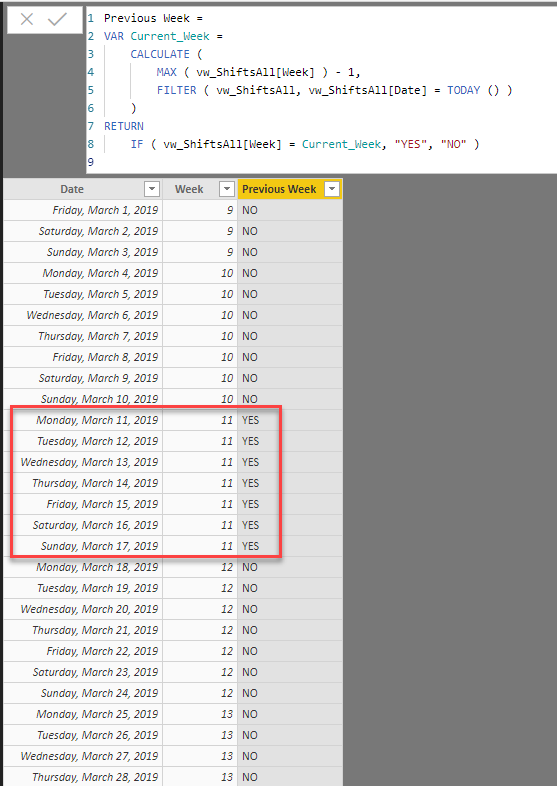
But it's returning dates between 12th March to 17th March.
 
I expected 11th March to 17th March (Monday to Sunday).
 
2 ACCEPTED SOLUTIONS
ChrisMendoza
Resident Rockstar
Resident Rockstar

@Qotsa -


It looks good to me. Only difference I see is:


VAR Current_Week =
    CALCULATE (
        MAX ( [Week] ) - 1,
        FILTER ( vw_ShiftsAll, vw_ShiftsAll[Date] = TODAY () )
    )

versus:

VAR Current_Week =
    CALCULATE (
        MAX ( vw_ShiftsAll[Week] ) - 1,
        FILTER ( vw_ShiftsAll, vw_ShiftsAll[Date] = TODAY () )
    )

Maybe you have something else going on that needs to be known?


1.PNG


Did I answer your question? Mark my post as a solution!
Did my answers help arrive at a solution? Give it a kudos by clicking the Thumbs Up!

Proud to be a Super User!


View solution in original post

TomMartens
Super User
Super User

Hey,


this DAX statement works in my calendar tables:


isInPreviousWeek = 
var someTestDate = today() -7
var SoWDatePrevWeek = someTestDate  - WEEKDAY(someTestDate,2) + 1
var SoWDate = 'Calendar'[Date]  - WEEKDAY('Calendar'[Date],2) + 1
return
IF(SoWDatePrevWeek = SoWDate, 1,0)

Basically I use this statement to flag some days in my calendar table with flags like

-1 for the previous week

0 for the current week

1 for the upcoming week


Regards,
Tom 


Did I answer your question? Mark my post as a solution, this will help others!

Proud to be a Super User!
I accept Kudos 😉
Hamburg, Germany

View solution in original post

2 REPLIES 2
TomMartens
Super User
Super User

Hey,


this DAX statement works in my calendar tables:


isInPreviousWeek = 
var someTestDate = today() -7
var SoWDatePrevWeek = someTestDate  - WEEKDAY(someTestDate,2) + 1
var SoWDate = 'Calendar'[Date]  - WEEKDAY('Calendar'[Date],2) + 1
return
IF(SoWDatePrevWeek = SoWDate, 1,0)

Basically I use this statement to flag some days in my calendar table with flags like

-1 for the previous week

0 for the current week

1 for the upcoming week


Regards,
Tom 


Did I answer your question? Mark my post as a solution, this will help others!

Proud to be a Super User!
I accept Kudos 😉
Hamburg, Germany
ChrisMendoza
Resident Rockstar
Resident Rockstar

@Qotsa -


It looks good to me. Only difference I see is:


VAR Current_Week =
    CALCULATE (
        MAX ( [Week] ) - 1,
        FILTER ( vw_ShiftsAll, vw_ShiftsAll[Date] = TODAY () )
    )

versus:

VAR Current_Week =
    CALCULATE (
        MAX ( vw_ShiftsAll[Week] ) - 1,
        FILTER ( vw_ShiftsAll, vw_ShiftsAll[Date] = TODAY () )
    )

Maybe you have something else going on that needs to be known?


1.PNG


Did I answer your question? Mark my post as a solution!
Did my answers help arrive at a solution? Give it a kudos by clicking the Thumbs Up!

Proud to be a Super User!


Helpful resources

Announcements
Join our Fabric User Panel

Join our Fabric User Panel

Share feedback directly with Fabric product managers, participate in targeted research studies and influence the Fabric roadmap.

February Power BI Update Carousel

Power BI Monthly Update - February 2026

Check out the February 2026 Power BI update to learn about new features.

FabCon Atlanta 2026 carousel

FabCon Atlanta 2026

Join us at FabCon Atlanta, March 16-20, for the ultimate Fabric, Power BI, AI and SQL community-led event. Save $200 with code FABCOMM.