Join us at FabCon Atlanta from March 16 - 20, 2026, for the ultimate Fabric, Power BI, AI and SQL community-led event. Save $200 with code FABCOMM.
Register now!Vote for your favorite vizzies from the Power BI Dataviz World Championship submissions. Vote now!
Easy question:
how to get just a single value from sumQty_by_item column?
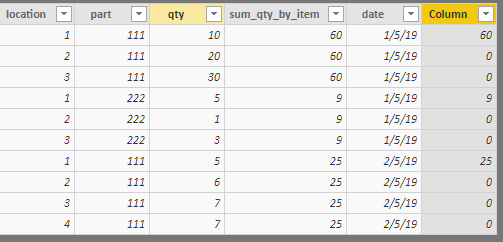
| location | part | qty | sum_qty_by_item | date | expected result |
| 1 | 111 | 10 | 60 | 01.05.2019 | 60 |
| 2 | 111 | 20 | 60 | 01.05.2019 | 0 |
| 3 | 111 | 30 | 60 | 01.05.2019 | 0 |
| 1 | 222 | 5 | 9 | 01.05.2019 | 9 |
| 2 | 222 | 1 | 9 | 01.05.2019 | 0 |
| 3 | 222 | 3 | 9 | 01.05.2019 | 0 |
| 1 | 111 | 5 | 25 | 02.05.2019 | 25 |
| 2 | 111 | 6 | 25 | 02.05.2019 | 0 |
| 3 | 111 | 7 | 25 | 02.05.2019 | 0 |
| 4 | 111 | 7 | 25 | 02.05.2019 | 0 |
is it even possible with dax? i need it in new column as im using it in chart/as slicer etc.
Solved! Go to Solution.
Hi @mhsk
I would suggest you to add an index column in query editor.Then create the column as below:
Column =
VAR pre_sum =
CALCULATE (
MAX ( 'Table'[sum] ),
FILTER ( 'Table', 'Table'[Index] = EARLIER ( 'Table'[Index] ) - 1 )
)
RETURN
IF (
pre_sum <> 'Table'[sum],
CALCULATE ( MAX ( 'Table'[sum] ), ALLEXCEPT ( 'Table', 'Table'[sum] ) ),
0
)
Regards,
Hi @mhsk
You may try below dax.
Column =
IF (
[location] = 1,
CALCULATE (
MAX ( [sum_qty_by_item] ),
ALLEXCEPT ( 'Table', 'Table'[sum_qty_by_item] )
),
0
)
Regards,
thanks for a prompt reply, the thing is I don't want to connect it anyhow to location imagine my table looks:
| part | sum | expected result |
| 111 | 50 | 50 |
| 111 | 50 | 0 |
| 111 | 50 | 0 |
| 222 | 60 | 60 |
| 222 | 60 | 0 |
| 222 | 60 | 0 |
| 333 | 1 | 1 |
| 333 | 1 | 0 |
| 333 | 1 | 0 |
| 444 | 10 | 10 |
| 444 | 10 | 0 |
| 444 | 10 | 0 |
Hi @mhsk
I would suggest you to add an index column in query editor.Then create the column as below:
Column =
VAR pre_sum =
CALCULATE (
MAX ( 'Table'[sum] ),
FILTER ( 'Table', 'Table'[Index] = EARLIER ( 'Table'[Index] ) - 1 )
)
RETURN
IF (
pre_sum <> 'Table'[sum],
CALCULATE ( MAX ( 'Table'[sum] ), ALLEXCEPT ( 'Table', 'Table'[sum] ) ),
0
)
Regards,
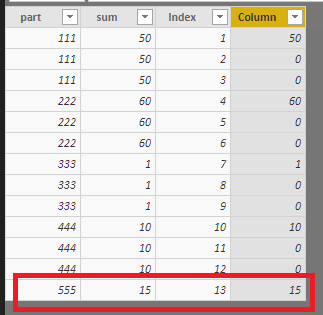
ok this works while parts are always represented in multiple rows, but there are also cases where part can have just one row (no index-1 possible) - like part 555 below, could you have a look ?
| part | sum | expected result |
| 111 | 50 | 50 |
| 111 | 50 | 0 |
| 111 | 50 | 0 |
| 222 | 60 | 60 |
| 222 | 60 | 0 |
| 222 | 60 | 0 |
| 333 | 1 | 1 |
| 333 | 1 | 0 |
| 333 | 1 | 0 |
| 444 | 10 | 10 |
| 444 | 10 | 0 |
| 444 | 10 | 0 |
| 555 | 15 | 15 |
Hi @mhsk
The above workaround could work for your scenario.
Regards,
Vote for your favorite vizzies from the Power BI World Championship submissions!
If you love stickers, then you will definitely want to check out our Community Sticker Challenge!
Check out the January 2026 Power BI update to learn about new features.
| User | Count |
|---|---|
| 65 | |
| 52 | |
| 45 | |
| 23 | |
| 21 |
| User | Count |
|---|---|
| 141 | |
| 114 | |
| 50 | |
| 37 | |
| 30 |