cancel
Showing results for 
Search instead for 
Did you mean: 

July 7 - July 17 | Round 2 of the Power BI Dataviz World Championships. Don't miss your chance! Learn more

Reply
yodha
Helper IV
Helper IV

Object Level Security

Hi

I have a "Revenue" column in my "Table visual", i want to restrict the "Revenue" column access to the end users using "Object level security.

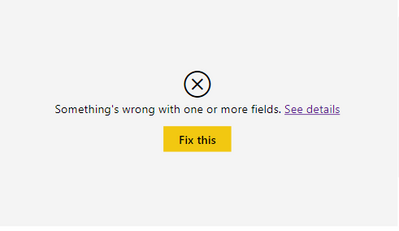
When i restrict the "Revenue" column, entire Table visual is not loading.


Note: i have one more role in my Pbix, and for that role i don't want to restrict access to the "Revenue" column. So i can't remove the "Revenue" column from the visual.


yodha_0-1623653182068.png

Is there a way can avoid this issue?


Any help on this is much appreciated, thanks in advance!

1 ACCEPTED SOLUTION
v-henryk-mstf
Community Support
Community Support

Hi @yodha ,


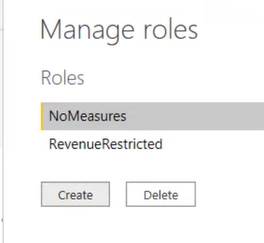
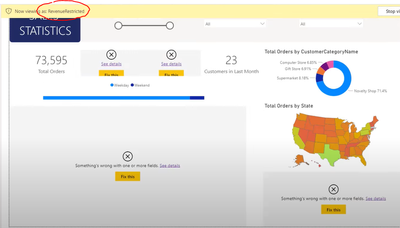
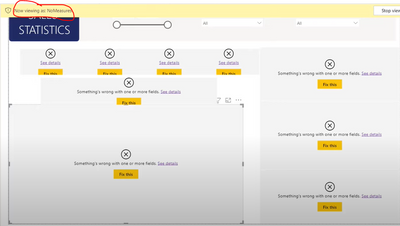
There is no problem with your settings. Object-level security is a measure that hides the entire table, column, or depends on the column. After setting the ols based on a certain role, the corresponding visual will not be displayed in the report, and the visual will only change after the role is switched.

vhenrykmstf_0-1623834649855.png

vhenrykmstf_2-1623834750936.pngvhenrykmstf_3-1623834774039.png


You can refer to related videos and documents:

Object-Level Security in Power BI - YouTube

Object-Level Security in Power BI | BI Elite


If the problem is still not resolved, please provide detailed error information and let me know immediately. Looking forward to your reply.

Best Regards,
Henry

If this post helps, then please consider Accept it as the solution to help the other members find it more quickly.

View solution in original post

2 REPLIES 2
v-henryk-mstf
Community Support
Community Support

Hi @yodha ,


There is no problem with your settings. Object-level security is a measure that hides the entire table, column, or depends on the column. After setting the ols based on a certain role, the corresponding visual will not be displayed in the report, and the visual will only change after the role is switched.

vhenrykmstf_0-1623834649855.png

vhenrykmstf_2-1623834750936.pngvhenrykmstf_3-1623834774039.png


You can refer to related videos and documents:

Object-Level Security in Power BI - YouTube

Object-Level Security in Power BI | BI Elite


If the problem is still not resolved, please provide detailed error information and let me know immediately. Looking forward to your reply.

Best Regards,
Henry

If this post helps, then please consider Accept it as the solution to help the other members find it more quickly.

amitchandak
Super User
Super User

@yodha , the way object level security is implemented as of now. if you use the column that you do not have access it will error for that user.


try to check iferror can help

iferror([revenue], blank(), [revenue])


Share with Power BI Enthusiasts: Full Power BI Video (20 Hours) YouTube
Microsoft Fabric Series 60+ Videos YouTube
Microsoft Fabric Hindi End to End YouTube

Helpful resources

Announcements
FabCon and SQLCon Barcelona 2026

FabCon & SQLCon – Barcelona 2026

Join us in Barcelona for FabCon and SQLCon, the Fabric, Power BI, SQL, and AI community event. Save €200 with code FABCMTY200.

July Power BI Update Carousel

Power BI Monthly Update - July 2026

Check out the July 2026 Power BI update to learn about new features.

60 days of Data Days Carousel

Data Days 2026

Join Data Days 2026: 60 days of free live/on-demand sessions, challenges, study groups, and certification opportunities.

Power BI DataViz World Championships carousel

Power BI DataViz World Championships - June 2026

A new Power BI DataViz World Championship is coming this June! Don't miss out on submitting your entry.

Top Solution Authors