cancel
Showing results for 
Search instead for 
Did you mean: 

July 28 - August 9 | Final Round of the Power BI Dataviz World Championships. This is your chance. Learn more

Reply
ola7mat
Frequent Visitor

OR statements

Appreciate if anyone can advise if there is an easier way to write this in power query?


if [Colour] = "Red" or [Colour] = "blue" then true else false

I.e. how or can I write something like so


if [Colour] = {"Red","Blue"} then true else false

 thanks, am quite a novice as you can imagine!


2 ACCEPTED SOLUTIONS
ChrisMendoza
Resident Rockstar
Resident Rockstar

Hello @ola7mat,


Using https://www.powerquery.training/portfolio/replicate-power-pivots-switch-function/ as a guide:

(input) =>

let

values = {
    { "Blue", true },
    { "Red", true },
    { input, false }
},

Result = List.First ( List.Select ( values, each _{ 0 } = input ) ) { 1 }

in

Result

Add Custom Column:


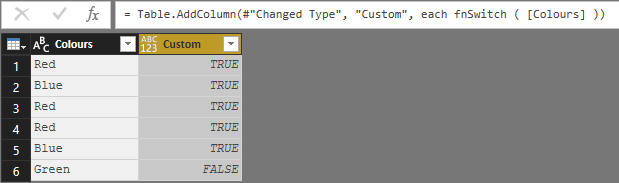
= fnSwitch ( [Colours] )

Yields the following result:

2.PNG


Did I answer your question? Mark my post as a solution!
Did my answers help arrive at a solution? Give it a kudos by clicking the Thumbs Up!

Proud to be a Super User!


View solution in original post

@ola7mat,


The function allows you not to have to rewrite the many formula's. Define it once and call it as necessary. Possibly share some more details about the data and your desired output(s).


Did I answer your question? Mark my post as a solution!
Did my answers help arrive at a solution? Give it a kudos by clicking the Thumbs Up!

Proud to be a Super User!


View solution in original post

5 REPLIES 5
ChrisMendoza
Resident Rockstar
Resident Rockstar

Hello @ola7mat,


Using https://www.powerquery.training/portfolio/replicate-power-pivots-switch-function/ as a guide:

(input) =>

let

values = {
    { "Blue", true },
    { "Red", true },
    { input, false }
},

Result = List.First ( List.Select ( values, each _{ 0 } = input ) ) { 1 }

in

Result

Add Custom Column:


= fnSwitch ( [Colours] )

Yields the following result:

2.PNG


Did I answer your question? Mark my post as a solution!
Did my answers help arrive at a solution? Give it a kudos by clicking the Thumbs Up!

Proud to be a Super User!


Thanks for this Chris and JoHo . I am after the correct way to write this in power query though.


Chris the solution does work however I have a number of formulas where i use this and so wont create lists for each one.


Do you know what the power query version of what JoHO wrote?

IF(Table[Colour] IN {"Red", "Blue"}, TRUE(), FALSE())

@ola7mat,


The function allows you not to have to rewrite the many formula's. Define it once and call it as necessary. Possibly share some more details about the data and your desired output(s).


Did I answer your question? Mark my post as a solution!
Did my answers help arrive at a solution? Give it a kudos by clicking the Thumbs Up!

Proud to be a Super User!


thanks for this, have finally got my head round the swtich function very useful.

appreciate the help very much!

JoHo_BI
Responsive Resident
Responsive Resident

Hi Ola,


Not too sure about Power Query, but DAX is easy enough.

2 ways, you can either use the IN keyword, or double pipes '||'.


In your example, 


IF(Table[Colour] IN {"Red", "Blue"}, TRUE(), FALSE())


Or...


IF(Table[Colour] = "Red" || Table[Colour] = "Blue", TRUE(), FALSE())


Hope that helps!

Helpful resources

Announcements
FabCon and SQLCon Barcelona 2026

FabCon & SQLCon – Barcelona 2026

Join us in Barcelona for FabCon and SQLCon, the Fabric, Power BI, SQL, and AI community event. Save €200 with code FABCMTY200.

Fabric Community Sticker Design Challenge Barcelona Carousel

Fabric Community Sticker Challenge - Barcelona 2026

If you love stickers, then you will definitely want to check out our community sticker challenge, Barcelona edition!

July Power BI Update Carousel

Power BI Monthly Update - July 2026

Check out the July 2026 Power BI update to learn about new features.

Power BI DataViz World Championships carousel

Power BI DataViz World Championships - June 2026

A new Power BI DataViz World Championship is coming this June! Don't miss out on submitting your entry.

Top Solution Authors