Learn from the best! Meet the four finalists headed to the FINALS of the Power BI Dataviz World Championships! Register now
Appreciate if anyone can advise if there is an easier way to write this in power query?
if [Colour] = "Red" or [Colour] = "blue" then true else false
I.e. how or can I write something like so
if [Colour] = {"Red","Blue"} then true else falsethanks, am quite a novice as you can imagine!
Solved! Go to Solution.
Hello @ola7mat,
Using https://www.powerquery.training/portfolio/replicate-power-pivots-switch-function/ as a guide:
(input) =>
let
values = {
{ "Blue", true },
{ "Red", true },
{ input, false }
},
Result = List.First ( List.Select ( values, each _{ 0 } = input ) ) { 1 }
in
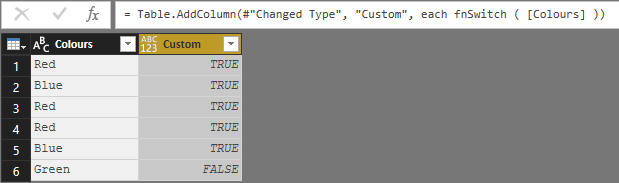
ResultAdd Custom Column:
= fnSwitch ( [Colours] )
Yields the following result:
Proud to be a Super User!
The function allows you not to have to rewrite the many formula's. Define it once and call it as necessary. Possibly share some more details about the data and your desired output(s).
Proud to be a Super User!
Hello @ola7mat,
Using https://www.powerquery.training/portfolio/replicate-power-pivots-switch-function/ as a guide:
(input) =>
let
values = {
{ "Blue", true },
{ "Red", true },
{ input, false }
},
Result = List.First ( List.Select ( values, each _{ 0 } = input ) ) { 1 }
in
ResultAdd Custom Column:
= fnSwitch ( [Colours] )
Yields the following result:
Proud to be a Super User!
Thanks for this Chris and JoHo . I am after the correct way to write this in power query though.
Chris the solution does work however I have a number of formulas where i use this and so wont create lists for each one.
Do you know what the power query version of what JoHO wrote?
IF(Table[Colour] IN {"Red", "Blue"}, TRUE(), FALSE())
The function allows you not to have to rewrite the many formula's. Define it once and call it as necessary. Possibly share some more details about the data and your desired output(s).
Proud to be a Super User!
thanks for this, have finally got my head round the swtich function very useful.
appreciate the help very much!
Hi Ola,
Not too sure about Power Query, but DAX is easy enough.
2 ways, you can either use the IN keyword, or double pipes '||'.
In your example,
IF(Table[Colour] IN {"Red", "Blue"}, TRUE(), FALSE())
Or...
IF(Table[Colour] = "Red" || Table[Colour] = "Blue", TRUE(), FALSE())
Hope that helps!
A new Power BI DataViz World Championship is coming this June! Don't miss out on submitting your entry.
Share feedback directly with Fabric product managers, participate in targeted research studies and influence the Fabric roadmap.
| User | Count |
|---|---|
| 53 | |
| 33 | |
| 32 | |
| 18 | |
| 16 |
| User | Count |
|---|---|
| 68 | |
| 67 | |
| 45 | |
| 29 | |
| 25 |