cancel
Showing results for 
Search instead for 
Did you mean: 

The Power BI Data Visualization World Championships is back! It's time to submit your entry. Live now!

Reply
walker4545
Frequent Visitor

Number Recurring Value by Date

Hello Power BI gurus, 


I need to write a DAX statement that can order what number a customer's purchase was according to when the purchase was made:


Order Table

Customer IDProduct IDDate
C41PR48815/01/2015
C03PR10024/10/2018
C41PR1002/07/2015
C41PR1001/09/2014
C86PR15618/2/2020
C03PR10025/10/2018
C17PR4882/2/2019
C03PR48823/11/2018


Note there is no Primary Key in this table. 


In other words, I need another column that says what number the purchase was for that particular customer according to the date of the purchase. 


How could this problem be solved using a calculated column in DAX?


Thanks in advance.

1 ACCEPTED SOLUTION
Jihwan_Kim
Super User
Super User

Hi,

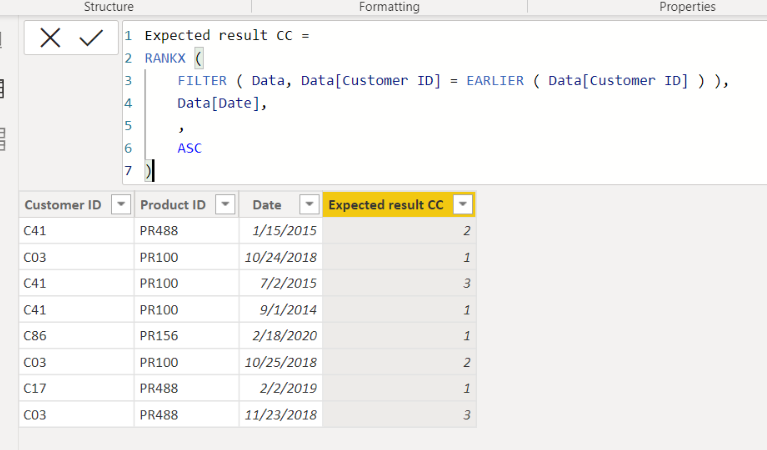
Please check the below picture and the attached pbix file.


Jihwan_Kim_0-1665372510613.png


Expected result CC =
RANKX (
    FILTER ( Data, Data[Customer ID] = EARLIER ( Data[Customer ID] ) ),
    Data[Date],
    ,
    ASC
)

If this post helps, then please consider accepting it as the solution to help other members find it faster, and give a big thumbs up.


Click here to visit my LinkedIn page

View solution in original post

2 REPLIES 2
Jihwan_Kim
Super User
Super User

Hi,

Please check the below picture and the attached pbix file.


Jihwan_Kim_0-1665372510613.png


Expected result CC =
RANKX (
    FILTER ( Data, Data[Customer ID] = EARLIER ( Data[Customer ID] ) ),
    Data[Date],
    ,
    ASC
)

If this post helps, then please consider accepting it as the solution to help other members find it faster, and give a big thumbs up.


Click here to visit my LinkedIn page

ppm1
Solution Sage
Solution Sage

I would do this in the query editor by first doing a Group By step on your Customer column and keeping all rows, then add a rank column to those grouped tables with Table.AddRankColumn, and then re-expand all but the Customer column. 


Here is an example.  To see how it works, just create a blank query, open the Advanced Editor and replace the text there with the M code below.


let
    Source = Table.FromRows(Json.Document(Binary.Decompress(Binary.FromText("bc67DcAgDIThXaiRfOdAcOosEKVF7L9GeBUgpbri0y87Z3cHOu+eN5jVZRRQFIyu+Io4OhKoq0GIhjZwlhMFaQk3o+BqFobZOSy2pYlWU/wdjPtBpuVV7R2vrZt0CDm78gE=", BinaryEncoding.Base64), Compression.Deflate)), let _t = ((type nullable text) meta [Serialized.Text = true]) in type table [#"Customer ID" = _t, #"Product ID" = _t, Date = _t]),
    #"Changed Type" = Table.TransformColumnTypes(Source,{{"Customer ID", type text}, {"Product ID", type text}, {"Date", type text}}),
    #"Changed Type with Locale" = Table.TransformColumnTypes(#"Changed Type", {{"Date", type date}}, "en-GB"),
    #"Grouped Rows" = Table.Group(#"Changed Type with Locale", {"Customer ID"}, {{"AllRows", each _, type table [Customer ID=nullable text, Product ID=nullable text, Date=nullable date]}}),
    #"Added Custom" = Table.AddColumn(#"Grouped Rows", "Ranked", each Table.AddRankColumn([AllRows], "OrderNumber", {"Date", Order.Ascending})),
    #"Removed Columns" = Table.RemoveColumns(#"Added Custom",{"AllRows"}),
    #"Expanded Ranked" = Table.ExpandTableColumn(#"Removed Columns", "Ranked", {"Product ID", "Date", "OrderNumber"}, {"Product ID", "Date", "OrderNumber"}),
    #"Changed Type1" = Table.TransformColumnTypes(#"Expanded Ranked",{{"Product ID", type text}, {"Date", type date}, {"OrderNumber", Int64.Type}})
in
    #"Changed Type1"


If you really need to do it with a DAX column, you could use this column expression (replace OrderRanks with your actual table name):


OrderNumberDAX =
VAR thisdate = OrderRanks[Date]
RETURN
    CALCULATE (
        COUNTROWS ( OrderRanks ),
        ALLEXCEPT ( OrderRanks, OrderRanks[Customer ID] ),
        OrderRanks[Date] <= thisdate
    )


Pat

Microsoft Employee

Helpful resources

Announcements
Power BI DataViz World Championships

Power BI Dataviz World Championships

The Power BI Data Visualization World Championships is back! It's time to submit your entry.

January Power BI Update Carousel

Power BI Monthly Update - January 2026

Check out the January 2026 Power BI update to learn about new features.

FabCon Atlanta 2026 carousel

FabCon Atlanta 2026

Join us at FabCon Atlanta, March 16-20, for the ultimate Fabric, Power BI, AI and SQL community-led event. Save $200 with code FABCOMM.