This is best Fabric, Power BI, SQL and AI community event. How do we know? The last event sold out! Save €200 with code FABCMTY200.
Register nowA new Data Days event is coming soon! This time we’re going bigger than ever. Fabric, Power BI, SQL, AI and more. Don't miss out.
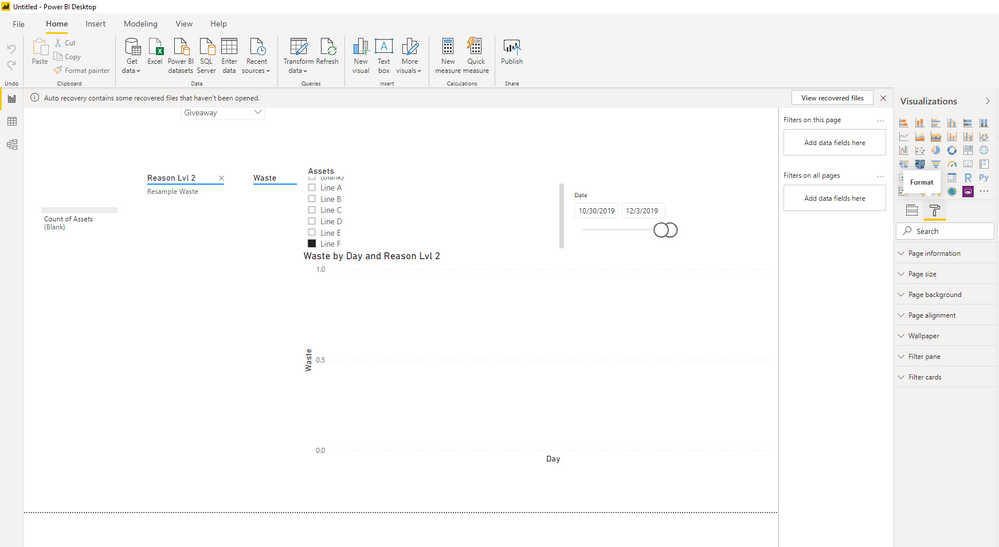
I've downloaded and press restart on the pc and the schedule refresh option in visualization still doesn't apper
Solved! Go to Solution.
@Anonymous ,
For this preview version, you must enable the automatic page refresh feature in Power BI Desktop. Go to File > Options and settings then select Options, and select Preview features from the left pane. Enable the feature by selecting the checkbox beside Automatic page refresh. Automatic page refresh is available only for DirectQuery data sources.
Community Support Team _ Jimmy Tao
If this post helps, then please consider Accept it as the solution to help the other members find it more quickly.
@Anonymous ,
There's no "schedule refresh" button in power bi desktop. Schedule refresh only exists in power bi service, please refer to doc below:
https://docs.microsoft.com/en-us/power-bi/report-server/configure-scheduled-refresh
Community Support Team _ Jimmy Tao
If this post helps, then please consider Accept it as the solution to help the other members find it more quickly.
here's what I was referring to:
https://docs.microsoft.com/en-us/power-bi/desktop-automatic-page-refresh
@Anonymous ,
For this preview version, you must enable the automatic page refresh feature in Power BI Desktop. Go to File > Options and settings then select Options, and select Preview features from the left pane. Enable the feature by selecting the checkbox beside Automatic page refresh. Automatic page refresh is available only for DirectQuery data sources.
Community Support Team _ Jimmy Tao
If this post helps, then please consider Accept it as the solution to help the other members find it more quickly.
Check out the May 2026 Power BI update to learn about new features.
Sign up to receive a private message when registration opens and key events begin.
If you have recently started exploring Fabric, we'd love to hear how it's going. Your feedback can help with product improvements.
| User | Count |
|---|---|
| 27 | |
| 25 | |
| 25 | |
| 21 | |
| 14 |
| User | Count |
|---|---|
| 50 | |
| 46 | |
| 23 | |
| 18 | |
| 18 |