Don't miss your chance to take exam DP-600 or DP-700 on us!
Request nowLearn from the best! Meet the four finalists headed to the FINALS of the Power BI Dataviz World Championships! Register now
Hello All,
Here I am facing a problem while importing data for 30 lakhs Rows, using data resource (SQL Server), but when i am refreshing the data it's only loading 27 lakhs. Don't know why! Also visited some official website and found that there is a limitations of upto 1GB. But my pbix file is only of size 110 mb.
Thanks in advance
Solved! Go to Solution.
Hi, @jay_patel
According to my research, here’s the official explanation of the row limitation of Power BI import mode:
Neither Power Query nor Power BI Desktop has a strict limitation on the number of rows.
However, when we talk about the 1 GB limitation, you should keep in mind that the hard limit of 1 GB for the .pbix file is the size that can be published to Power BI Service (the .pbix file itself can be much larger)
From my point of view, when the amount of data reaches a million level in the Power BI, we usually consider using the DirectQuery to connect to the data source for the, which is more suitable to display current data can require large data transfers, making reimporting data unfeasible. And the 1-GB dataset limitation also doesn't apply to DirectQuery.
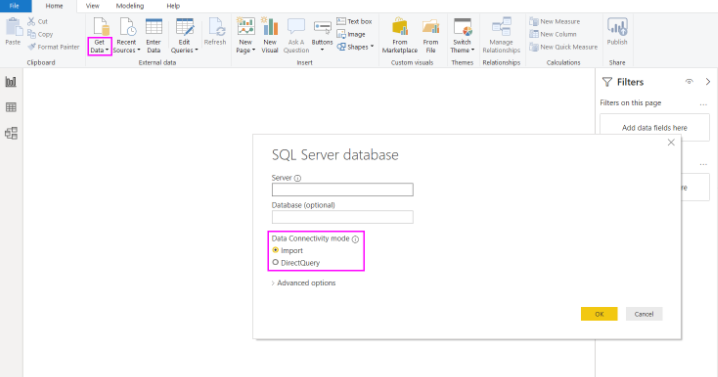
You can follow this document:
https://docs.microsoft.com/en-us/power-bi/connect-data/desktop-use-directquery
Best Regards,
Community Support Team _Robert Qin
If this post helps, then please consider Accept it as the solution to help the other members find it more quickly.
Hi, @jay_patel
According to my research, here’s the official explanation of the row limitation of Power BI import mode:
Neither Power Query nor Power BI Desktop has a strict limitation on the number of rows.
However, when we talk about the 1 GB limitation, you should keep in mind that the hard limit of 1 GB for the .pbix file is the size that can be published to Power BI Service (the .pbix file itself can be much larger)
From my point of view, when the amount of data reaches a million level in the Power BI, we usually consider using the DirectQuery to connect to the data source for the, which is more suitable to display current data can require large data transfers, making reimporting data unfeasible. And the 1-GB dataset limitation also doesn't apply to DirectQuery.
You can follow this document:
https://docs.microsoft.com/en-us/power-bi/connect-data/desktop-use-directquery
Best Regards,
Community Support Team _Robert Qin
If this post helps, then please consider Accept it as the solution to help the other members find it more quickly.
@jay_patel , Open power query there should be some error, Try to check and address
debug issue
https://www.youtube.com/watch?v=OE6DPmKqN7s
refer how to handle error in power query
https://www.youtube.com/watch?v=OE6DPmKqN7s
https://www.youtube.com/watch?v=9-Lag0VOiTs
Share feedback directly with Fabric product managers, participate in targeted research studies and influence the Fabric roadmap.
Check out the February 2026 Power BI update to learn about new features.
| User | Count |
|---|---|
| 55 | |
| 45 | |
| 38 | |
| 16 | |
| 15 |
| User | Count |
|---|---|
| 86 | |
| 69 | |
| 38 | |
| 29 | |
| 26 |