Don't miss your chance to take the Fabric Data Engineer (DP-600) exam for FREE! Find out how by watching the DP-600 session on-demand now through April 28th.
Learn moreJoin the FabCon + SQLCon recap series. Up next: Power BI, Real-Time Intelligence, IQ and AI, and Data Factory take center stage. All sessions are available on-demand after the live show. Register now
Hi @JakeandSnake ,
It could be issue in the data source. Is the latest version of power bi desktop working?
If this post helps, then please consider Accept it as the solution to help the other members find it more quickly.
Best Regards,
Dedmon Dai
Hi @v-deddai1-msft ,
I've updated to the latest version of PBI, but still encounter the same issue.
I believe you are right, issues may from the data source. I actually spent 2 hours recreating those files and managed to solve them. Just wondering anything can be done from Power BI side so that in the future I do not have take time to locate those problematic files and recreate them.
Hi @JakeandSnake ,
You may need to get support from the sharedrive you used to store data source file. I didn't find any solution in power bi side.
If this post helps, then please consider Accept it as the solution to help the other members find it more quickly.
Best Regards,
Dedmon Dai
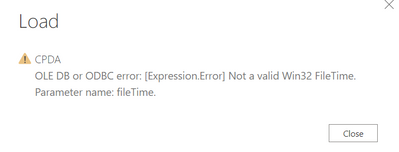
It turned out we have some issues related to the "Date Accessed" attributes under properties for certain files.
I'm using Folder.Files to get the list of files, and by default, it will also get "Date Accessed" attributes for me, is there any way I can get the list of files from a folder without getting "Date Accessed" attribute? However, I still need the "Date created" and file size info.
Hi @JakeandSnake ,
The column is created by default when you import data source from folders. I didn't find any solution that you can removed the column before you load the data source to power bi.
If this post helps, then please consider Accept it as the solution to help the other members find it more quickly.
Best Regards,
Dedmon Dai
Alright. Thanks as well!
Check out the April 2026 Power BI update to learn about new features.
If you have recently started exploring Fabric, we'd love to hear how it's going. Your feedback can help with product improvements.
A new Power BI DataViz World Championship is coming this June! Don't miss out on submitting your entry.
| User | Count |
|---|---|
| 41 | |
| 37 | |
| 34 | |
| 21 | |
| 16 |
| User | Count |
|---|---|
| 66 | |
| 58 | |
| 31 | |
| 25 | |
| 24 |