cancel
Showing results for 
Search instead for 
Did you mean: 

The Power BI Data Visualization World Championships is back! Get ahead of the game and start preparing now! Learn more

Reply
wac1ldy
Frequent Visitor

Not Reading Data

Good day all.

My PBI reads data from an Excel file that is fed by an Alteryx Workflow. The workflow simply pulls two Excel worksheets together, cleans them and outputs the results to a third Excel workbook. It appends the file each time it runs.


On the PBI side, the report reads the data and does it's thing.


When I manually update the source .xlsx, PBI reads the appended data just fine. However, when I append the data using Alteryx, PBI does not read the new data at all.


OK, now here is the weird thing, I open the file and the new Alteryx data is there. Close and it still won't read it. But if I save the file manually, PBI picks up the new data as one would expect.


I have completely recreated the Excel file from scratch. Emptied it except the headers and run the Alteryx, PBI does not see a thing until I save the Excel manually. I have made sure there are no ghost rows or columns by anually deleting all the empty ones. I am befuddled.


Does anyone have any ideas?


Thanks

CW

4 REPLIES 4
Anonymous
Not applicable

Hi @wac1ldy ,


Does your manual refresh also not work? (just click "refresh" in Power BI Desktop)

What data source did you choose in the figure below? I cannot find the "Alteryx Workflow".


v-yuaj-msft_0-1614048388389.png


Best Regards,

Yuna

Yuna,

I selected the Excel (top one).

There is no auto refresh yet, strictly unpublished. When I manually refresh, it runs through the read process as normal but does not pick up the new data. I then manually open the Excel file and click in any cell and save the file and close it. I run the refresh again and it picks up the new data. But as soon as I run the next day's Alteryx, I am back to it not picking up the new data.


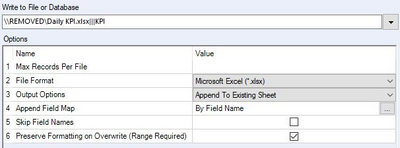
Here is the Alteryx append piece:

wac1ldy_0-1614079581087.png

Thank


CW

PhilipTreacy
Super User
Super User

Hi @wac1ldy 

I'm not familiar with Alteryx but could the workflow be locking the Excel file preventing PBI from reading it?

Phil


Did I answer your question? Then please mark my post as the solution.
If I helped you, click on the Thumbs Up to give Kudos.


Blog :: YouTube Channel :: Connect on Linkedin


Proud to be a Super User!


Phil,


Good thought, thanks for the suggestion. I just ran it again and no, it is not locked and has the correct "Last Modified Date". I even went to far as to created a whole new PBI and connect to the Excel file and it still did not see the last append.

Strange me thinks.


CW

Helpful resources

Announcements
Power BI DataViz World Championships

Power BI Dataviz World Championships

The Power BI Data Visualization World Championships is back! Get ahead of the game and start preparing now!

December 2025 Power BI Update Carousel

Power BI Monthly Update - December 2025

Check out the December 2025 Power BI Holiday Recap!

FabCon Atlanta 2026 carousel

FabCon Atlanta 2026

Join us at FabCon Atlanta, March 16-20, for the ultimate Fabric, Power BI, AI and SQL community-led event. Save $200 with code FABCOMM.