Join us at FabCon Atlanta from March 16 - 20, 2026, for the ultimate Fabric, Power BI, AI and SQL community-led event. Save $200 with code FABCOMM.
Register now!Get Fabric Certified for FREE during Fabric Data Days. Don't miss your chance! Request now
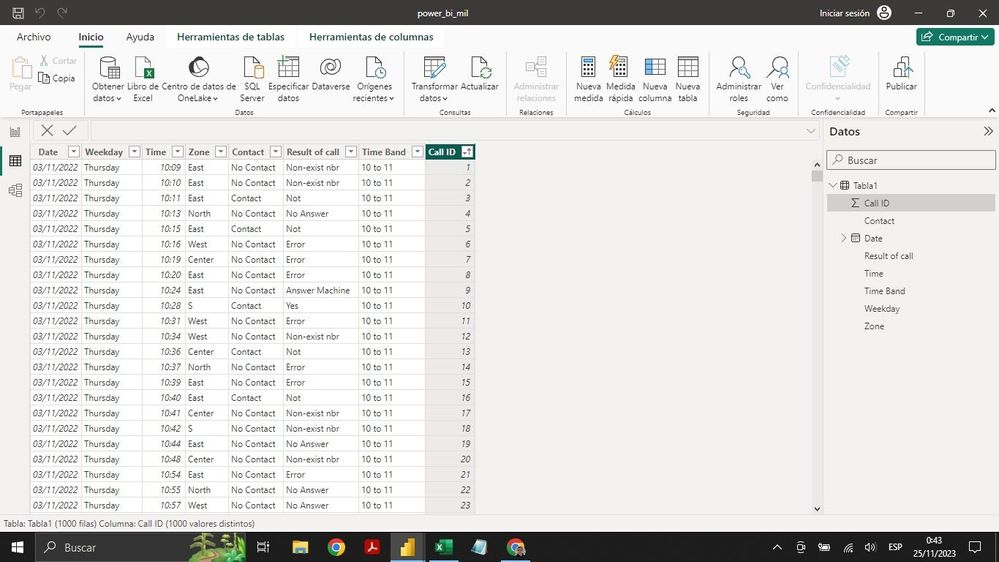
Hello. I have trouble understanding how to proceed in cases like this. This is a table with call data from a call center. The main data to display is the number of contacts achieved (Contact column, Contact value) and I must segment it according to time band and day of the week. I must also show the quantity of each of the call results (Yes, not, error, Answer machine, etc.) and also filter them by day of the week and by time band. I would greatly appreciate your help. Kind regards.
Hi,
Create a Calendar Table with calculated column formulas for Year, Month name and Month number. Likewise, create a Time Table with 24 rows representing each hour of the day. In another column, create Time bands. Create a relationship (Many to One and Single) from he two columns of your Data Table to the 2 tables created (Calendar and Time). To your visuals/slicer/filters, drag Date/time from the 2 created tables.
Check out the November 2025 Power BI update to learn about new features.
Advance your Data & AI career with 50 days of live learning, contests, hands-on challenges, study groups & certifications and more!