Don't miss your chance to take the Fabric Data Engineer (DP-600) exam for FREE! Find out how by watching the DP-600 session on-demand now through April 28th.
Learn moreJoin the FabCon + SQLCon recap series. Up next: Power BI, Real-Time Intelligence, IQ and AI, and Data Factory take center stage. All sessions are available on-demand after the live show. Register now
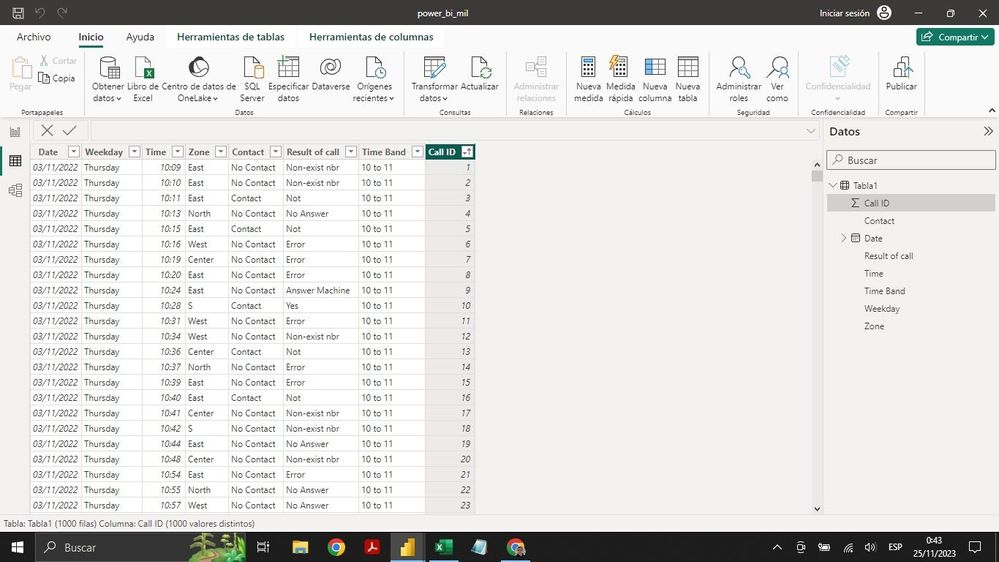
Hello. I have trouble understanding how to proceed in cases like this. This is a table with call data from a call center. The main data to display is the number of contacts achieved (Contact column, Contact value) and I must segment it according to time band and day of the week. I must also show the quantity of each of the call results (Yes, not, error, Answer machine, etc.) and also filter them by day of the week and by time band. I would greatly appreciate your help. Kind regards.
Hi,
Create a Calendar Table with calculated column formulas for Year, Month name and Month number. Likewise, create a Time Table with 24 rows representing each hour of the day. In another column, create Time bands. Create a relationship (Many to One and Single) from he two columns of your Data Table to the 2 tables created (Calendar and Time). To your visuals/slicer/filters, drag Date/time from the 2 created tables.
Check out the April 2026 Power BI update to learn about new features.
If you have recently started exploring Fabric, we'd love to hear how it's going. Your feedback can help with product improvements.
A new Power BI DataViz World Championship is coming this June! Don't miss out on submitting your entry.
| User | Count |
|---|---|
| 48 | |
| 40 | |
| 38 | |
| 20 | |
| 17 |
| User | Count |
|---|---|
| 68 | |
| 65 | |
| 30 | |
| 26 | |
| 25 |