cancel
Showing results for 
Search instead for 
Did you mean: 

Get Fabric Certified for FREE during Fabric Data Days. Don't miss your chance! Request now

Reply
Raghuvanshi
New Member

No reference for the columns listed in Dataset

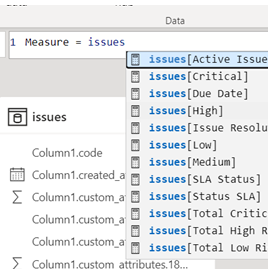
When I am trying to calculate a new measure in PowerBI, it doesn’t pop up the results for already available columns in Dataset instead it only pops up the suggestion for the measure which I calculated earlier. Please note that I have tried re-installing and repairing PowerBI but it's not working. The app is updated to June 2023 version. The columns are not hidden either. M intellisense is enabled also. Please advise what is going wrong here. It was working fine earlier and suddenly it stopped showing the suggestions of columns while creating a new measure
I look forward to the solution.

2 REPLIES 2
Idrissshatila
Super User
Super User

Hello @Raghuvanshi ,


Not all dax fuctions can use columns, some of them can just work with measures. To check if things are working fine, try the dax funvtion COUNT(<column>)  and  it should allow you to reference a column.


learn about count https://learn.microsoft.com/en-us/dax/count-function-dax


If I answered your question, please mark my post as solution, Appreciate your Kudos 👍

Follow me on Linkedin


Did I answer your question? Mark my post as a solution! Appreciate your Kudos
Follow me on LinkedIn linkedIn
Vote for my Community Mobile App Idea

Proud to be a Super User!


@Idrissshatila Thank you for your reply.

I would like to give you additional information of the problem which I am facing. I am not talking something specifically about using COUNT function. Here is the screenshot for your reference

Raghuvanshi_1-1688014610701.png

While creating measure, i only get the calculated measure for the reference. This file has API integration with our tool and I am working on static data. The dataset has many columns but none of the column pops up while i start writing measure. 


Helpful resources

Announcements
November Power BI Update Carousel

Power BI Monthly Update - November 2025

Check out the November 2025 Power BI update to learn about new features.

Fabric Data Days Carousel

Fabric Data Days

Advance your Data & AI career with 50 days of live learning, contests, hands-on challenges, study groups & certifications and more!

FabCon Atlanta 2026 carousel

FabCon Atlanta 2026

Join us at FabCon Atlanta, March 16-20, for the ultimate Fabric, Power BI, AI and SQL community-led event. Save $200 with code FABCOMM.

Top Solution Authors
Top Kudoed Authors