cancel
Showing results for 
Search instead for 
Did you mean: 

Get Fabric Certified for FREE during AI Skills Fest. This week only. Secure your voucher now.

Reply
Anonymous
Not applicable

No data value for 0 in highlight mode of Donut(Ring)/Pie Chart

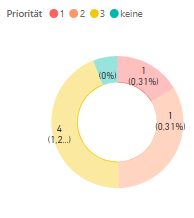
If you make a selection in another visual, and the interaction mode for your Donut or Pie chart is "Highlight", the data value 0 is not shown in the Donut chart, while this works fine for e.g. Bar charts, see screenshot.

donut_chart_example.png

I find it a bit inconsistent, because the small bar chart (bottom right of the screenshot) works fine, so it seems to depend on the type of chart.
Interestingly, it works if you display the percentage value instead of the data value in the Donut chart, but the 0 data value itself is never shown in the Donut/Pie charts.

donut_chart_example2.png

Can anyone help in this matter? Thanks!

4 REPLIES 4
amitchandak
Super User
Super User

@Anonymous , Try changing interaction to cross filter.

https://docs.microsoft.com/en-us/power-bi/service-reports-visual-interactions

Interactions.png


Share with Power BI Enthusiasts: Full Power BI Video (20 Hours) YouTube
Microsoft Fabric Series 60+ Videos YouTube
Microsoft Fabric Hindi End to End YouTube
Anonymous
Not applicable

Thanks @amitchandak , but cross filtering is not what we (our customer) want. We want to have a "cross highlighting" for the Donut chart! It works for other types of charts, so this seems to be an issue with the Donut/Pie chart ...

Anonymous
Not applicable

HI @Anonymous,

In fact, these visuals not contain highlight interaction mode for a long time. Perhaps you can submit an idea with highlight interaction mode.

Regards,

Xiaoxin Sheng

Anonymous
Not applicable

@Anonymoushmm, I think the highlight interaction works fine for the Donut/Pie chart in principle, it is just that the data value for 0 is not being displayed while all other data values are shown and e.g. percentage zero values (0%) are also shown. I don't see a reason, why this is not implemented for the 0 data value, as it could be done the same way as it is done for other data values and it already works for e.g. bar charts ...

Helpful resources

Announcements
May Power BI Update Carousel

Power BI Monthly Update - May 2026

Check out the May 2026 Power BI update to learn about new features.

Fabric SQL PBI Data Days

Data Days 2026 coming soon!

Sign up to receive a private message when registration opens and key events begin.

New to Fabric survey Carousel

New to Fabric Survey

If you have recently started exploring Fabric, we'd love to hear how it's going. Your feedback can help with product improvements.

Power BI DataViz World Championships carousel

Power BI DataViz World Championships - June 2026

A new Power BI DataViz World Championship is coming this June! Don't miss out on submitting your entry.