Get certified for free when you join Fabric Data Days 2026 and dive into Fabric, Power BI, SQL, AI, and other essential data skills.
Join nowData Days is here! Join us now for 60+ days of learning, challenges, and connection. Learn more
While using a Power BI Matrix a cannot do conditional formatting on Rows, However the same option is available when we use a Table. Also I would like Power BI Conditional Formatting to support Replace Text feature as in other BI Tools.
Hi @Anonymous ,
Please show me an example and I'll conduct specific tests. Maybe there is one workaround.
Best Regards,
Icey
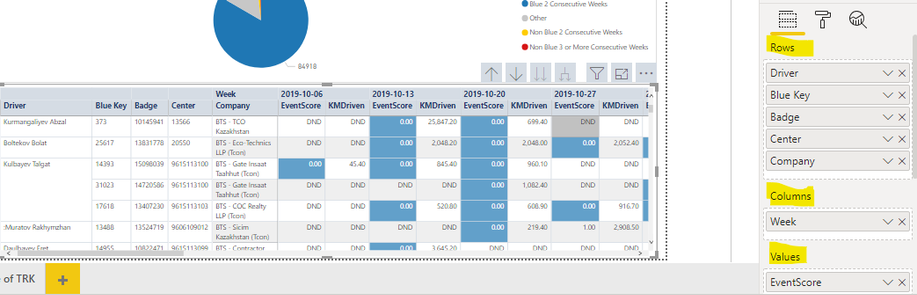
This is a default Matrix
Default Matrix
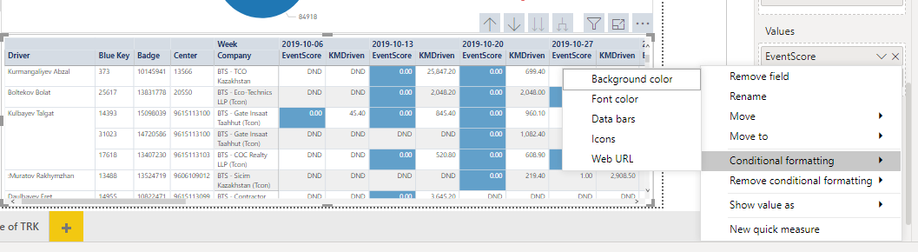
It has conditional formatting feature availabe with Values as EventScore & KmDriven
Conditional Formatting available for Values only
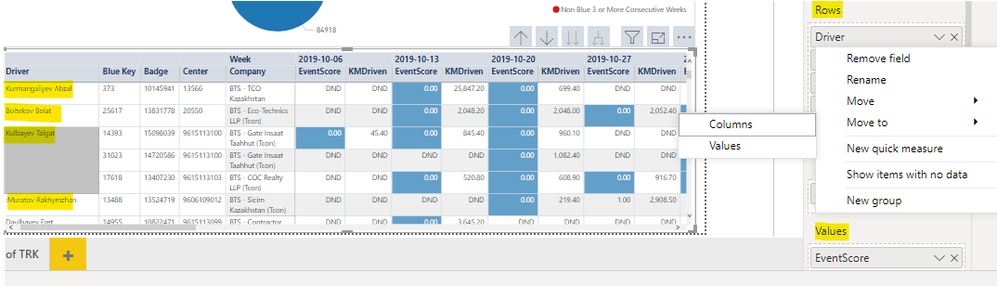
But at the same time it has no Conditional Formatting feature for Rows like Driver, BlueKey, Badge etc.
Formatting not available for Rows
Hi @Anonymous ,
Based on my test, Power BI does not support it currently. And I find no workaround until now.
Please share your ideas on Power BI Ideas, where customers can provide feedback about Power BI to improve it.
Best Regards,
Icey
If this post helps, then please consider Accept it as the solution to help the other members find it more quickly.
Hello @Anonymous,
One can achieve that. Please refer to the following link:
https://docs.microsoft.com/en-us/power-bi/desktop-conditional-table-formatting
Hope this helps.
Thanks @rajulshah but this seems to be a work around with Table. However in my scenario I want to achieve the same on Matrix because data needs to be pivoted.
Matrix too does support conditional formatting on Values only. But unfortunately not for Rows.
Don't miss out on Data Days, June 15 through August 7. Learn Fabric, Power BI, SQL, AI and more.
Check out the May 2026 Power BI update to learn about new features.
| User | Count |
|---|---|
| 23 | |
| 23 | |
| 20 | |
| 18 | |
| 14 |
| User | Count |
|---|---|
| 58 | |
| 51 | |
| 41 | |
| 30 | |
| 24 |