Join us in Barcelona for FabCon and SQLCon, September 28 - October 1, 2026.
This is best Fabric, Power BI, SQL and AI community event. How do we know? The last event sold out! Save €200 with code FABCMTY200.
Register now- Power BI forums
- Get Help with Power BI
- Desktop
- Service
- Report Server
- Power Query
- Mobile Apps
- Developer
- DAX Commands and Tips
- Custom Visuals Development Discussion
- Health and Life Sciences
- Power BI Spanish forums
- Translated Spanish Desktop
- Training and Consulting
- Instructor Led Training
- Dashboard in a Day for Women, by Women
- Galleries
- Data Stories Gallery
- Themes Gallery
- Contests Gallery
- QuickViz Gallery
- Quick Measures Gallery
- Visual Calculations Gallery
- Fabric Apps Gallery
- Notebook Gallery
- Translytical Task Flow Gallery
- TMDL Gallery
- R Script Showcase
- Webinars and Video Gallery
- Ideas
- Custom Visuals Ideas (read-only)
- Issues
- Issues
- Events
- Upcoming Events
July 28 - August 9 | Final Round of the Power BI Dataviz World Championships. This is your chance. Learn more
- Power BI forums
- Forums
- Get Help with Power BI
- Desktop
- Re: Nlp data cleaning problem.
- Subscribe to RSS Feed
- Mark Topic as New
- Mark Topic as Read
- Float this Topic for Current User
- Bookmark
- Subscribe
- Printer Friendly Page

- Mark as New
- Bookmark
- Subscribe
- Mute
- Subscribe to RSS Feed
- Permalink
- Report Inappropriate Content
Nlp data cleaning problem.
Hello to All,
kindly help me in following query .
I have a dataset i want to search over each row and check meta data in each cell and copy it to the root cell 3000 rows and 490 colums.

the meta data mostly starts like (1) ,(2)... or a,b..., (i),(ii),(iii)... or "gjk"in duble quets in above pictur second row has root cell 5.the has meta data till the 6.in our
Thanx in advance
Solved! Go to Solution.


- Mark as New
- Bookmark
- Subscribe
- Mute
- Subscribe to RSS Feed
- Permalink
- Report Inappropriate Content
Hi @Anonymous ,
According to your description, here's my solution.
1.This is the sample data.

2.Select column B,C,D,E at the same time, then replace value " with )
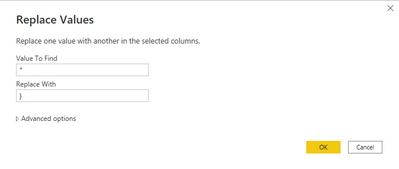
Get this result.

3.Select extract text after delimiter in the Transform tab.

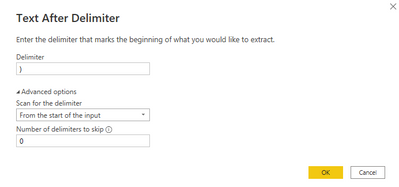
Get this result.

4.Seperately select column B,C,D,E, then select split column in the Transform tab
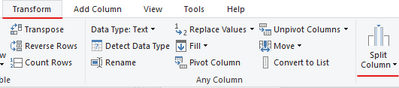
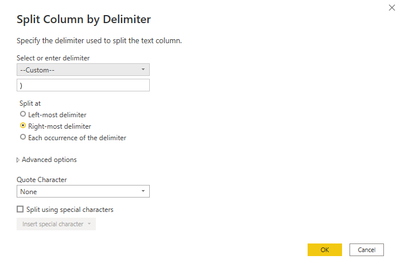
Get this result.

5.Remove the null columns, get this result.

6.Select column B,C,D,E at the same time, and then select merge columns in the Transform tab.

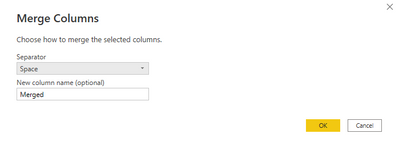
Get the expected result.
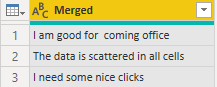
This is the query code.
let
    Source = Table.FromRows(Json.Document(Binary.Decompress(Binary.FromText("Lc0xDsMgDAXQqyBPsZSl7SmydyMMyJjUKmApoJ6/QLK9768vWwub8RlWWB54qAYT9TQjPpE0SzmGX6gxCnE3uNXC+zO4CAbf/JSg1AuClXxrfHKYhx9KMT4lQ5xSnfOtFzsU5rDDZNXMN0t/c5OS0Lf24Nwf", BinaryEncoding.Base64), Compression.Deflate)), let _t = ((type nullable text) meta [Serialized.Text = true]) in type table [A = _t, B = _t, C = _t, D = _t, E = _t]),
    #"Changed Type" = Table.TransformColumnTypes(Source,{{"A", type text}, {"B", type text}, {"C", type text}, {"D", type text}, {"E", type text}}),
    #"Replaced Value" = Table.ReplaceValue(#"Changed Type","""",")",Replacer.ReplaceText,{"B", "C", "D", "E"}),
    #"Extracted Text After Delimiter" = Table.TransformColumns(#"Replaced Value", {{"B", each Text.AfterDelimiter(_, ")"), type text}, {"C", each Text.AfterDelimiter(_, ")"), type text}, {"E", each Text.AfterDelimiter(_, ")"), type text}, {"D", each Text.AfterDelimiter(_, ")"), type text}}),
    #"Split Column by Delimiter" = Table.SplitColumn(#"Extracted Text After Delimiter", "B", Splitter.SplitTextByDelimiter(")", QuoteStyle.None), {"B.1", "B.2"}),
    #"Changed Type1" = Table.TransformColumnTypes(#"Split Column by Delimiter",{{"B.1", type text}, {"B.2", type text}}),
    #"Split Column by Delimiter1" = Table.SplitColumn(#"Changed Type1", "C", Splitter.SplitTextByDelimiter(")", QuoteStyle.Csv), {"C.1", "C.2"}),
    #"Changed Type2" = Table.TransformColumnTypes(#"Split Column by Delimiter1",{{"C.1", type text}, {"C.2", type text}}),
    #"Split Column by Delimiter2" = Table.SplitColumn(#"Changed Type2", "D", Splitter.SplitTextByDelimiter(")", QuoteStyle.Csv), {"D.1", "D.2"}),
    #"Changed Type3" = Table.TransformColumnTypes(#"Split Column by Delimiter2",{{"D.1", type text}, {"D.2", type text}}),
    #"Split Column by Delimiter3" = Table.SplitColumn(#"Changed Type3", "E", Splitter.SplitTextByEachDelimiter({")"}, QuoteStyle.None, true), {"E.1", "E.2"}),
    #"Changed Type4" = Table.TransformColumnTypes(#"Split Column by Delimiter3",{{"E.1", type text}, {"E.2", type text}}),
    #"Removed Columns" = Table.RemoveColumns(#"Changed Type4",{"B.2", "C.2", "D.2", "E.2"}),
    #"Merged Columns" = Table.CombineColumns(#"Removed Columns",{"A", "B.1", "C.1", "D.1", "E.1"},Combiner.CombineTextByDelimiter(" ", QuoteStyle.None),"Merged")
in
    #"Merged Columns"
I attach my sample below for reference.
Best Regards,
Community Support Team _ kalyj
If this post helps, then please consider Accept it as the solution to help the other members find it more quickly.
- Mark as New
- Bookmark
- Subscribe
- Mute
- Subscribe to RSS Feed
- Permalink
- Report Inappropriate Content
Hi @Anonymous ,
I'm sorry for that I'm not clear about your purpose"search over each row and check meta data in each cell".
Could you please give an example and explain it more?
Best Regards,
Community Support Team _ kalyj
- Mark as New
- Bookmark
- Subscribe
- Mute
- Subscribe to RSS Feed
- Permalink
- Report Inappropriate Content
Yes search over each row and meta data starts with small brackets(1).. or (i).. or in double quets "asdn" i want to merge over single row with root data
in one row .This is solution i need
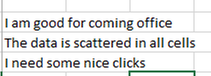
while below is problem
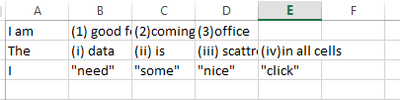
- Mark as New
- Bookmark
- Subscribe
- Mute
- Subscribe to RSS Feed
- Permalink
- Report Inappropriate Content
Hi @Anonymous ,
According to your description, here's my solution.
1.This is the sample data.
2.Select column B,C,D,E at the same time, then replace value " with )
Get this result.
3.Select extract text after delimiter in the Transform tab.
Get this result.
4.Seperately select column B,C,D,E, then select split column in the Transform tab
Get this result.
5.Remove the null columns, get this result.
6.Select column B,C,D,E at the same time, and then select merge columns in the Transform tab.
Get the expected result.
This is the query code.
let
    Source = Table.FromRows(Json.Document(Binary.Decompress(Binary.FromText("Lc0xDsMgDAXQqyBPsZSl7SmydyMMyJjUKmApoJ6/QLK9768vWwub8RlWWB54qAYT9TQjPpE0SzmGX6gxCnE3uNXC+zO4CAbf/JSg1AuClXxrfHKYhx9KMT4lQ5xSnfOtFzsU5rDDZNXMN0t/c5OS0Lf24Nwf", BinaryEncoding.Base64), Compression.Deflate)), let _t = ((type nullable text) meta [Serialized.Text = true]) in type table [A = _t, B = _t, C = _t, D = _t, E = _t]),
    #"Changed Type" = Table.TransformColumnTypes(Source,{{"A", type text}, {"B", type text}, {"C", type text}, {"D", type text}, {"E", type text}}),
    #"Replaced Value" = Table.ReplaceValue(#"Changed Type","""",")",Replacer.ReplaceText,{"B", "C", "D", "E"}),
    #"Extracted Text After Delimiter" = Table.TransformColumns(#"Replaced Value", {{"B", each Text.AfterDelimiter(_, ")"), type text}, {"C", each Text.AfterDelimiter(_, ")"), type text}, {"E", each Text.AfterDelimiter(_, ")"), type text}, {"D", each Text.AfterDelimiter(_, ")"), type text}}),
    #"Split Column by Delimiter" = Table.SplitColumn(#"Extracted Text After Delimiter", "B", Splitter.SplitTextByDelimiter(")", QuoteStyle.None), {"B.1", "B.2"}),
    #"Changed Type1" = Table.TransformColumnTypes(#"Split Column by Delimiter",{{"B.1", type text}, {"B.2", type text}}),
    #"Split Column by Delimiter1" = Table.SplitColumn(#"Changed Type1", "C", Splitter.SplitTextByDelimiter(")", QuoteStyle.Csv), {"C.1", "C.2"}),
    #"Changed Type2" = Table.TransformColumnTypes(#"Split Column by Delimiter1",{{"C.1", type text}, {"C.2", type text}}),
    #"Split Column by Delimiter2" = Table.SplitColumn(#"Changed Type2", "D", Splitter.SplitTextByDelimiter(")", QuoteStyle.Csv), {"D.1", "D.2"}),
    #"Changed Type3" = Table.TransformColumnTypes(#"Split Column by Delimiter2",{{"D.1", type text}, {"D.2", type text}}),
    #"Split Column by Delimiter3" = Table.SplitColumn(#"Changed Type3", "E", Splitter.SplitTextByEachDelimiter({")"}, QuoteStyle.None, true), {"E.1", "E.2"}),
    #"Changed Type4" = Table.TransformColumnTypes(#"Split Column by Delimiter3",{{"E.1", type text}, {"E.2", type text}}),
    #"Removed Columns" = Table.RemoveColumns(#"Changed Type4",{"B.2", "C.2", "D.2", "E.2"}),
    #"Merged Columns" = Table.CombineColumns(#"Removed Columns",{"A", "B.1", "C.1", "D.1", "E.1"},Combiner.CombineTextByDelimiter(" ", QuoteStyle.None),"Merged")
in
    #"Merged Columns"
I attach my sample below for reference.
Best Regards,
Community Support Team _ kalyj
If this post helps, then please consider Accept it as the solution to help the other members find it more quickly.
Helpful resources

FabCon & SQLCon – Barcelona 2026
Join us in Barcelona for FabCon and SQLCon, the Fabric, Power BI, SQL, and AI community event. Save €200 with code FABCMTY200.

Power BI DataViz World Championships - June 2026
A new Power BI DataViz World Championship is coming this June! Don't miss out on submitting your entry.

| User | Count |
|---|---|
| 27 | |
| 22 | |
| 20 | |
| 18 | |
| 14 |


| User | Count |
|---|---|
| 25 | |
| 20 | |
| 20 | |
| 20 | |
| 20 |


