Don't miss your chance to take the Fabric Data Engineer (DP-700) exam on us!
Learn moreWe've captured the moments from FabCon & SQLCon that everyone is talking about, and we are bringing them to the community, live and on-demand. Starts on April 14th. Register now
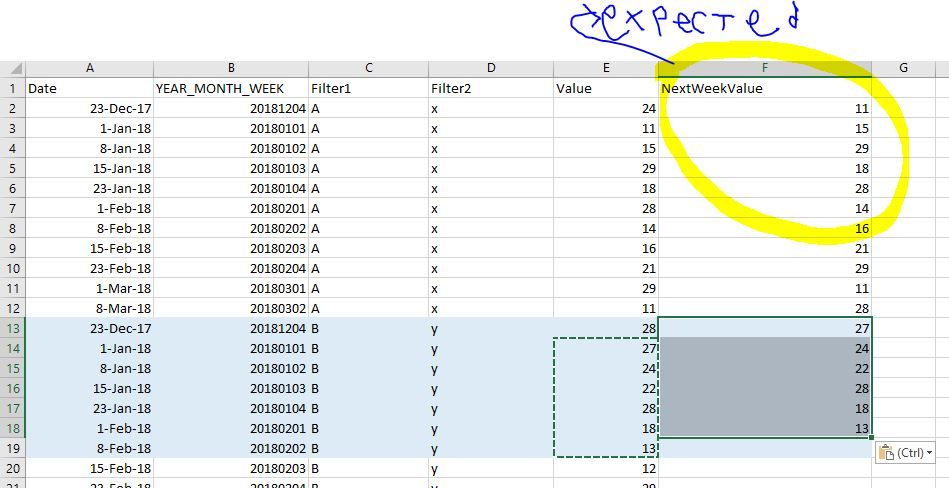
I need a measure to calculate next week value. I already formated the data model that only include row in weekly level.
The next week value should be accomodated by two slicer: Filter 1 and Filter2
Any idea to create either measure/calculated column to achieve this result ?
The sample data model is in this link
https://drive.google.com/open?id=1vQxhDpjojoDvA4AUzRgNbN7o3ITDulPP
Solved! Go to Solution.
Slightly amended the formula to take into account the first week as well
next_week = CALCULATE(
SUM(Sheet1[Value]),
FILTER(ALL(Sheet1), IF(WEEKNUM(Sheet1[Date], 21)=51,0,WEEKNUM(Sheet1[Date], 21)) = IF(WEEKNUM(MAX(Sheet1[Date]), 21)=51,0,WEEKNUM(MAX(Sheet1[Date]), 21)) + 1
&& Sheet1[Filter1] = MAX(Sheet1[Filter1])
&& Sheet1[Filter2] = MAX(Sheet1[Filter2])
))
Slightly amended the formula to take into account the first week as well
next_week = CALCULATE(
SUM(Sheet1[Value]),
FILTER(ALL(Sheet1), IF(WEEKNUM(Sheet1[Date], 21)=51,0,WEEKNUM(Sheet1[Date], 21)) = IF(WEEKNUM(MAX(Sheet1[Date]), 21)=51,0,WEEKNUM(MAX(Sheet1[Date]), 21)) + 1
&& Sheet1[Filter1] = MAX(Sheet1[Filter1])
&& Sheet1[Filter2] = MAX(Sheet1[Filter2])
))
Add tis formula on a measure:
next_week = CALCULATE(
SUM(Sheet1[Value]),
FILTER(ALL(Sheet1), WEEKNUM(Sheet1[Date]) = WEEKNUM(MAX(Sheet1[Date])) + 1
&& Sheet1[Filter1] = MAX(Sheet1[Filter1])
&& Sheet1[Filter2] = MAX(Sheet1[Filter2])
))
OR THIS
next_week = CALCULATE(
SUM(Sheet1[Value]),
FILTER(ALL(Sheet1), WEEKNUM(Sheet1[Date]) = WEEKNUM(MAX(Sheet1[Date])) + 1
&& Sheet1[Filter1] = MAX(Sheet1[Filter1])
&& Sheet1[Filter2] = MAX(Sheet1[Filter2])
))Also it seems that you first YEARMONTHWEEK value may be wrong.
Hi, Thanks for the solution. Unfortunately I cannot use the WEEKNUM Function because the week definiton is customized and changed according to users. Instead, i Have to use YEAR_MONTH_WEEK column (it is formated as integer).
Also the first date row, 23 Dec 2017 is intended as it is, because the date can be any, as long as it is on the date 1,8,15,23
I modified your measure, but it gives me nothing . Any advice ?
next_week = CALCULATE(
SUM(Sheet1[Value]),
FILTER(ALL(Sheet1), WEEKNUM(Sheet1[WEEK_YEAR_MONTH]) = WEEKNUM(MAX(Sheet1[WEEK_YEAR_MONTH])) + 1
&& Sheet1[Filter1] = MAX(Sheet1[Filter1])
&& Sheet1[Filter2] = MAX(Sheet1[Filter2])
))
You mentioned that you cant use weeknum function but you are using it in your formula.
Were you referring to something different?
Also the first YEARMONTHWEEK is wrong.
It says 20181204 and the relevant date is 23/12/2017
Hi @andrehawari,
If you need your measure to be based on Year_Month_Week then try the below measure
NextWeek =
var _weekn=RIGHT(MAX(Sheet1[YEAR_MONTH_WEEK]),1)
var _diff=IF(_weekn="4",97,1)
RETURN
CALCULATE(
SUM(Sheet1[Value]),
FILTER(ALL(Sheet1), Sheet1[YEAR_MONTH_WEEK] = MAX(Sheet1[YEAR_MONTH_WEEK]) + _diff
&& Sheet1[Filter1] = MAX(Sheet1[Filter1])
&& Sheet1[Filter2] = MAX(Sheet1[Filter2])
))
If this helped you, please mark this post as an accepted solution and like to give KUDOS .
Regards,
Affan
If you have recently started exploring Fabric, we'd love to hear how it's going. Your feedback can help with product improvements.
A new Power BI DataViz World Championship is coming this June! Don't miss out on submitting your entry.
Share feedback directly with Fabric product managers, participate in targeted research studies and influence the Fabric roadmap.
| User | Count |
|---|---|
| 56 | |
| 40 | |
| 36 | |
| 20 | |
| 18 |
| User | Count |
|---|---|
| 74 | |
| 72 | |
| 38 | |
| 35 | |
| 26 |