cancel
Showing results for 
Search instead for 
Did you mean: 

July 7 - July 17 | Round 2 of the Power BI Dataviz World Championships. Don't miss your chance! Learn more

Reply
andrehawari
Helper II
Helper II

Next Week Function

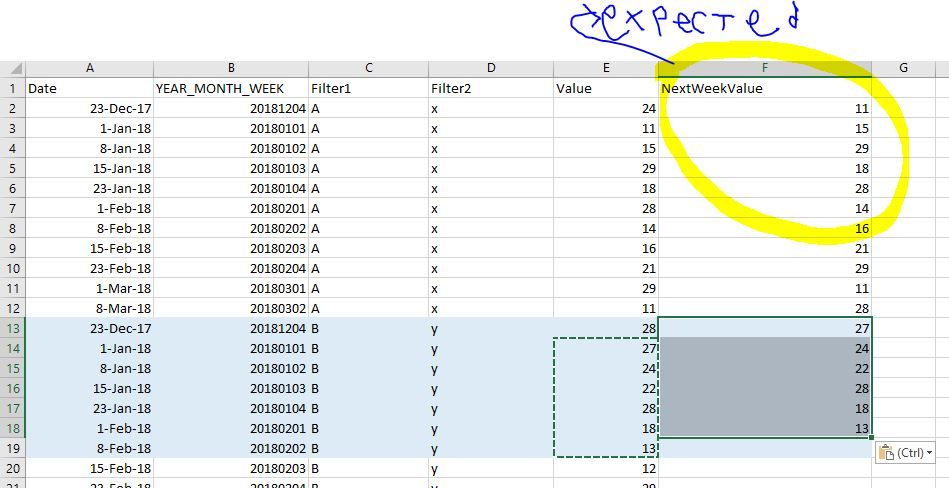
I need a measure to calculate next week value. I already formated the data model that only include row in weekly level. 

The next week value should be accomodated by two slicer: Filter 1 and Filter2


Any idea to create either measure/calculated column to achieve this result ?

 Capture.JPG


The sample data model is in this link

https://drive.google.com/open?id=1vQxhDpjojoDvA4AUzRgNbN7o3ITDulPP

1 ACCEPTED SOLUTION
themistoklis
Community Champion
Community Champion

Slightly amended the formula to take into account the first week as well


next_week = CALCULATE(
SUM(Sheet1[Value]),
	FILTER(ALL(Sheet1), IF(WEEKNUM(Sheet1[Date], 21)=51,0,WEEKNUM(Sheet1[Date], 21)) = IF(WEEKNUM(MAX(Sheet1[Date]), 21)=51,0,WEEKNUM(MAX(Sheet1[Date]), 21)) + 1
    && Sheet1[Filter1] = MAX(Sheet1[Filter1])
    && Sheet1[Filter2] = MAX(Sheet1[Filter2])
	))

View solution in original post

5 REPLIES 5
themistoklis
Community Champion
Community Champion

Slightly amended the formula to take into account the first week as well


next_week = CALCULATE(
SUM(Sheet1[Value]),
	FILTER(ALL(Sheet1), IF(WEEKNUM(Sheet1[Date], 21)=51,0,WEEKNUM(Sheet1[Date], 21)) = IF(WEEKNUM(MAX(Sheet1[Date]), 21)=51,0,WEEKNUM(MAX(Sheet1[Date]), 21)) + 1
    && Sheet1[Filter1] = MAX(Sheet1[Filter1])
    && Sheet1[Filter2] = MAX(Sheet1[Filter2])
	))
themistoklis
Community Champion
Community Champion

@andrehawari


Add tis formula on a measure:


next_week = CALCULATE(
SUM(Sheet1[Value]),
	FILTER(ALL(Sheet1), WEEKNUM(Sheet1[Date]) = WEEKNUM(MAX(Sheet1[Date])) + 1
    && Sheet1[Filter1] = MAX(Sheet1[Filter1])
    && Sheet1[Filter2] = MAX(Sheet1[Filter2])
	))


OR THIS


next_week = CALCULATE(
SUM(Sheet1[Value]),
	FILTER(ALL(Sheet1), WEEKNUM(Sheet1[Date]) = WEEKNUM(MAX(Sheet1[Date])) + 1
    && Sheet1[Filter1] = MAX(Sheet1[Filter1])
    && Sheet1[Filter2] = MAX(Sheet1[Filter2])
	))

Also it seems that you first YEARMONTHWEEK value may be wrong. 

Hi, Thanks for the solution. Unfortunately I cannot use the WEEKNUM Function because  the week definiton is customized and changed according to users. Instead, i Have to use YEAR_MONTH_WEEK column (it is formated as integer).

Also the first date row, 23 Dec 2017 is intended as it is, because the date can be any, as long as it is on the date 1,8,15,23


I modified your measure, but it gives me nothing . Any advice ?


next_week = CALCULATE(
SUM(Sheet1[Value]),
	FILTER(ALL(Sheet1), WEEKNUM(Sheet1[WEEK_YEAR_MONTH]) = WEEKNUM(MAX(Sheet1[WEEK_YEAR_MONTH])) + 1
    && Sheet1[Filter1] = MAX(Sheet1[Filter1])
    && Sheet1[Filter2] = MAX(Sheet1[Filter2])
	))


@andrehawari


You mentioned that you cant use weeknum function but you are using it in your formula.


Were you referring to something different?


Also the first YEARMONTHWEEK is wrong.

It says 20181204 and the relevant date is 23/12/2017

Hi @andrehawari,


If you need your measure to be based on Year_Month_Week then try the below measure


NextWeek = 
var _weekn=RIGHT(MAX(Sheet1[YEAR_MONTH_WEEK]),1)
var _diff=IF(_weekn="4",97,1)
RETURN
CALCULATE(
SUM(Sheet1[Value]),
	FILTER(ALL(Sheet1), Sheet1[YEAR_MONTH_WEEK] = MAX(Sheet1[YEAR_MONTH_WEEK]) + _diff
    && Sheet1[Filter1] = MAX(Sheet1[Filter1])
    && Sheet1[Filter2] = MAX(Sheet1[Filter2])
	))


If this helped you, please mark this post as an accepted solution and like to give KUDOS .


Regards,

Affan

Helpful resources

Announcements
FabCon and SQLCon Barcelona 2026

FabCon & SQLCon – Barcelona 2026

Join us in Barcelona for FabCon and SQLCon, the Fabric, Power BI, SQL, and AI community event. Save €200 with code FABCMTY200.

60 days of Data Days Carousel

Data Days 2026

Join Fabric Data Days 2026: 60 days of free live/on-demand sessions, challenges, study groups, and certification opportunities.

Power BI DataViz World Championships carousel

Power BI DataViz World Championships - June 2026

A new Power BI DataViz World Championship is coming this June! Don't miss out on submitting your entry.